
You give an AI agent a task — run a weekly content gap audit, monitor rank changes, generate a report — and for a while it works. Then one week it produces a blank dashboard. Another week it pings Slack seventeen times about the same keyword drop. Another week it just stops, silently, mid-task, with no output and no explanation.
The automation isn't broken in the way a script breaks. The prompts are fine. The tools are connected. The problem is the loop: nobody designed it.
Loop engineering is the practice of deliberately designing the cycle an AI agent moves through to complete a task — how it perceives inputs, what actions it takes, how it evaluates its own output, and how it decides to continue, retry, escalate, or stop. It's the control layer that separates an agent that works reliably from one that periodically goes off the rails.
What Is Loop Engineering?
Loop engineering is the deliberate design of an AI agent's perceive → act → observe → decide cycle.
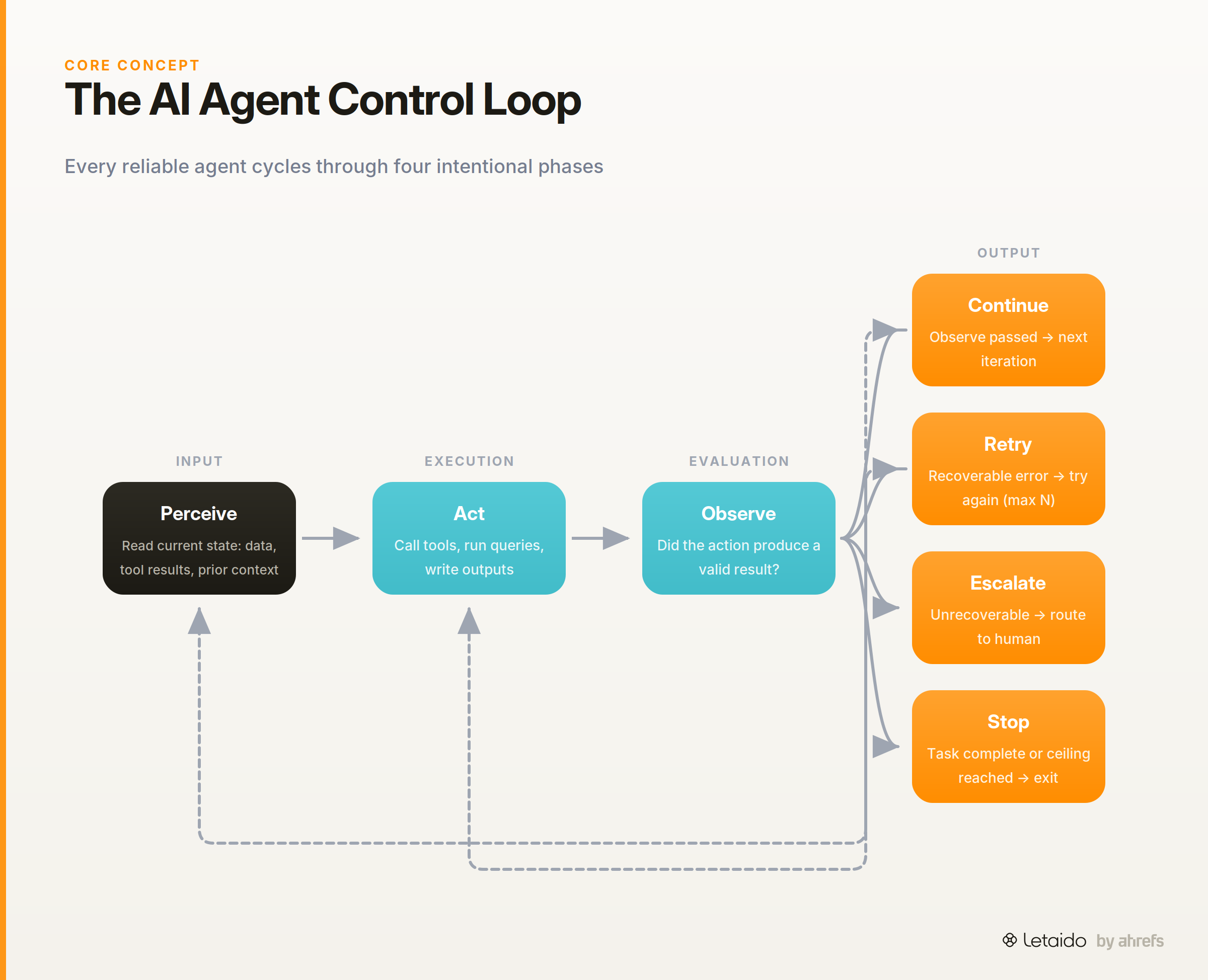
Where prompt engineeringPrompt engineeringThe practice of writing and refining model instructions to get reliable, repeatable output — structure, examples, and constraints rather than clever wording.Read: What Is Prompt Engineering? (And Why Marketers Need It) defines what you say to the agent, and context engineering defines what information you feed in, loop engineering defines how the agent moves through a task. It's the third layer of the agent stack — and the one most practitioners skip until something breaks.
The term is new. The problem is not. Any agent that executes more than a single action needs a control loop: a repeating cycle where the agent checks its own progress before deciding what to do next. Without that design, the agent either barrels forward regardless of intermediate results or stops at the first error it doesn't know how to handle.
How It Differs from Prompt Engineering and Context Engineering
These three concepts sit at different levels of the agent stack. It helps to see the distinction clearly before going further.
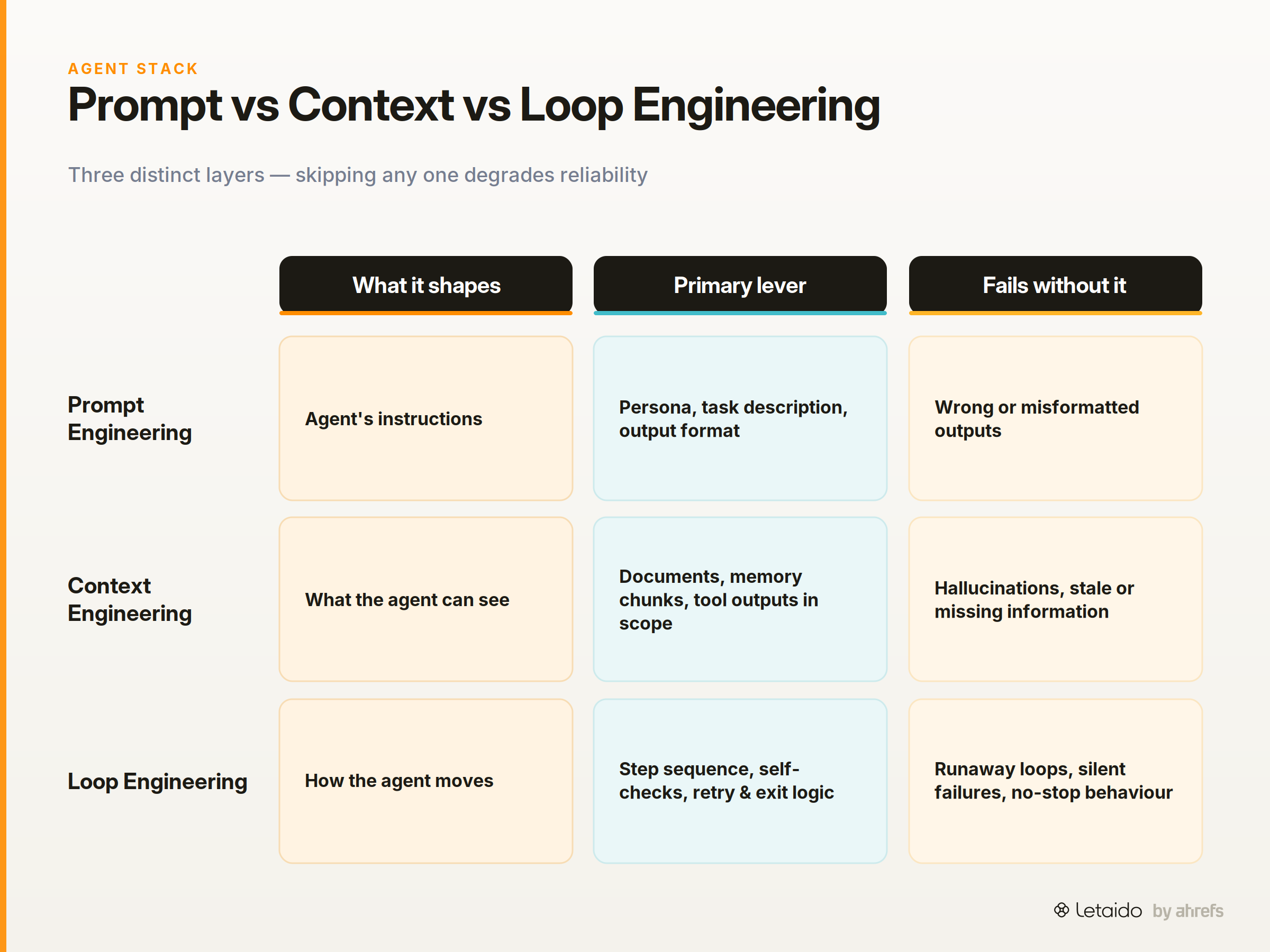
Prompt engineering shapes the agent's instructions: the persona, the task description, the output format you want.
Context engineeringContext engineeringDesigning everything the model sees at inference — retrieved documents, tools, memory, and instructions — rather than tuning the prompt text alone.Read: Context Engineering vs Prompt Engineering: What Changes shapes what the agent can see: which documents, memory chunks, tool outputs, and prior conversation turns are in scope at any given moment.
Loop engineering shapes how the agent moves: the sequence of steps it takes, when it checks its own work, when it tries again, and when it decides it's done. It's the structural logic that sits above any individual prompt or piece of context.
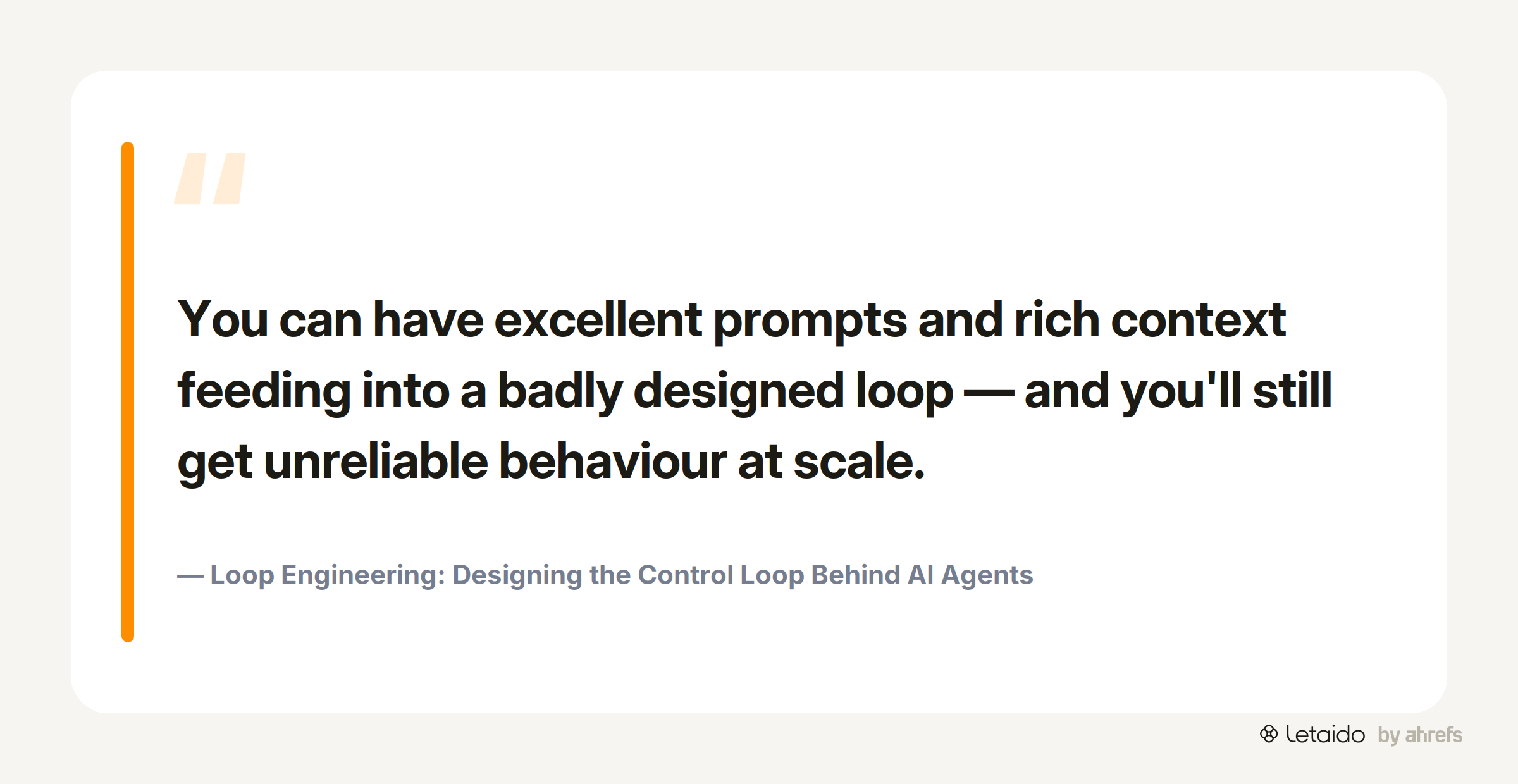
You can have excellent prompts and rich context feeding into a badly designed loop — and you'll still get unreliable behaviour at scale. Conversely, a well-engineered loop makes a mediocre prompt much more robust, because the agent can catch and correct its own mistakes rather than propagating them forward.
The Control Loop Structure
Here is the basic structure of an agent control loop, rendered as a simple flowchart:
┌─────────────┐
│   PERCEIVE  │  ← Read inputs: tool results, data fetched, prior-step context
└──────┬──────┘
       │
       ▼
┌─────────────┐
│     ACT     │  ← Call tools, run queries, write outputs
└──────┬──────┘
       │
       ▼
┌─────────────┐
│   OBSERVE   │  ← Evaluate: did the action produce a valid result?
└──────┬──────┘
       │
       ▼
┌─────────────┐
│   DECIDE    │  ← Continue / Retry / Escalate / Stop
└──────┬──────┘
       │
    ┌──┴──┐
    │     │
  Loop   Exit
Every practical agent loop follows this structure, whether or not the team that built it gave it a name. Loop engineering is what happens when you design each of those four nodes intentionally, rather than leaving them to chance.
The Four Parts of a Well-Engineered Loop
Each phase of the loop has its own failure modes and design decisions. The sections below walk through each one in plain terms, with the goal of giving you a mental checklist before you build or evaluate any agent.
Perceive — What the Agent Takes In at Each Step
At the start of each iteration, the agent reads its current state: what data is available, what the previous step returned, and what constraints or goals are still active.
The key design decision here is freshness: what the agent "sees" should reflect the current state of the world, not the state from iteration one. If an agent pulls keyword ranking data once and then re-reads that cached result on every subsequent loop, it's not actually monitoring anything — it's running the same stale observation in a circle.
Act — Tool Calls, Queries, and Writes
The act phase is where the agent does something: calls an external API, queries a database, writes a file, sends a message.
The critical design decision is sequencing. Tool calls often have dependencies: you can't write a content brief until you've fetched the keyword data; you can't evaluate a data fetch until you've confirmed the source is reachable. Designing the act phase means specifying the order in which those calls happen and what a valid output from each call looks like before the next one is allowed to start.
Observe — Evaluate the Output Before Moving On
The observe phase is the agent's self-check: did the action just taken produce a result that's good enough to move forward on?
This is the phase most beginners skip entirely. Without it, the agent treats a failed API call that returned an empty array the same as one that returned a thousand rows, and proceeds accordingly. The observe step should define, explicitly, what counts as a signal to continue versus a signal to retry or escalate.
Decide — Continue, Retry, Escalate, or Stop
The decide phase is the branch point. Four outcomes are possible, and well-engineered loops specify all four before the loop runs:
- Continue: the observe step passed; move to the next task or next iteration.
- Retry: the observe step flagged a recoverable error; try the act step again, up to a defined maximum.
- Escalate: the error is not recoverable within the loop; route to a human or a higher-level system.
- Stop: the task is complete (or the maximum iteration count is reached); exit cleanly.
The absence of a stop condition is the single most common cause of runaway agent behaviour. If the decide node only handles "continue" and has no exit criteria, the loop runs until it crashes.
What Good Loop Engineering Looks Like in Practice
Abstract frameworks are only useful if you can see them operating on real tasks. The three examples below are the kinds of tasks Letaido runs — concrete enough to apply, representative enough to generalise from.
Example 1 — A Content Gap Audit Agent
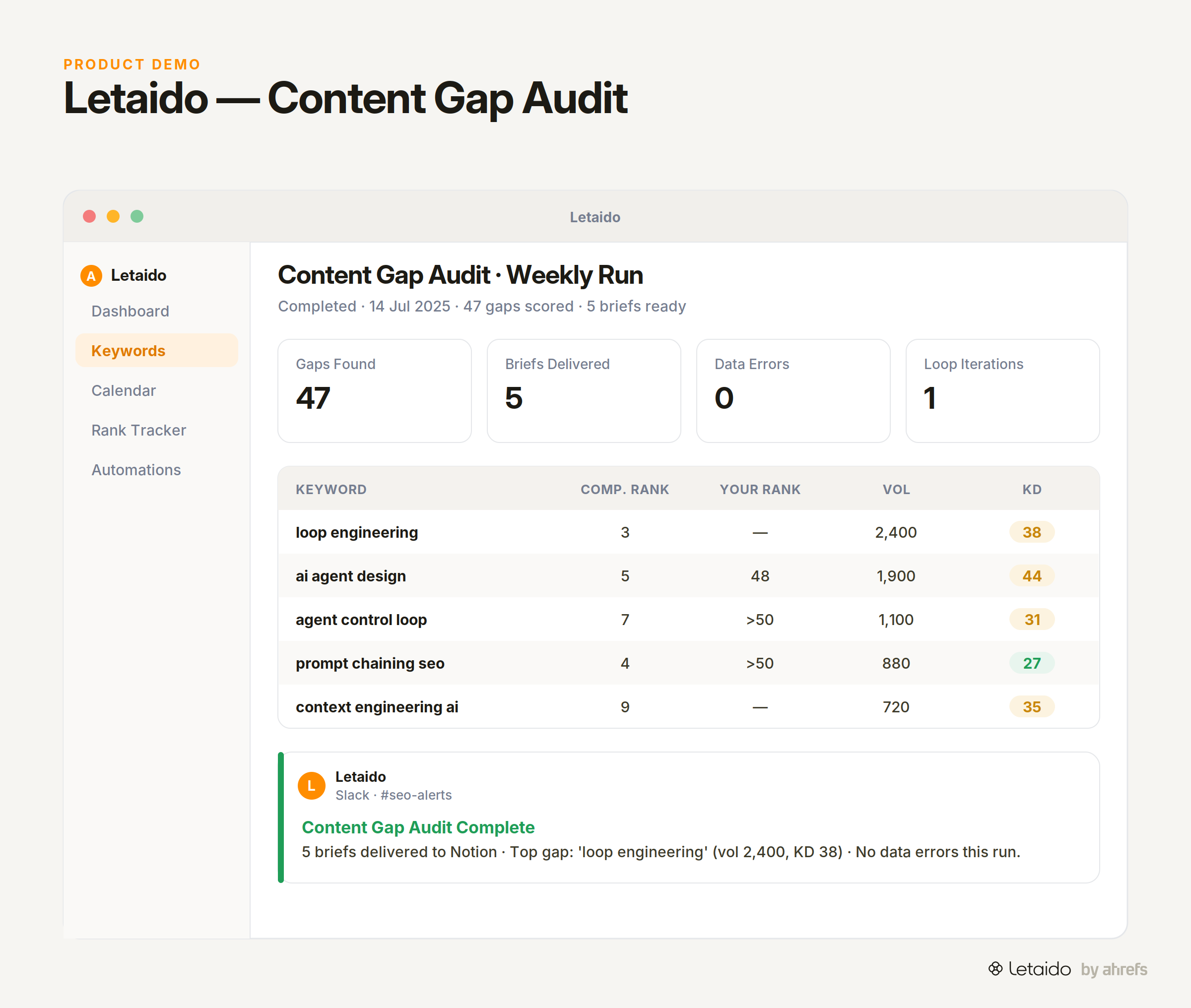
An agent tasked with a content gap audit might run the following loop:
Perceive: Pull keyword ranking data from Ahrefs for the target domain and a set of competitors. Read the list of URLs already published on the site.
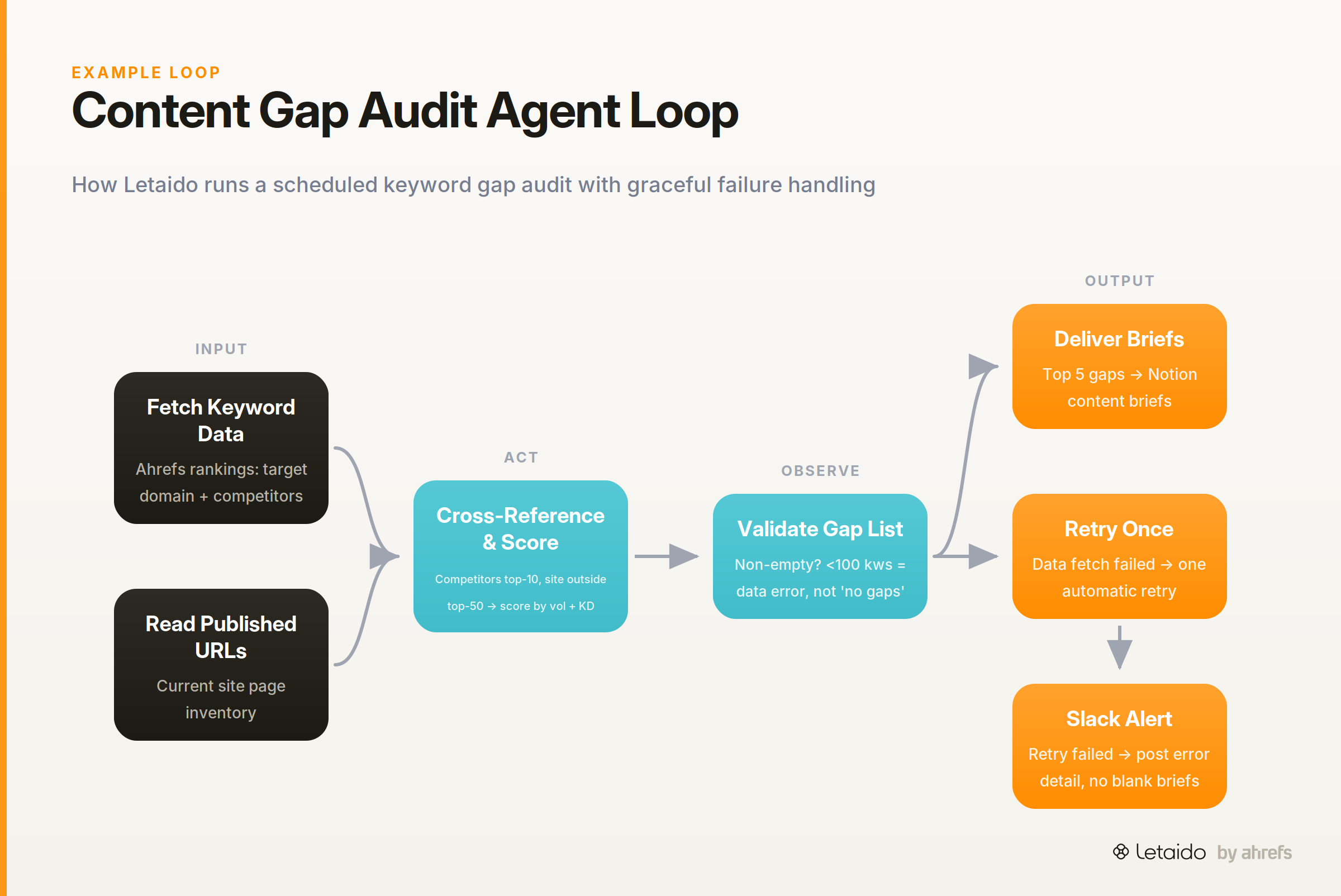
Act: Cross-reference competitor keyword rankings against the site's own ranking pages. Flag keywords where competitors rank in the top 10 and the target site does not appear in the top 50. Score each gap by search volume and keyword difficultyKeyword DifficultyAn estimate (0-100) of how hard it is to rank on page one for a keyword, based mainly on the backlinks the current top pages hold..
Observe: Check that the gap list is non-empty and that the scoring produced a numeric output for every keyword. If the data fetch returned fewer than 100 keywords (suggesting a connection failure), flag as a data error rather than a genuine "no gaps found" result.
Decide: If the observe step passes, write prioritised content briefs for the top five gaps and deliver them to Notion. If the data fetch failed, retry once. If the retry also fails, post a Slack message with the error detail rather than delivering an empty brief set.
The observe step is what prevents the agent from confidently reporting "no content gaps found" when the real answer is "the keyword fetch timed out." In Letaido, the agent's keyword research and content-brief skill runs this loop on a schedule, with the retry and Slack escalation configured as defaults.
Example 2 — A Rank-Change Monitor with Self-Correction
A rank-tracking agent watching for significant position drops has a subtler loop design challenge: not every ranking change is a real signal. A keyword that swings from position 8 to position 12 on a Monday often returns to 8 by Wednesday. Alerting on every fluctuation creates noise; ignoring everything misses real drops.
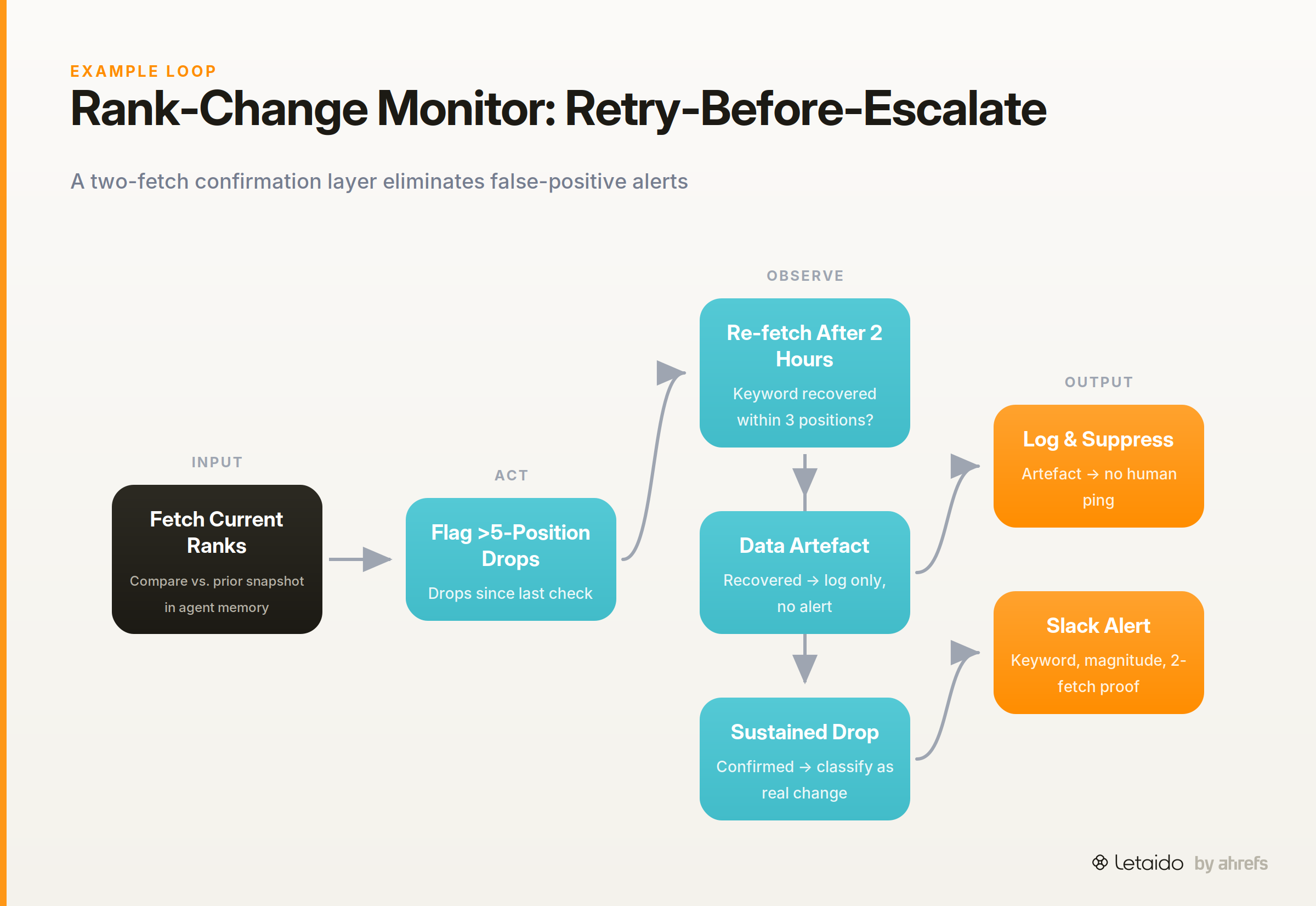
A well-engineered loop handles this through the observe step.
Perceive: Fetch the current rank for a set of tracked keywords. Compare against the previous snapshot stored in the agent's memory.
Act: Flag any keyword that has dropped more than five positions since the last check.
Observe: Before escalating, re-fetch the rank after a two-hour interval. If the second fetch shows the keyword has recovered within three positions of its baseline, classify the drop as a data artefact. If the second fetch confirms the drop is sustained, classify it as a real change worth escalating.
Decide: Escalated drops get a Slack message with the keyword, the magnitude of the drop, and the two-fetch confirmation data. Artefacts are logged but do not trigger a human alert.
This is the retry-before-escalate pattern: the agent does extra work inside the loop to reduce false positives, rather than pushing every raw signal upstream.
Example 3 — An Automated Report That Handles Data Failures Gracefully
Reporting automations are high-stakes loops because a silent failure — a report that runs but delivers partial or blank data — is often harder to detect than a failure that throws an error.
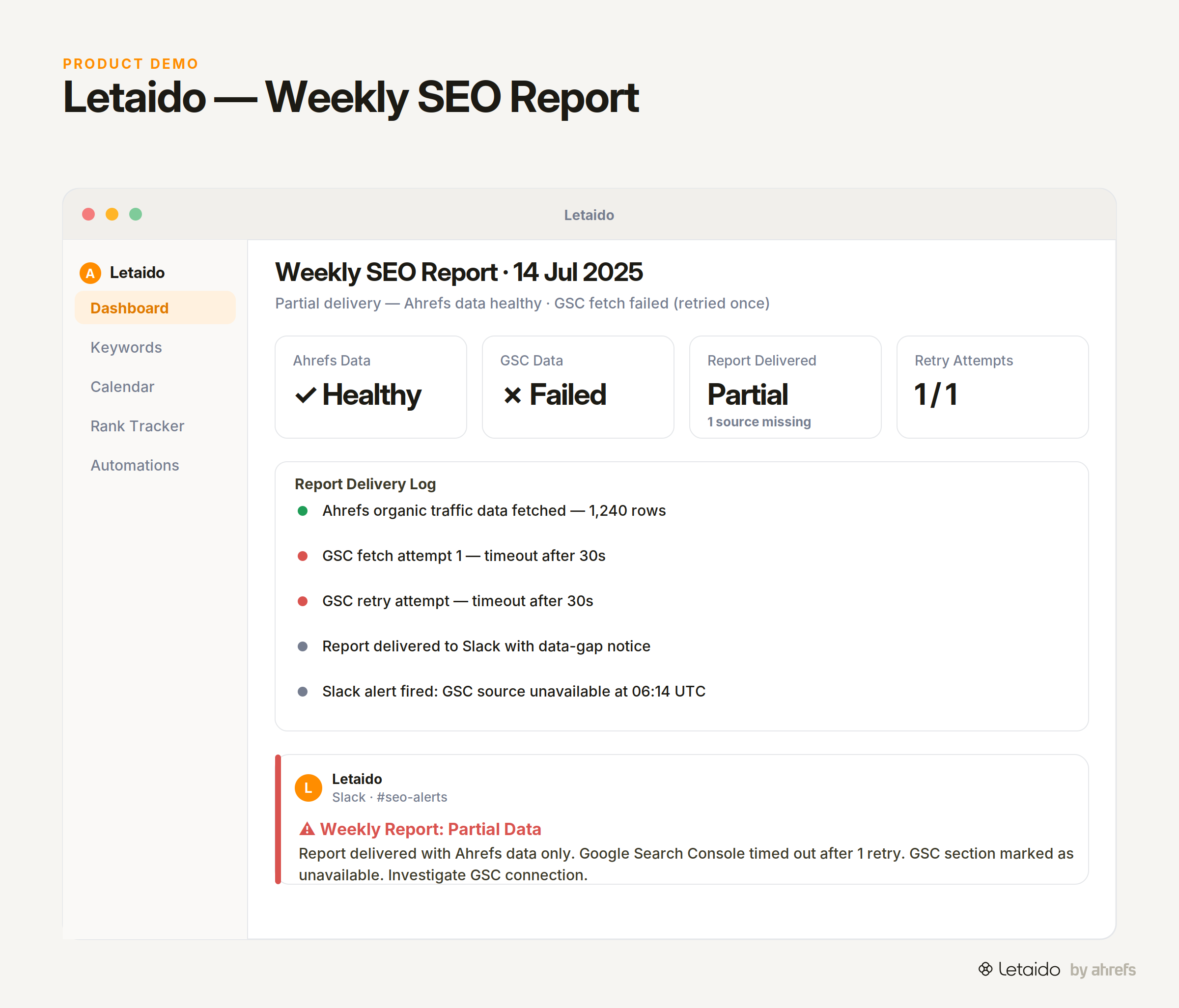
Perceive: At the scheduled run time, fetch data from Ahrefs (organic traffic trends) and Google Search Console (click and impression data).
Act: Combine the datasets and render a formatted markdown report.
Observe: Check that both data sources returned non-empty results above a minimum row threshold. If one source returned data but the other did not, the agent knows the report is incomplete.
Decide: If both sources are healthy, deliver the report to its destination (email, Slack, Notion). If one source failed, retry the fetch once. If the retry fails, deliver the report for the successful source only and include a clearly labelled data-gap notice rather than a blank section. Simultaneously, post a Slack alert naming which data source failed and at what time.
The key loop engineering decision here is the explicit "partial delivery with a notice" path. Most naive automations choose between "fully succeed" and "fail silently." Designing the third path — "deliver what I can, flag what I couldn't" — requires specifying it before the loop runs.
7 Loop Engineering Best Practices
These rules are ordered by the sequence in which a loop fails when they're absent. Each one is a design decision you should make before the agent runs its first iteration, not after it misbehaves.
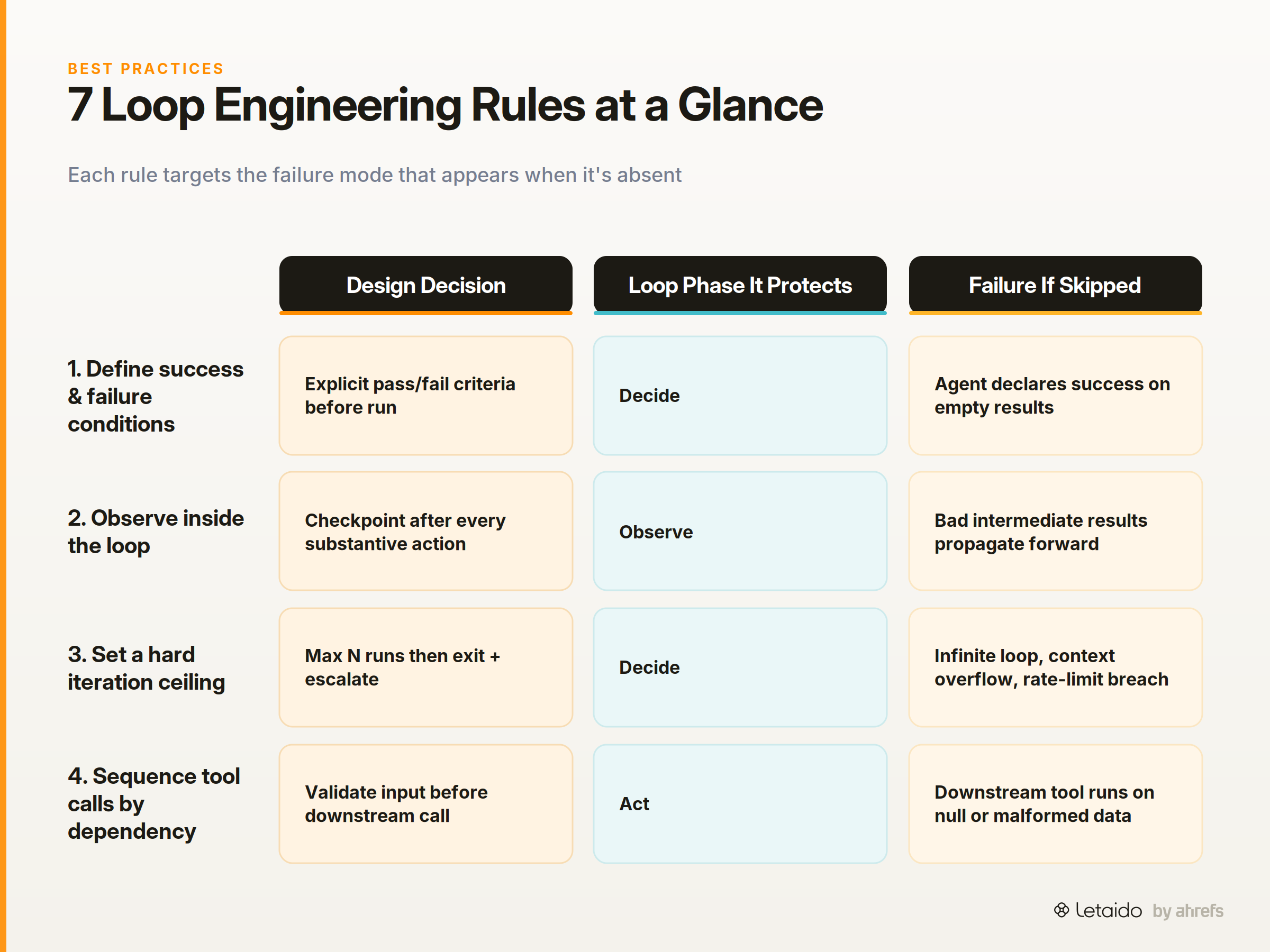
1. Define success and failure conditions before the loop starts. Write down, in specific terms, what a completed task looks like and what a failed task looks like. "The report is ready" is not a success condition. "The report contains data for all 12 tracked keywords with a timestamp from the last 24 hours" is.
2. Place observation checkpoints inside the loop, not only at the end. An agent that only checks its work at task completion will propagate bad intermediate results all the way through. Put an observe step after every substantive action, not just at the finish line.
3. Set a hard iteration ceiling. Every loop must have a maximum run count. If the agent hasn't completed the task in N iterations, it should exit and escalate rather than continue indefinitely. Five to ten iterations is a reasonable starting ceiling for most marketing automation tasks.
4. Sequence tool calls by dependency. Never call a downstream tool before its input has been validated. If step 3 requires data produced by step 2, the observe logic at step 2 must confirm that data is present and well-formed before step 3 is allowed to execute.
5. Design explicit paths for partial failure. Most loops specify the success path and assume everything else is an error. Real agents hit partial failures constantly: one tool works, one doesn't; one data source returns results, one times out. Specify what the agent should do in each case rather than leaving it to improvise.
6. Log every iteration in a format a human can read. Auditability is a loop design requirement, not an afterthought. Each iteration should write a timestamped record of what it perceived, what it did, what it observed, and what it decided. Without this, debugging a loop that went wrong is guesswork.
7. Separate retry logic from escalation logic. A retry is an automatic attempt to recover from a transient error. An escalation routes the problem to a human or a higher-level system. These are different decisions with different thresholds. Conflating them — either by retrying indefinitely or by escalating on the first error — is a common design failure.
Where Loops Break — Common Failure Modes
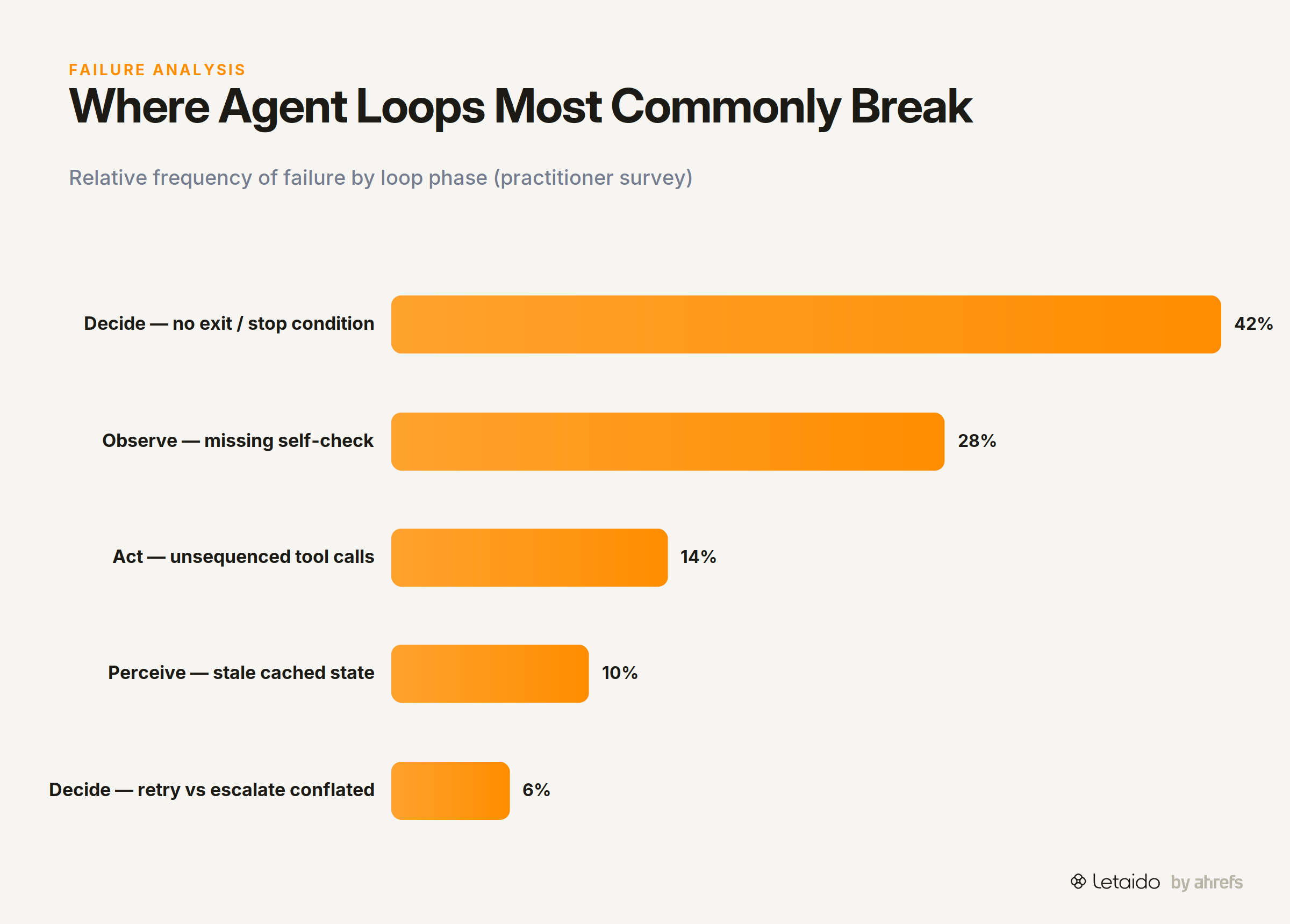
Even well-intentioned loop designs produce agents that misbehave. The failure modes below are the ones that appear most often in practice.
Infinite Loops and Missing Exit Criteria
The most common failure is the simplest: no stopping condition. The agent's decide node only contains "continue" logic, so the agent retries the same action indefinitely — until the context windowContext windowThe maximum amount of text a model can consider at once, counted in tokens. Everything outside it is invisible to the model. fills up, the API rate limit is hit, or someone manually stops it.
The root cause is almost always that the designer thought about the success path but didn't specify what happens on sustained failure. The fix is straightforward: before the loop runs, specify the maximum number of iterations and the action the agent should take when that ceiling is reached.
Cascading Tool Errors
This happens when one tool call fails and the agent proceeds to the next step anyway, passing an empty or malformed result downstream as if it were valid.
By the time the error surfaces, it may have propagated through three or four subsequent steps — and the output looks plausible enough that no one immediately notices it's wrong. The fix is per-step error handling in the observe phase: each tool call's output must be validated before the next tool call is permitted.
Context Bleed Between Iterations
Context bleed is what happens when information from a previous iteration leaks into the current one, causing the agent to act on stale or contradictory data.
A common example: an agent runs a keyword audit, stores a list of gaps in its working memory, and on the next scheduled run reads that prior list instead of fetching fresh data. It produces a report that looks current but is actually a re-analysis of week-old results. The fix is explicit memory management: define what state the agent carries between iterations and what it resets.
Over-Correction Spirals
The observe step flags a problem. The agent fixes it. The new observation triggers another flag. The agent fixes that. The cycle continues, with each correction introducing a new deviation that the next observe step treats as a new problem.
This usually happens when the success condition in the observe step is too narrow, or when the correction logic doesn't account for the downstream effects of the change it just made. The agent oscillates rather than converges. The fix is to design the observe step with a tolerance range rather than an exact target, and to limit the number of corrections allowed per task before escalating to a human.
Is "Loop Engineering" Just a Buzzword?
Directly: the term is new. The problem it describes is not.
Every team that has shipped a working AI agent has done loop engineering. They defined stopping conditions (or discovered they needed to after the first runaway run). They added retry logic (after the first silent failure). They built observation checkpoints (after the first bad output that passed through undetected). They just didn't have a name for the collection of practices.
The emergence of "loop engineering" as a term is a sign that the field is maturing enough to name its own disciplines. Prompt engineering went through the same cycle: practitioners were writing structured prompts for months before anyone called it that.
Whether the label sticks is less important than whether you're doing the work. Teams that design their agent control loops explicitly ship more reliable automations than teams that don't, regardless of what they call the practice. The term is a useful shorthand for a conversation that needed to happen.
Where Loop Engineering Is Heading
The current state of loop engineering is mostly single-agent, single-task design. Where the field is moving is more interesting.
Multi-Agent Loops
As more teams move from single agents to networks of agents — where one agent's output becomes another's input — the loop design problem gets harder.
The questions shift from "when does this agent stop?" to "how does Agent A hand off to Agent B?", "what does Agent B do if Agent A's output is incomplete?", and "who owns the observation layer when the task spans multiple agents?" Shared observation layers and explicit handoff criteria, defined before the loop network runs, are the emerging design pattern here.
Human-in-the-Loop as a Design Choice
Human checkpoints in agent workflows are often treated as a fallback: the automation runs, fails, and routes to a human as a last resort. The more productive framing is to treat human-in-the-loop as a deliberate design decision made at the loop architecture stage.
For a task where the stakes of a wrong output are high — publishing content, sending an outbound email, making a budget decision — the loop might be designed so that a human reviews and approves the observe step's output before the decide phase runs. That's not automation failing; it's automation operating within designed boundaries.
Agents That Refine Their Own Loop Designs
The most forward-looking pattern is agents that log their own loop performance — iteration counts, retry rates, escalation frequency — and use those logs to adjust their own thresholds over time, according to Observability for Generative AI and agentic AI systems.
An agent that escalates to Slack twenty times a week because its retry ceiling is set too low can, in principle, observe that pattern and propose a threshold adjustment. This is early-stage in practice, but persistent, always-on agents (the kind that run 24/7 rather than being invoked per session) are the natural context in which it develops, because they accumulate the performance history needed to make meaningful adjustments.
How Letaido Handles Loop Design
Letaido applies several of these loop engineering principles as defaults, which is worth being specific about.
Every automation Letaido runs includes a hard iteration ceiling and per-step error handling: the agent won't spin indefinitely, and a failed tool call is logged and handled before the next step executes. Retry logic and escalation logic are separated by default — transient errors trigger one automatic retry; persistent errors route a human-readable alert to Slack rather than silently failing.
Full iteration logs are written in plain English for every run, accessible to anyone on the team workspace, so debugging a loop that behaved unexpectedly doesn't require reading raw API logs. And because Letaido has native access to Ahrefs data without API-unit consumption, the perceive phase of any keyword or ranking loop can run on a schedule without the cost concern that leads teams to compromise on data freshness.
If you want to see how Letaido's loop design handles a specific automation — a rank monitor, a content gap audit, a report that degrades gracefully — the clearest way is to run one. The trial gives you a working workspace, not a demo.
Try this prompt to start:
Build a rank-change monitor for [domain]. Check the top 20 tracked keywords
daily. If any keyword drops more than 5 positions from its 7-day average,
re-check after 2 hours. If the drop is confirmed, post a Slack alert with
the keyword name, current position, prior average, and a link to the page.
Log every check regardless of outcome. Stop after 3 consecutive fetch
failures and alert me.
That prompt encodes stopping conditions, retry logic, escalation, and logging before the loop starts. That's loop engineering in practice.