
Context engineering is the practice of designing what an AI model knows before it responds — the data sources, memory, retrieval logic, and structured context that determine whether an agent gives a useful answer or a generic one. Google Cloud frames it as "the bigger job of designing the entire data system and memory that the AI uses to answer those questions." If you're evaluating tools to make your AI agents more reliable, this is the right frame to start from.
The category is moving fast. Most tool comparisons either define the concept without naming real options, or list generic "AI tools" with no honest connection to what context engineering actually requires. This article does neither: it breaks down real tools by the specific context engineering job they handle, and names their limits honestly.
What Context Engineering Actually Means for Tool Selection
Context engineering is not about crafting better instructions. It is about building the system that feeds an AI agentAI agentA system that combines a language model with tools and a goal, so it can decide what to do next and act — not just generate text.Read: What Are AI Agents? Definition, Types, and Examples the right information at the right moment — the documents it retrieves, the memory it carries between sessions, the live data injected automatically from your stack.
Get this wrong and your agent answers confidently from stale or irrelevant information. Get it right and the agent behaves like a specialist who already knows your business.
It Is Not Prompt Engineering
Prompt engineeringPrompt engineeringThe practice of writing and refining model instructions to get reliable, repeatable output — structure, examples, and constraints rather than clever wording.Read: What Is Prompt Engineering? (And Why Marketers Need It) is about what you say to the model. Context engineering is about what the model knows before you say anything.
A prompt engineer refines the instruction: "Write a competitor analysis for this keyword." A context engineer builds the system that automatically loads the competitor backlink data, the current SERPSERPThe search engine results page — the full set of organic listings, ads, and features returned for a query. structure, and the site's own ranking history before that instruction runs. The distinction matters for tool selection because prompt-focused tools and context-focused tools solve different problems.
The Real Question: What Context Does Your Agent Need, and When?
Before comparing platforms, get specific about the job. Does your agent need to retrieve documents on demand, or does it need the same structured data loaded every run? Does it need to remember what happened last session, or start fresh each time? The answers determine which category of tool you actually need — and prevent you from buying a vector database when what you need is a scheduling layer.
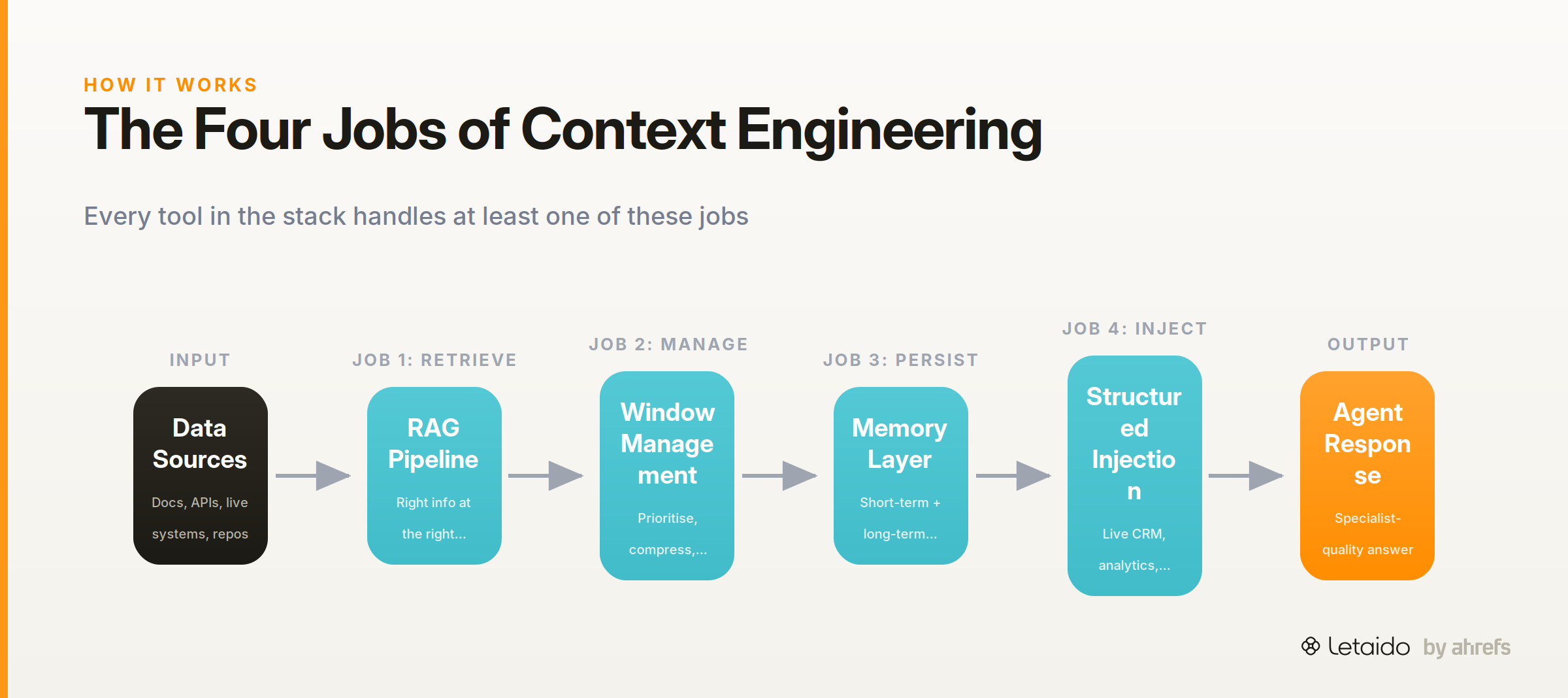
The Four Jobs Any Context Engineering Tool Must Do
Every context engineering tool handles at least one of these jobs. The best stacks handle all four. Use this as your evaluation rubric.
-
Retrieve the right information at the right time. This is retrieval-augmented generationRetrieval-augmented generationFetching relevant documents at query time and feeding them to the model, so answers are grounded in your own content instead of the model's memory. (RAG): pulling relevant documents, data, or search results into the context windowContext windowThe maximum amount of text a model can consider at once, counted in tokens. Everything outside it is invisible to the model. when the agent needs them. Without it, the agent works from training data alone, which is almost always too generic and too stale.
-
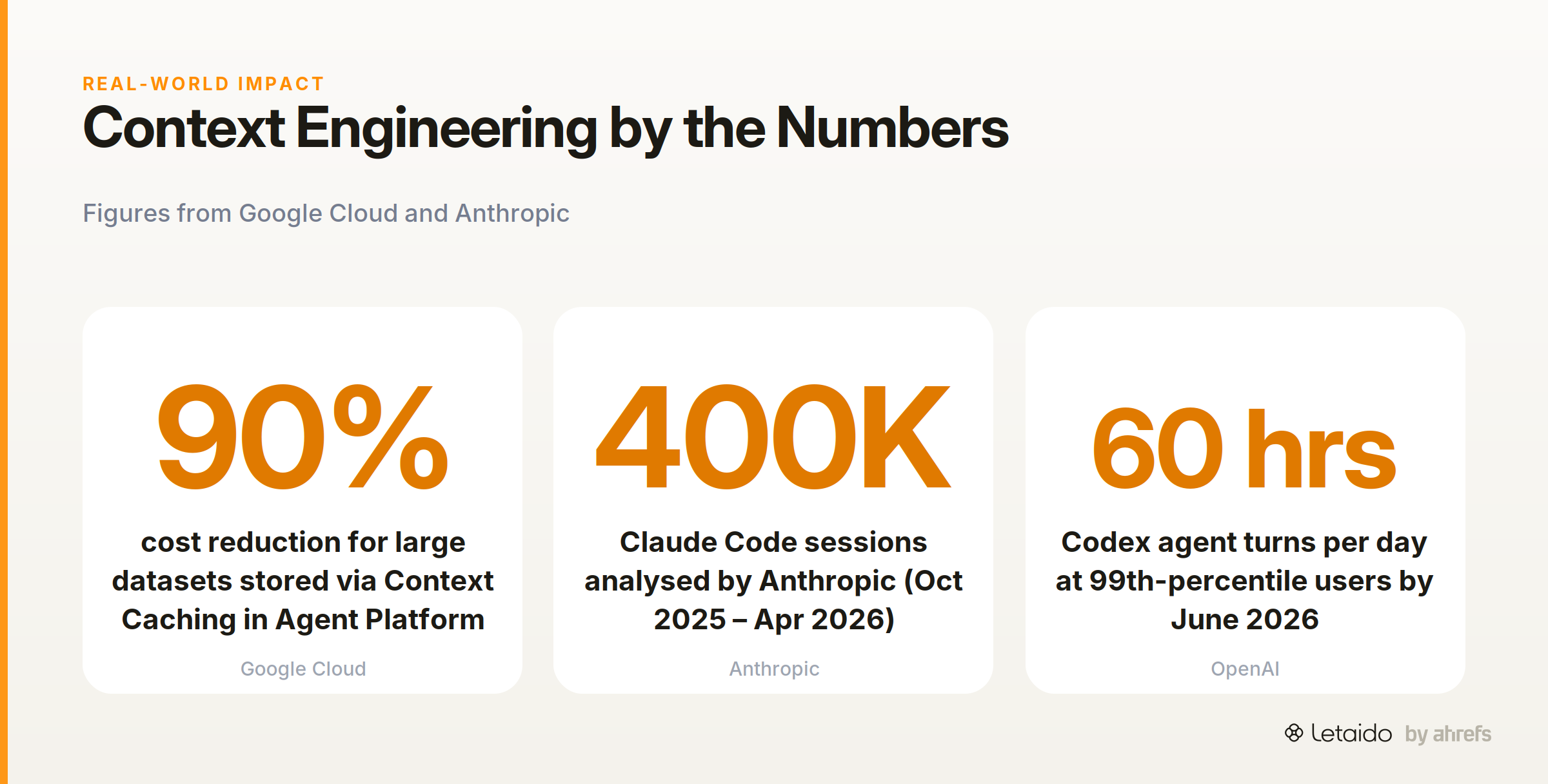
Manage what fits inside the context window. Every model has a hard limit on how much text it can process at once. Prioritisation, compression, and caching determine whether the most relevant content makes the cut. Google Cloud reports a 90% cost reduction for storing large datasets in active memory via Context Caching in Agent Platform — a concrete sign that window management is both a performance and a budget problem.
-
Persist memory across sessions. Agents that forget everything between runs can't build on prior work. Short-term memory covers the current conversation; long-term memory means the agent can recall decisions, user preferences, or past outputs the next time it runs.
-
Inject structured, domain-specific data automatically. This is the job most tools leave to the user. Truly useful agents don't wait to be given data — they pull it from your live systems (your CRM, your analytics platform, your keyword database) at run time, without manual copy-paste.
Context Engineering Tools, by Category
The tools below are organised by the job they primarily handle. Each entry covers what it does, which of the four jobs it addresses, who it's designed for, and one honest limitation. Real-world usage is growing fast: Anthropic's privacy-preserving analysis of approximately 400,000 Claude Code sessions between October 2025 and April 2026 illustrates how broadly practitioners are already running agentic workflows in production — not just in experiments.
Retrieval and RAG Frameworks
These tools handle Job 1 — getting the right information into the context window when the agent needs it.
LlamaIndex
LlamaIndex is a data framework for building retrieval pipelines on top of documents, APIs, and structured databases. It provides connectors to ingest data from dozens of sources, indexing layers to organise it, and query pipelines to retrieve the most relevant chunks at inference time.
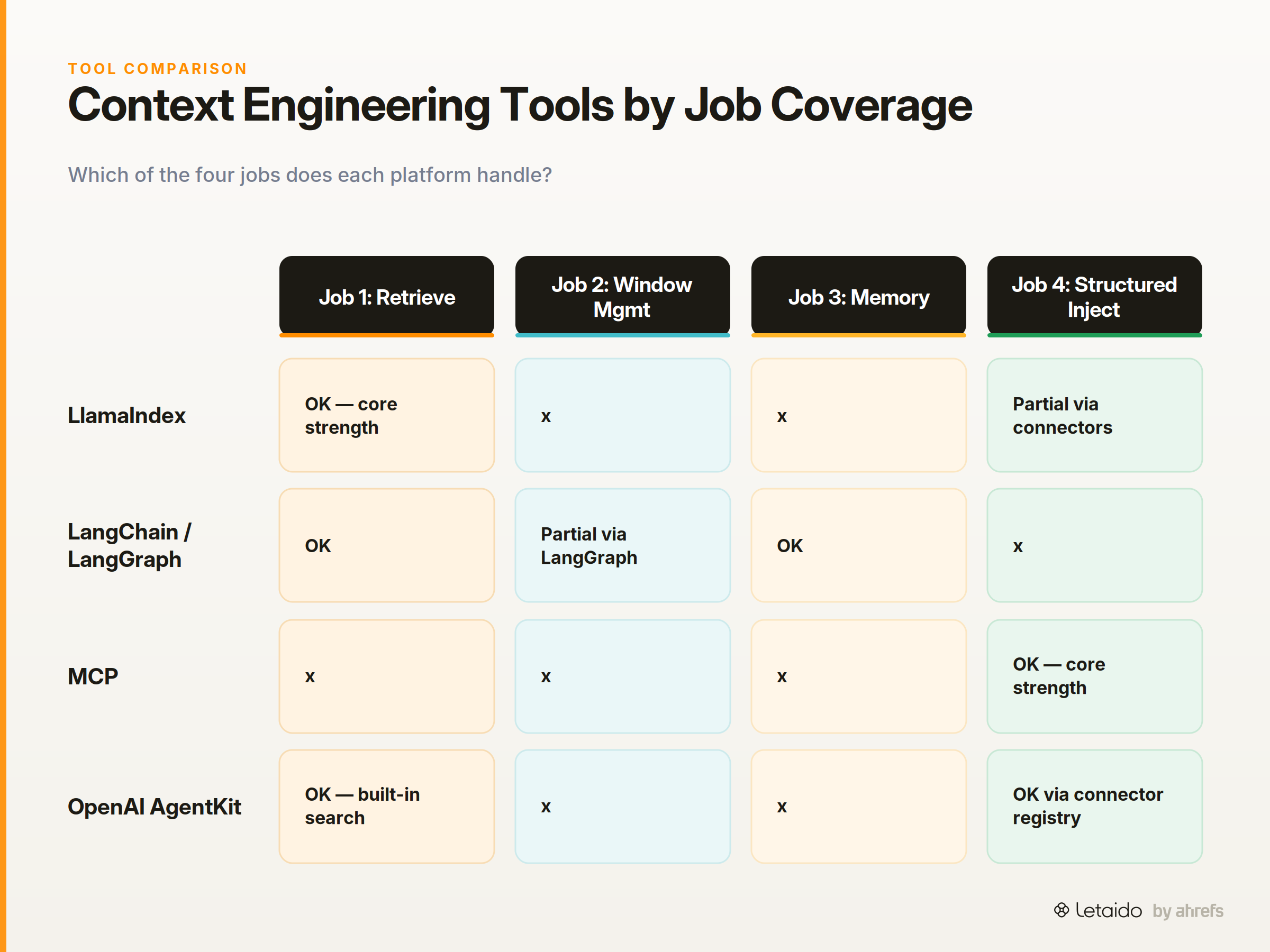
Context jobs: Primarily Job 1 (retrieve); some support for Job 4 (structured injection) via structured data connectors.
Best for: Developers building document-heavy agents — legal research assistants, internal knowledge bases, document Q&A.
Honest limitation: Orchestration logic lives in your code. LlamaIndex handles retrieval well but doesn't manage agent state or workflow scheduling. You'll need additional tooling for Jobs 2 and 3.
LangChain and LangGraph
LangChain is a framework for composing chains of LLM calls, tool invocations, and retrieval steps. LangGraph extends it with stateful, cyclic agent graphs — workflows where the agent can loop, branch, and remember state across steps. LangChain's own engineering team has published on context engineering for agents, framing context management as one of the core design challenges in production systems.
Context jobs: Job 1 (retrieve) and Job 3 (persist memory), with some support for Job 2 via LangGraph's state management.
Best for: Engineering teams building custom multi-step agents that need fine-grained control over what context flows between steps.
Honest limitation: The abstractions can obscure what context is actually being passed to the model. Debugging why an agent made a wrong decision often requires tracing through multiple layers of chain composition — a steep learning curve for teams without Python expertise.
Protocol and Interoperability Layer
Model Context Protocol (MCP)
MCP is an open protocol that standardises how AI applications discover and call external tools, data sources, and services. Any app that exposes an MCPModel Context ProtocolAn open standard for connecting AI models to external tools and data sources through one consistent interface instead of bespoke integrations. server can be connected to any MCP-compatible AI agent without custom integration code. It supports long-running tasks via a Tasks extension and interactive UI components via MCP Apps.
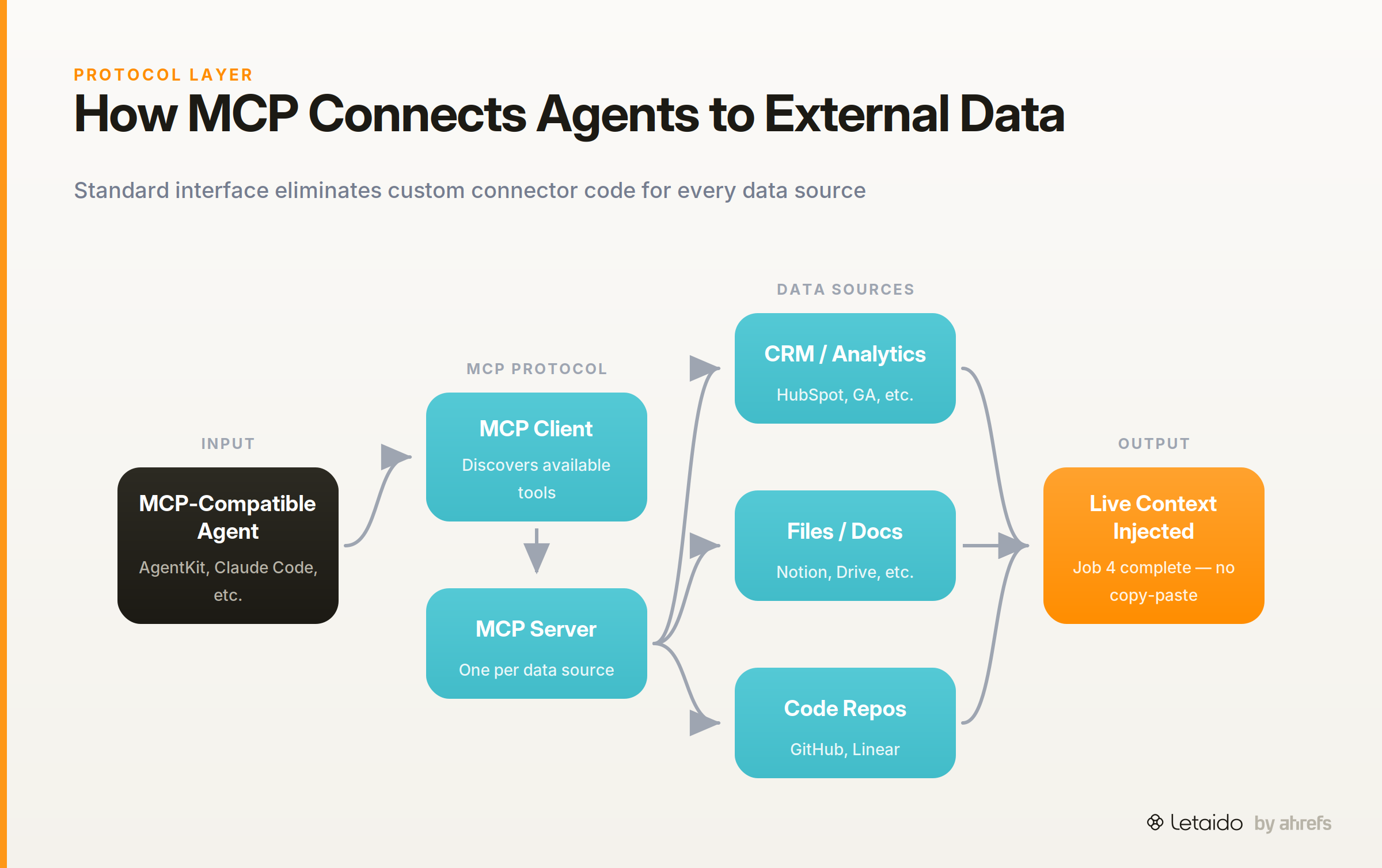
Context job: Primarily Job 4 (structured injection) — MCP is the plumbing that lets agents pull live data from external systems automatically.
Best for: Teams building multi-tool agents who want a standard interface rather than writing custom connectors for every data source. MCP is infrastructure, not a product — it makes other tools in this list interoperable.
Honest limitation: MCP requires an MCP server implementation for each data source you want to connect. Someone has to build and maintain those servers. The protocol is open and free, but the integration work is not zero.
Agent-Building Platforms with Context Management
These platforms abstract over the lower-level frameworks and give teams a higher-level interface for building agents with context management included.
OpenAI AgentKit
OpenAI AgentKit builds on top of the Responses API with a visual workflow builder, a connector registry for linking data sources and tools, an embeddable chat UI, and evaluation tooling for grading agent outputs. The Responses API itself handles the low-level orchestration: web search, file retrieval, and multi-step model chaining are available as built-in tool calls.
Context jobs: Job 1 (retrieve via built-in search and file tools) and Job 4 (structured injection via the connector registry).
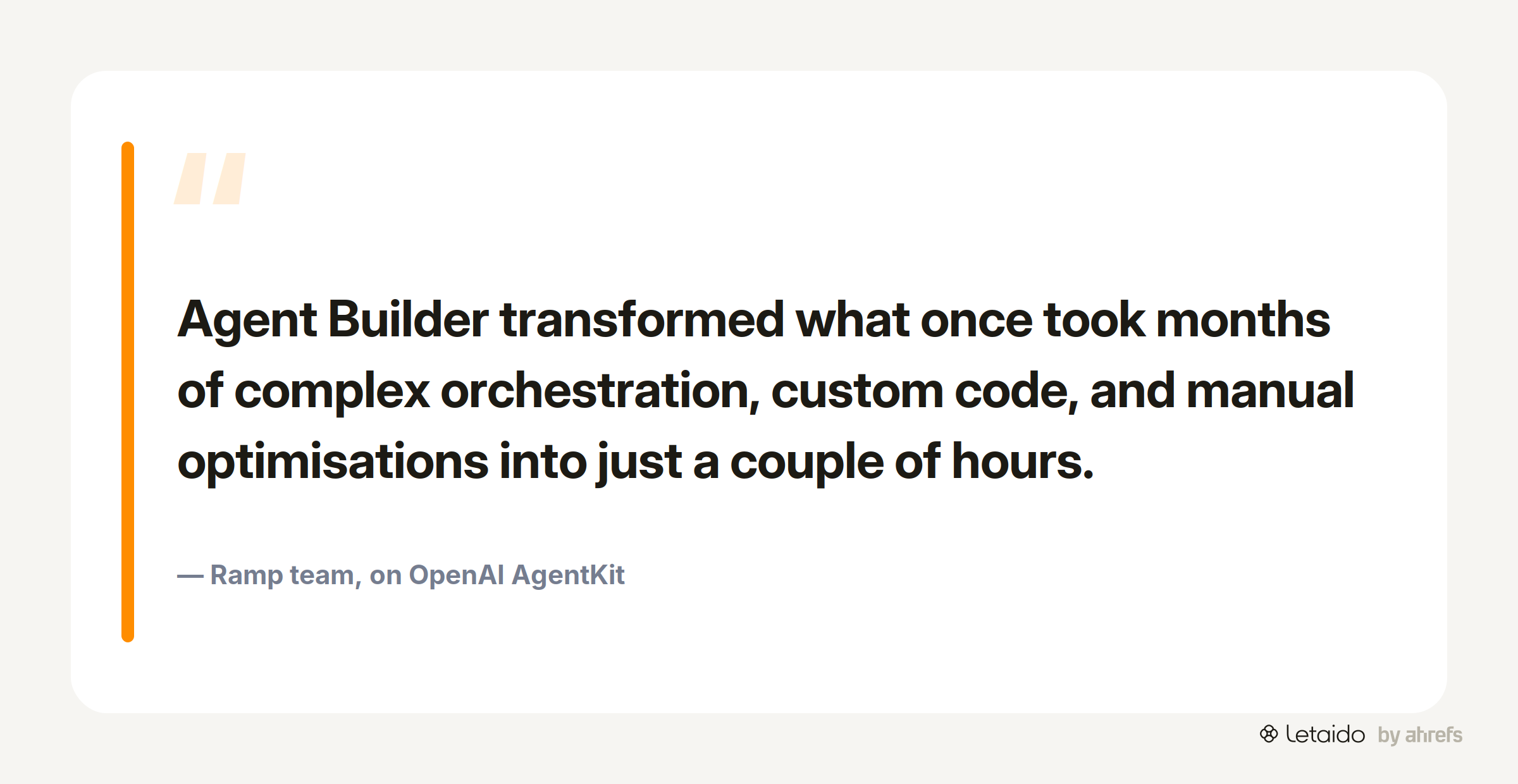
Best for: Product and engineering teams who want to build internal or customer-facing agents without assembling a framework stack from scratch. Ramp's team found that "Agent Builder transformed what once took months of complex orchestration, custom code, and manual optimisations into just a couple of hours."
Honest limitation: Tied to OpenAI models. If your use case requires model-agnostic infrastructure or on-premise deployment, AgentKit is not the right fit. Evaluation tooling is still in beta as of August 2026.
OpenAI Workspace Agents
OpenAI Workspace Agents are Codex-powered agents embedded inside ChatGPT for Business, Enterprise, and Edu accounts. They pull context from connected work apps — documents, tickets, calendars — run multi-step tasks on schedules, and surface outputs with approval controls before taking actions.
As OpenAI described the product intent: "This agent helps account teams spend less time stitching together details and more time with customers."
Context jobs: Job 1 (retrieve from connected apps), Job 3 (memory across scheduled runs), and Job 4 (structured injection from workspace tools).
Best for: Business teams who want agents embedded directly in their existing ChatGPT workspace without a separate build.
Honest limitation: Context is pulled from general workspace apps. There is no native domain-specific data layer — no SEO data, no CRM analytics, no industry-specific retrieval. For marketing or content teams, the agent knows your calendar and your documents, but not your keyword rankings or your backlink profile.
OpenAI Codex
OpenAI Codex is a cloud coding agent that gathers context from GitHub repositories and Slack threads, then executes tasks in a sandboxed coding environment. It is designed for engineering workflows: code review, test writing, debugging, and automated refactoring. By June 2026, users at the 99th percentile were generating more than 60 hours of Codex agent turns per day, run in parallel across multiple simultaneous agents.
Context jobs: Job 1 (retrieve repo and conversation context) and Job 2 (manage what fits via sandboxed execution and scoped file access).
Best for: Engineering teams running high-volume, parallelised coding work where context gathering from the repo is the bottleneck.
Honest limitation: Codex is purpose-built for software engineering. It has no meaningful application to marketing, content, or SEO workflows. The context it understands is code and engineering communication.
Terminal and IDE-Based Coding Agents
Claude Code
Claude Code runs in your terminal and uses Anthropic's Claude models alongside command-line tools and MCP integrations to inspect a codebase, propose changes, and execute them with explicit permission gates. It integrates with VS Code and JetBrains, and automatically keeps itself updated to the latest version. Anthropic's analysis of approximately 400,000 real sessions shows it is being used at scale for both greenfield development and iterative debugging.
Context jobs: Job 1 (retrieve repo context, historical code, and MCP-connected tool outputs) and Job 4 (structured injection via MCP server connections).
One practitioner put it plainly: "I use Claude Code for building demos and PoCs as well as automating tasks, and I love that it's easy to spin up from the terminal and grant it access to all necessary context."
Best for: Developers who want a terminal-native agent with deep codebase awareness and the flexibility to connect external tools via MCP.
Honest limitation: Requires CLI comfort and a codebase. There is no GUI, no scheduling layer, and no non-technical user path. Marketing practitioners cannot use Claude Code without engineering support.
Agent-Powered Workspaces with Domain Context Built In
This is a small but distinct category: platforms where the context engineering is pre-assembled for a specific domain, rather than left for the user to build.
Letaido
Letaido sits in a different position from every other tool in this list. Rather than giving you building blocks to assemble a context stack, it ships with context already wired to a specific domain: SEO, content, and marketing operations.
Letaido has direct access to full Ahrefs data — site explorer, keyword explorer, rank tracker, backlink data — without consuming API units. Native connectors for Slack, HubSpot, Notion, Airtable, GitHub, Linear, WordPress, and others bring live business context into every agent run. Scheduled automations mean the context is not a snapshot you pull manually; it is updated continuously and surfaced to the team on whatever cadence makes sense.
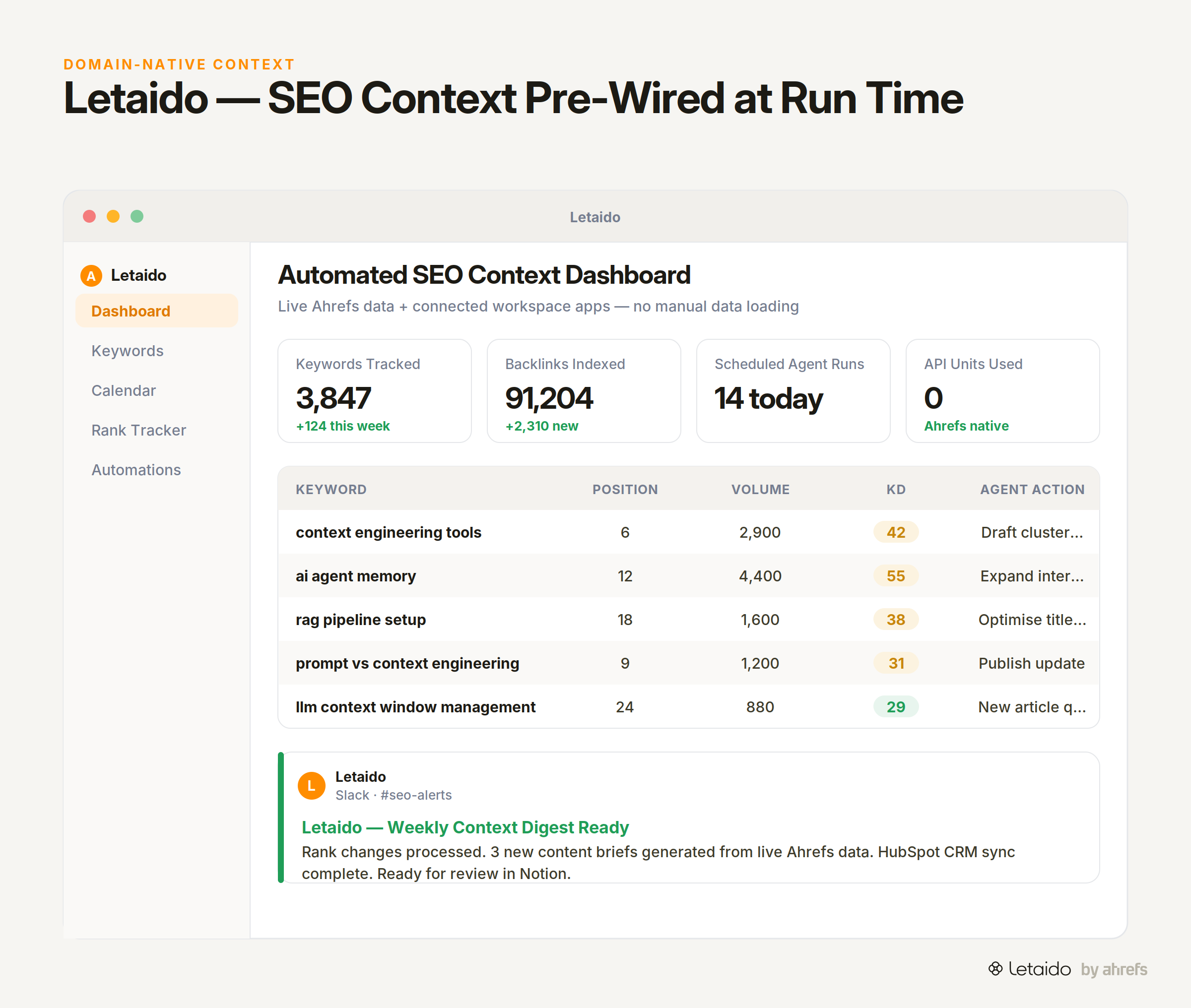
Context jobs: All four, scoped to marketing.
- Job 1 (retrieve): Live Ahrefs SERP data, competitor backlink profiles, and keyword gap data pulled at run time — not pasted in.
- Job 2 (window management): Letaido selects and prioritises the relevant data slices for each task rather than dumping a full dataset into a prompt.
- Job 3 (memory): Shared team workspace with persistent history; prior reports, audits, and alerts are available context for the next run.
- Job 4 (structured injection): Ahrefs data and connector outputs are injected automatically — no manual export, no copy-paste.
The practical contrast: ask a general-purpose AI agent to identify keyword gaps for your site and you'll spend 20 minutes exporting CSVs, formatting them, and constructing the prompt. Ask Letaido the same question and the live data is already there.
Try this prompt with Letaido:
Pull the top 50 keywords where our top three competitors rank in positions 1–10
but we have no page ranking in the top 30. Cluster them by topic, flag estimated
traffic opportunity from Ahrefs data, and post a summary to #seo-team in Slack.
Pricing: Flat $99/month including $50 in AI credits. An active Ahrefs subscription is required for Ahrefs data pulls.
Honest limitation: Letaido is purpose-built for marketing and SEO teams. It is not a general-purpose agent builder. If your use case is software engineering, enterprise document retrieval, or a custom domain outside marketing, the other tools in this list are more appropriate.
How to Choose: A Quick Evaluation Framework
The right tool depends on which of the four jobs is your bottleneck. Use the table below as a starting point, then validate against your team's technical capacity and the domain you're building for.
| Tool | Context job(s) handled | Best for | Key limitation |
|---|---|---|---|
| LlamaIndex | Retrieve (#1), Inject (#4) | Document-heavy RAG pipelines | No workflow orchestration or memory |
| LangChain / LangGraph | Retrieve (#1), Memory (#3) | Custom multi-step agent graphs | Steep learning curve; complex debugging |
| MCP | Inject (#4) — interoperability layer | Standardising tool connections across agents | Requires MCP server per data source |
| OpenAI AgentKit | Retrieve (#1), Inject (#4) | Product teams building user-facing agents | OpenAI-only; evals still in beta |
| OpenAI Workspace Agents | Retrieve (#1), Memory (#3), Inject (#4) | Business teams inside ChatGPT Enterprise | No domain-specific data layer |
| OpenAI Codex | Retrieve (#1), Window management (#2) | High-volume engineering automation | Engineering-only; no marketing utility |
| Claude Code | Retrieve (#1), Inject (#4 via MCP) | Terminal-native coding agents | Requires CLI comfort; developer-only |
| Letaido | All four (marketing domain) | SEO, content, and marketing ops teams | Purpose-built for marketing; not a general builder |
One additional question worth asking before you commit to a platform: does your team have the engineering capacity to maintain it? LangGraph and LlamaIndex are powerful, but both require ongoing code ownership. MCP is infrastructure that someone has to implement. If the honest answer is "we have one ops-minded person and a marketing team," a pre-assembled workspace with domain context built in will deliver more value faster than a DIY stack you won't maintain.
What Tools Cannot Fix: Context Quality Is Still Your Problem
Even the best retrieval pipeline fails if the underlying data is stale, disorganised, or scoped to the wrong question. This is the "garbage in, garbage out" problem applied to context engineering, and no tool solves it for you.
Three failure modes to watch for:
Stale data injected on a broken schedule. If your agent pulls keyword rankings once a week but your content team is publishing daily, the context the agent has is already wrong. Scheduling is a solvable problem, but only if someone sets it up correctly.
Unstructured data that retrieval can't parse cleanly. A vector database retrieves semantically similar chunks — but if your source documents are a mixture of internal Slack exports, PDFs with inconsistent formatting, and half-finished Google Docs, the retrieved chunks will be incoherent. Clean, structured source data matters more than the sophistication of the retrieval layer.
Context scoped to the wrong granularity. This is the failure mode that looks like a model problem but is actually a context problem. If an agent returns flat, alphabetically sorted keyword lists instead of intent-grouped topic clusters, the issue is usually that the prompt gave the agent a raw keyword export rather than specifying the grouping logic. What you asked for ("give me keywords") and what you actually needed ("group keywords by searcher intent, prioritised by traffic opportunity") are different context requirements — and no tool automatically bridges that gap.
The honest implication: tooling reduces the cost of getting context right. It does not remove the work of deciding what the right context is.
The Bottom Line: Match the Tool to the Job
If you're an engineer building a custom agent that reasons over internal documents or code, start with LlamaIndex for retrieval, LangGraph for stateful orchestration, and MCP as your interoperability layer. Claude Code is worth evaluating if your agent needs deep codebase awareness in a terminal-native workflow.
If you're an operations team or product team that wants agents without a build-from-scratch commitment, OpenAI AgentKit and Workspace Agents give you a faster path with OpenAI's model and tooling ecosystem already integrated.
If you run SEO, content, or marketing operations and your agents need to work with live Ahrefs data, competitive analysis, rank tracking, and team notifications — without assembling a context stack — Letaido is the only option in this list that pre-wires that domain context for you.