
AI agents are software systems that perceive their environment, reason toward a goal, plan a sequence of actions, execute those actions using external tools, and refine their approach based on feedback — all without step-by-step human instruction. Unlike a chatbot, which waits for a prompt and responds once, an agent initiates, sequences, and completes multi-step tasks on its own. Unlike a script, it reasons rather than follows a fixed ruleset.
That distinction matters more than it sounds. It is the difference between a tool you operate and a system that operates on your behalf.
What Is an AI Agent?
An AI agent is autonomous, goal-oriented software. Give it an objective — "find the keyword gaps hurting our organic traffic" or "alert the team when any top-10 page drops below position 15" — and the agent figures out the steps, uses the tools it has access to, executes the work, and reports back. It does not need you to specify each action in advance.
It helps to see how an agent differs from three things it is often confused with:
- A chatbot waits for your input, generates one response, and stops. It has no persistent goal and takes no action in the world.
- A script or workflow tool executes a fixed sequence of steps. Change the input, and the output changes; but the sequence itself cannot reason or adapt.
- An LLMLarge language modelA model trained on vast amounts of text to predict the next token, which is what lets it write, summarise, and reason over language. (large language model) is the reasoning engine underneath many agents, but on its own it only generates text. It does not call APIs, remember what it did last Tuesday, or decide to check your rankings at 3am.
An AI agent combines a reasoning engine with memory, tool access, and a feedback loop. That combination is what makes it autonomous.
How AI Agents Work: The Perception–Decision–Action Loop
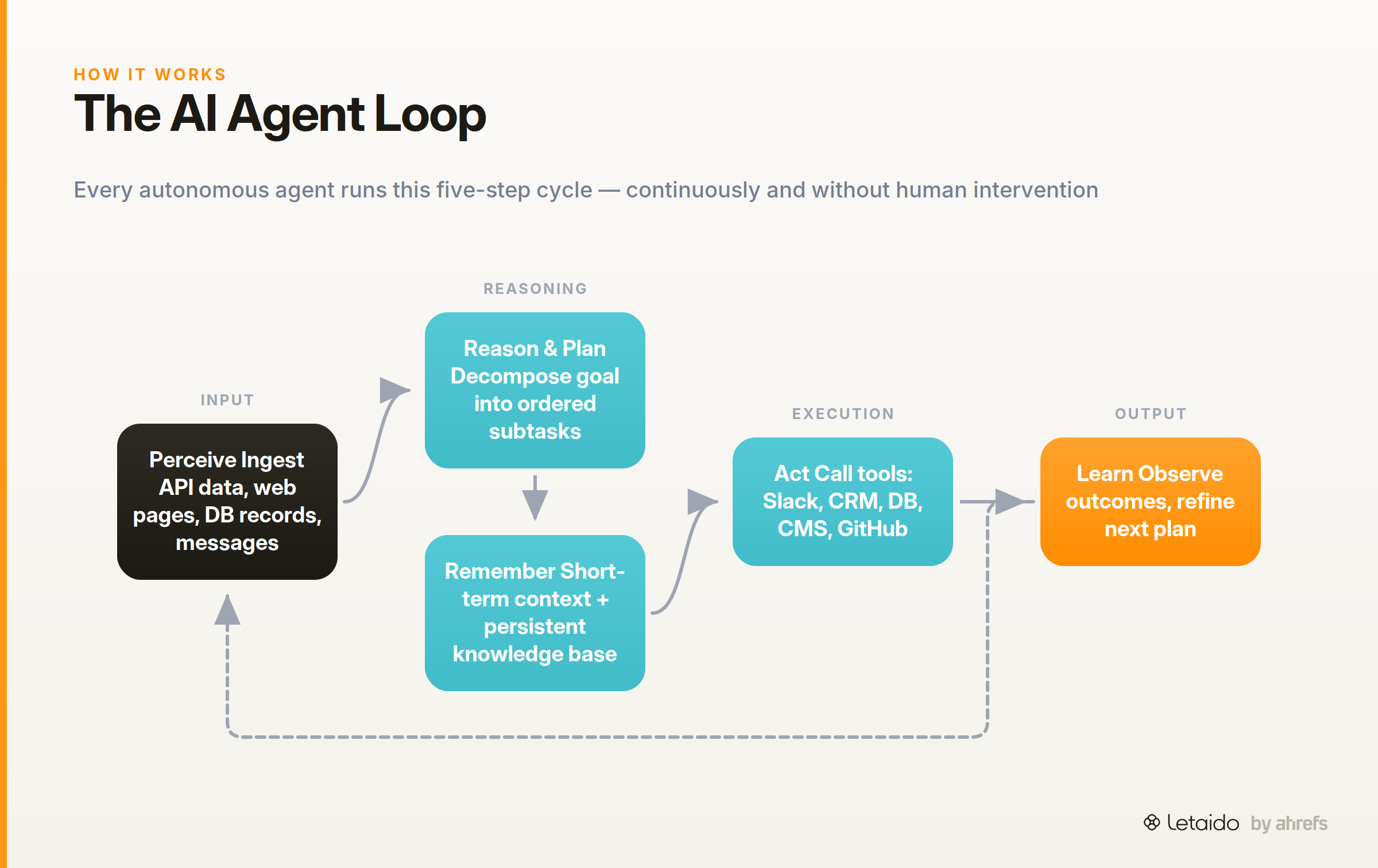
Every AI agent, regardless of vendor or architecture, runs some version of the same five-step loop: perceive, reason, plan, act, and learn. Understanding each step makes the rest of the article easier to follow — and helps you evaluate any agent you encounter in the wild.
Perceive: Read the Environment
Perception, for a software agent, means ingesting structured data from the world: API responses, database records, web pages, user messages, file contents, or sensor readings. The agent is not just reading your prompt; it is scanning a live environment.
A marketing agent, for example, might perceive a drop in ranking position by pulling fresh data from Ahrefs, reading a Google Search Console report, or monitoring a Slack channel for performance alerts. The richer and more current the data it can read, the better its decisions will be.
Reason and Plan: Decompose the Goal
Once the agent has perceived its environment, a reasoning engine breaks the high-level goal into an ordered sequence of smaller subtasks. This is called task decomposition.
One influential approach is the ReAct paradigm (short for Reason + Act), where the agent interleaves reasoning steps with action steps: think about what to do, do it, observe the result, think again. More complex agents use Hierarchical Task Networks (HTNs), which nest subtasks within subtasks, useful when the goal has many dependent steps.
The planning module is what separates an agent from a simple API call. It is deciding how to reach the goal, not just executing a predefined path.
Remember: Short-Term Context vs. Long-Term Knowledge
Agents use two kinds of memory. In-context memory (sometimes called working memory) is the information held in the active session: the current task, recent tool outputs, intermediate results. It is fast but limited and disappears when the session ends.
Persistent storage, or a knowledge base, survives across sessions. An agent can write a summary to a database after Monday's audit and read it back on Friday when building a weekly report. That continuity is what enables multi-session tasks that would otherwise require a human to carry context forward.
Act: Use Tools and Trigger Actions
Text generation is not action. An agent acts by calling external tools: querying a database, posting to Slack, creating a record in HubSpot, committing a file to GitHub, or publishing a page to WordPress. Each of these changes something in the world rather than returning a string.
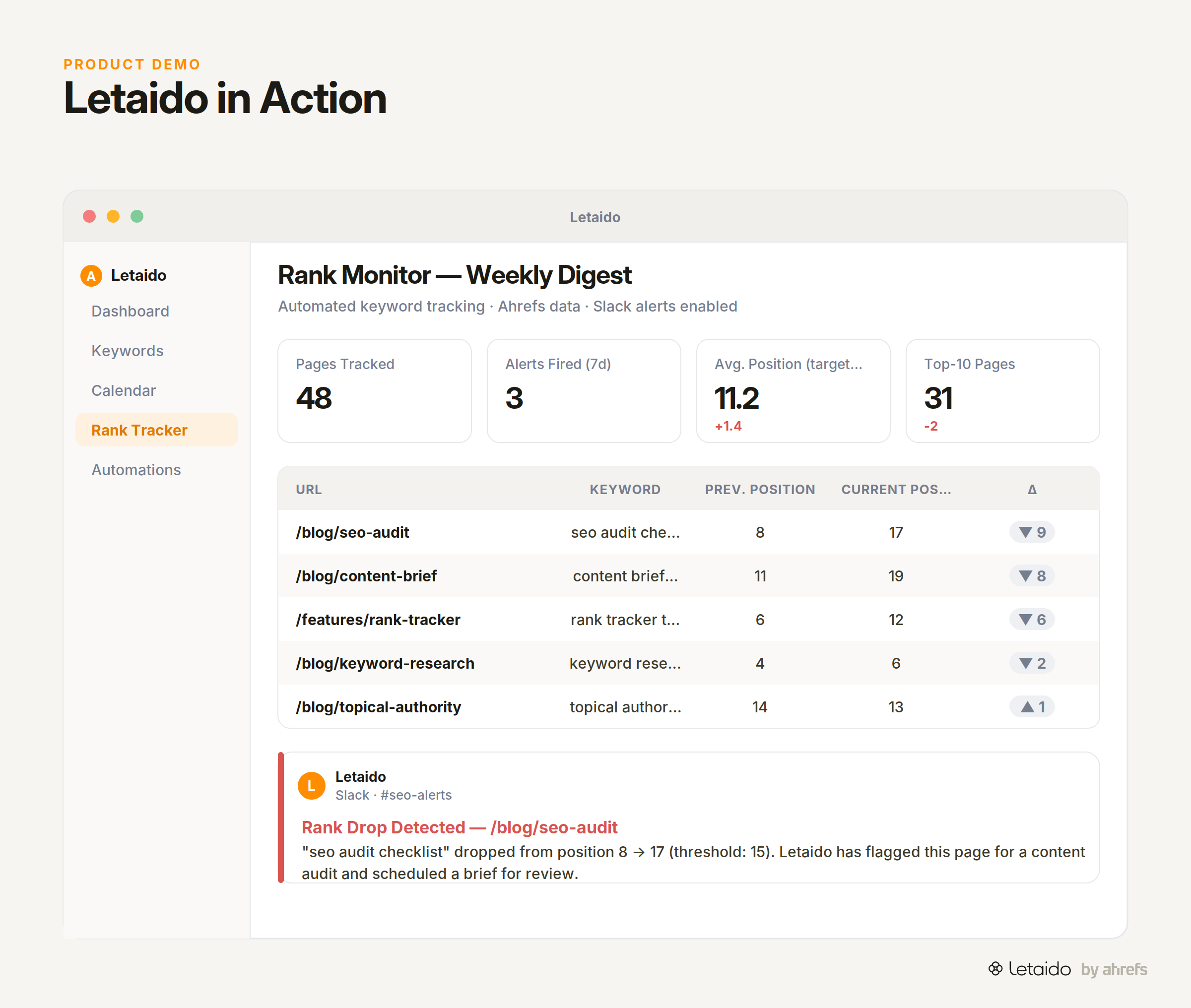
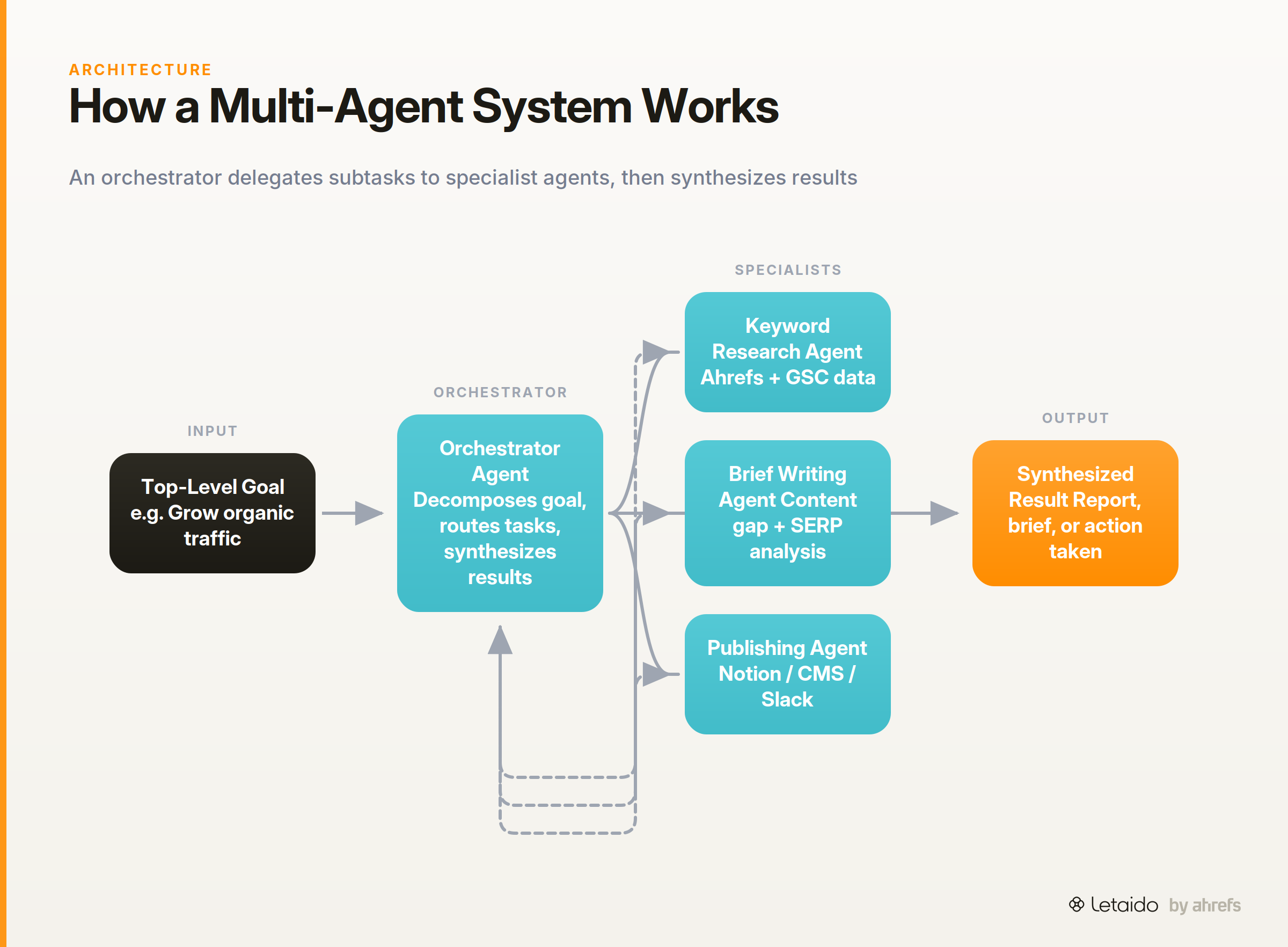
Tool integration is the mechanism that makes agents genuinely useful. An orchestrator agent can coordinate a set of specialist sub-agents, each responsible for a narrow tool or task, while the orchestrator sequences the overall workflow and synthesizes results.
Claude 3.5 Sonnet's computer use pushes this further: the model looks at a live screen, moves a cursor, clicks buttons, and types text in applications — acting through a graphical interface the same way a human would. As Anthropic put it at launch: "Available today on the API, developers can direct Claude to use computers the way people do — by looking at a screen, moving a cursor, clicking buttons, and typing text."
Learn: Close the Feedback Loop
After each action, the agent observes what happened and adjusts. Did the Slack message send? Did the page actually publish? Did the ranking move? This constructive-feedback loop lets the agent self-refine across runs without a human reviewing every output.
This is not the same as fine-tuningFine-tuningFurther training a base model on your own examples so it internalises a style or task, rather than being told about it in the prompt each time. the underlying model. The agent is updating its plan based on real-world outcomes, not retraining its weights. Think of it as the agent correcting its own work rather than becoming a different model.
The loop in practice — a marketing example
Goal: grow organic traffic from a set of target pages.
- Perceive: Letaido queries Ahrefs data and reads the current ranking positions and keyword gaps for the site.
- Reason and plan: It identifies three pages ranking on page two with high-volume keywords and decomposes the goal into: audit each page's content, identify missing subtopics, draft a content brief.
- Remember: It stores the audit results in a persistent workspace so the brief references the same data a week later.
- Act: It generates a structured content brief and posts it to Notion; it schedules a follow-up rank check for 14 days out.
- Learn: When the follow-up check runs, it reads the new positions and logs whether traffic moved, feeding the result into the next planning cycle.
No human stepped in between steps 1 and 5. The whole sequence ran while the team slept.
Types of AI Agents
AI agents are not all the same. The field classifies them by how they make decisions, ranging from simple pattern-matching to full goal-directed reasoning. The table below maps each type to a plain-language description and a practical marketing-team parallel.
| Type | How it decides | Marketing-team parallel |
|---|---|---|
| Simple reflex agent | Matches current input to a preset rule; ignores history | An auto-responder that sends a fixed reply when a form is submitted |
| Model-based reflex agent | Maintains an internal model of the world; uses it to handle partial information | A monitoring script that tracks ranking history before deciding whether a drop is significant |
| Goal-based agent | Evaluates actions by whether they move toward a defined goal | A content agent given "increase topical authority in category X" as its objective |
| Utility-based agent | Chooses the action that maximizes a utility score across competing options | An ad-spend optimizer that balances CPA, volume, and brand safety simultaneously |
| Learning agent | Refines its own behavior based on feedback over time | An agent that improves brief quality by learning which briefs led to published articles vs. abandoned drafts |
| Multi-agent system | Multiple agents with different roles coordinate toward a shared goal | An orchestrator that delegates keyword research, brief writing, and CMS publishing to specialist sub-agents |
Multi-agentMulti-agent systemSeveral specialised agents working together on one job, each owning a step, coordinated by a planner or a shared workflow. systems deserve a closer look, because they are the architecture most production deployments use. An orchestrator agent receives the top-level goal, breaks it into subtasks, and routes each subtask to a specialist sub-agent with the right tools for that job. Results flow back to the orchestrator, which synthesizes them and decides what to do next. This division of labor is more reliable and easier to debug than a single agent trying to do everything.
Foundation-model-based agents are the most common type readers will encounter today. They use a large language model as their reasoning engine, wrapping it with memory, tool integrations, and a feedback loop. Most commercial agents (including those built on Azure AI Foundry Agent Service or Amazon Bedrock Agents) follow this pattern.
AI Agents vs. Chatbots, Bots, and LLMs
This is the question every reader has after the first section: "How is this actually different from ChatGPT?" Four comparisons make the distinction concrete.
LLMs generate; agents act. An LLM given a prompt returns text. It cannot call your CRM, check today's rankings, or post to Slack. An agent uses an LLM as its reasoning core and wraps it with tools that change the world. The LLM is the brain; the agent is the brain plus hands.
Bots follow rules; agents reason. A traditional bot (a customer service routing bot, for example) executes a decision tree. Every branch is predefined. Give it an input it wasn't programmed for, and it fails or escalates. An agent can handle novel situations by reasoning from first principles and calling the appropriate tool.
AI assistants react; agents initiate. An AI assistant (the kind embedded in most productivity apps) responds when you ask something. An agent can be scheduled to run at 3am, monitor a condition, and trigger an action without any human prompt. Proactivity is a core property.
Compound AI systems vs. single-model calls. A compound AI system chains multiple model calls, tools, and decision points into a single workflow. Agents are often compound systems by nature. A single ChatGPT message is not; ChatGPT agent mode, which can browse the web, run code, and take actions on your behalf, is closer. Similarly, OpenAI Operator is described as "a research preview of an agent that can use its own browser to perform tasks for you" — a tool that sits clearly on the agentic side of this spectrum.
The line between "smart assistant" and "true agent" is blurry and moving fast. What matters for practical purposes is whether the system can take actions autonomously over multiple steps using real tools. If it can, it is operating as an agent regardless of what the product is called.
AI Agent Examples: What They Actually Do
Understanding the theory is useful; seeing what agents actually do in practice is more useful. The following examples run from the marketing use cases most relevant to this article's audience, then broaden to other industries.
Marketing and Content Operations
This is where AI agents create immediate, visible leverage for growth and content teams.
Rank monitoring with threshold alerts. An agent watches keyword positions in Ahrefs data and sends a Slack message the moment a target page drops below a defined position. No dashboard-checking required; the signal finds you. Letaido does this on a schedule you set, using native Slack integration to ping the relevant channel with the affected URL, the previous position, and the current position.
Content gap identification and brief creation. An agent can query full Ahrefs data to find keywords where competitors rank but your site does not, cluster them by topic, prioritize by volume and difficulty, and generate a structured content brief grounded in live SERPSERPThe search engine results page — the full set of organic listings, ads, and features returned for a query. structure. A marketer who would spend three hours on that workflow gets it in minutes.
Campaign performance digests on a schedule. An agent can pull metrics from connected data sources, format a summary, and post it to Slack or email it to the team every Monday at 7am. No one builds the report manually; the agent owns the cadence.
OpenAI Deep Research is a browsing-and-synthesis agent worth mentioning here. It uses a reasoning model trained with reinforcement learning to search the public web, synthesize hundreds of sources, and produce a cited report — automating the kind of research that would otherwise take a junior analyst several hours. The hype around it is real, but so are the limitations. One practitioner on Reddit noted: "I was really excited to try out deep research given all the hype I have heard but have been pretty disappointed so far." The tool is genuinely useful for broad research tasks; it is not a replacement for domain-specific data or expert judgment.
Customer Service and Business Operations
Agent deployments in customer service are more mature and have published outcome data.
Eneco, a Dutch energy company, built a customer-service AI agent in Microsoft Copilot Studio that handles 70% more customer conversations without requiring handoff to a live representative. The agent was deployed on their customer website and handles common service queries end-to-end.
Commerzbank built Ava, an AI-powered customer interaction agent on Azure AI Foundry Agent Service, which automates 30,000 monthly conversations at scale. These are not prototype demos — they are production agents handling real volume.
Software Development and Other Domains
In software development, agents are used for code review, test generation, and automated pull-request triage. Claude 3.5 Sonnet's computer use capability enables agents to interact with legacy applications that have no API, by treating the screen as the interface. This opens agent automation to software environments that would otherwise require full custom integration work.
The physical-world analog is autonomous vehicles. A self-driving car is an AI agent: it perceives road conditions through sensors, reasons about the right maneuver, plans a path, acts by steering and braking, and updates its model continuously. The architecture is the same as a software agent; the stakes and environment are very different.
Benefits of Deploying AI Agents
The practical case for agents comes down to five concrete shifts in how work gets done.
-
24/7 task execution. An agent does not stop at 5pm. Rank monitoring, report generation, and data audits run on schedule regardless of the team's working hours. This is productivity augmentation without headcount.
-
Fewer handoff bottlenecks. In a typical marketing workflow, a task stalls every time it needs a different person to pick it up: the analyst to pull data, the writer to draft the brief, the manager to review. An agent can own the handoffs between steps, removing the queue at each transition.
-
Decisions made on live data, not snapshots. A weekly report reflects last week's reality. An agent querying live data makes decisions on what is true right now — a ranking drop that happened two hours ago, not one that appeared in Friday's export.
-
Personalization at scale. An agent can generate a different brief, a different email sequence, or a different performance summary for each of fifty clients, drawing on each client's specific data. A human doing that manually is choosing between depth and volume; an agent is not.
-
Early-warning signals. Agents can surface anomalies before a human would notice them: a page losing backlinks, a competitor publishing a cluster of content in your category, a conversion rate drifting below threshold. Predictive in practice means catching the signal before it becomes a problem.
Limitations and Risks to Know
No honest evaluation of AI agents stops at the benefits. These systems have real failure modes, and skipping them would make this article less useful than the ones it is trying to beat.
Mistakes compound across chained agents. When one agent's output becomes another agent's input, mistakes compound. A misclassified keyword in step two becomes a flawed brief in step three and a published article that misses the intent entirely in step four. Multi-agent systems need checkpoints between stages, not just at the end.
Data privacy and the risks of broad access. An agent that has access to your Ahrefs account, your CRM, your CMS, and your email platform holds a large set of credentials. That access needs to be scoped tightly, audited regularly, and revoked cleanly when a team member leaves. The convenience of broad access and the risk of broad access are the same thing.
Feedback loops that drift from the goal. An agent optimizing for a metric can optimize toward the metric rather than toward the intent behind it. An agent told to maximize content output might produce volume at the expense of quality. GuardrailsGuardrailsThe checks around a model — validation, allowlists, human review — that constrain what its output is allowed to do downstream. need to define not just the goal but the constraints on how the agent pursues it.
Complex agent workflows can be slow and expensive. A complex multi-step agent workflow is computationally expensive and takes time. For tasks where a result is needed in seconds, agents are often the wrong tool. This is especially true when the task requires many sequential tool calls, each of which adds latency.
Emotional intelligence gaps. In customer-facing contexts, agents can misread tone, handle complaints with technically correct but socially clumsy responses, or escalate friction rather than resolve it. Human handoff protocols need to be designed in from the start, not added as an afterthought.
Deploy AI Agents Responsibly: Five Practical Rules
Most agent deployments that go wrong fail not because the technology is broken, but because the deployment was not designed thoughtfully. These five rules cover the highest-leverage points.
1. Start with logged, reversible actions. Before your agent posts to Slack, publishes to your CMS, or updates your CRM, run it in a logging-only mode where you review outputs before they go live. Once you trust the outputs, enable the live actions. Start narrow and expand.
2. Define the goal and guardrails before the agent runs, not after. Vague goals produce unpredictable behavior. "Improve our content" is not a goal an agent can act on reliably. "Identify pages ranking 11–20 for keywords with over 500 monthly searches and generate a one-page optimization brief for each" is. Constraints matter as much as objectives.
3. Keep humans in the review loop for high-stakes outputs. Published content, sent emails, and updated client records all have consequences that are expensive to reverse. Build a human approval step for these outputs, even if everything else runs automatically.
4. Audit activity logs on a defined cadence. Agents accumulate a trail of every action they took and every tool call they made. Reviewing that log weekly (or after any anomaly) is how you catch drift before it causes a real problem. Letaido surfaces these logs in the workspace so any team member can review what ran and when.
5. Treat multi-agent handoffs as the highest-risk seams. The point where one agent passes its output to another is where errors are most likely to propagate undetected. Add validation steps at handoffs: confirm the output is in the expected format, within expected parameters, and worth continuing before the next agent picks it up.
What AI Agents Mean for Marketing Teams
This section describes how Letaido applies the concepts above. It is the product-specific part of the article.
Marketing teams are, structurally, a good fit for AI agents. The work is repetitive enough that an agent can be trained on it, varied enough that a script cannot handle it, and data-intensive enough that live-data access creates real leverage. Rank monitoring, content gap analysis, technical SEO audits, competitor tracking, and performance reporting all follow a perceive–reason–act–learn pattern. They are also all currently done manually, on a human's schedule, with human-speed latency.
Letaido is built specifically for this context. It runs inside a shared team workspace with direct access to Ahrefs data (no API unit consumption per pull) and native connectors to Slack, HubSpot, Notion, GitHub, Linear, WordPress, and Airtable, among others. You give it a goal; it builds the workflow, runs it on a schedule, and reports back. A rank-drop alert, a weekly content gap digest, a live dashboard of campaign performance — each of these is a starting prompt, not a development project.
Try this prompt to get started:
Monitor the top 20 pages on [your domain] by organic traffic.
Alert me in Slack if any page drops more than 3 positions week-over-week.
Include the current position, the previous position, and the top keyword for that page.
Run every Monday at 7am.
The underlying concepts in this article — the perception loop, the memory model, the tool integrations, the feedback mechanism — are what make that prompt work rather than fail. Understanding how agents operate is how you give them useful goals, set the right guardrails, and catch problems before they compound.
If you want to see how Letaido handles the full content-operations workflow — from keyword research through brief generation to rank tracking — start a free trial at Letaido.