
The gap between an AI agent that produces a boardroom-ready SEO report and one that produces confident nonsense is almost never the model. Both agents might run on the same underlying technology. The difference is context: what information the agent had, how current it was, and whether it knew what success looked like.
Context engineering is the discipline of deciding what information an AI agent needs, when it needs it, and in what structure — so it can do useful work without hallucinating, drifting off-brand, or repeating last month's stale recommendations.
This guide covers a five-layer framework for structuring agent context, a preflight checklist you can copy into your own workflows, and a complete worked example of a weekly SEO report agent with every layer filled in.
What Context Engineering Is (and How It Differs from Prompt Engineering)
Prompt engineering and context engineering are related but distinct disciplines. Understanding the difference is the first step to getting consistent agent outputs.
Prompt engineering vs. context engineering
Prompt engineeringPrompt engineeringThe practice of writing and refining model instructions to get reliable, repeatable output — structure, examples, and constraints rather than clever wording.Read: What Is Prompt Engineering? (And Why Marketers Need It) is the craft of writing the right instruction: choosing words, tone, format directives, and examples within a single message to get a better response. It operates at the sentence and paragraph level.
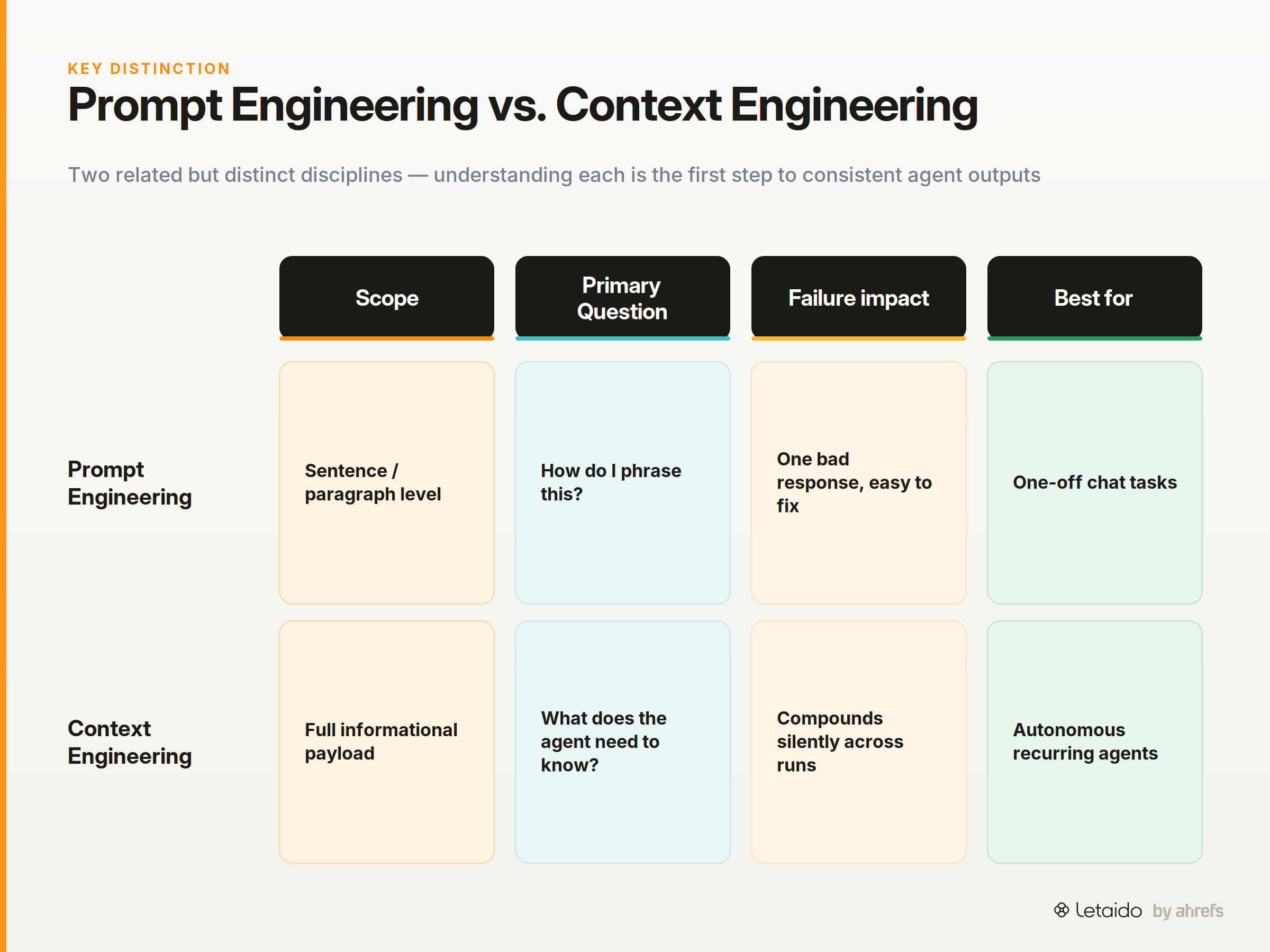
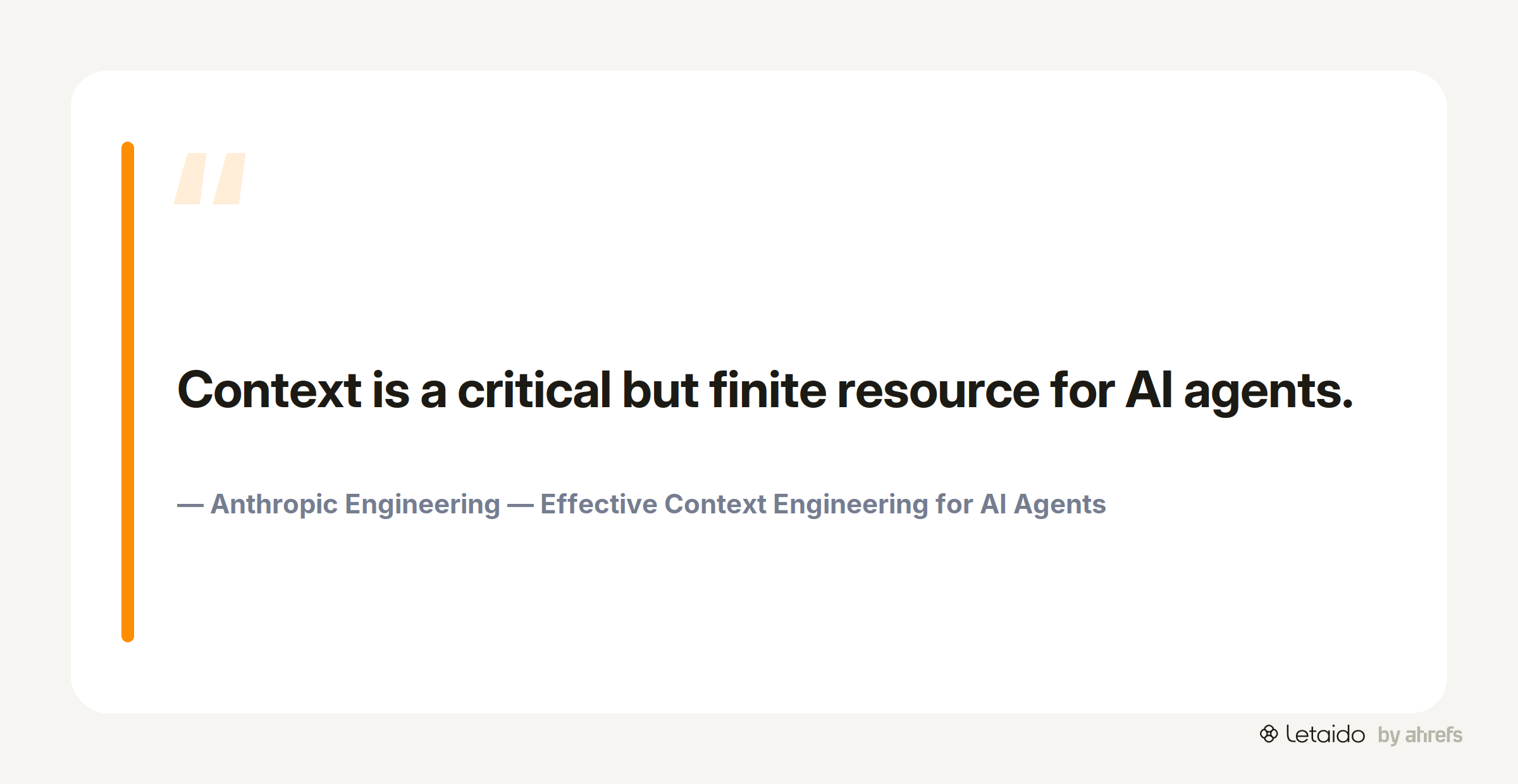
Context engineering operates at a higher level. As Anthropic's engineering team puts it, "Context is a critical but finite resource for AI agents." Where prompt engineering asks "how do I phrase this?", context engineering asks "what does this agent need to know, across the entire dossier, to complete this task reliably?"
A 2024 academic methodology paper defines it precisely as "assembling, declaring, and sequencing the complete informational payload" sent to an AI tool. That framing is useful: it positions context as something you design and curate, not something you improvise mid-task.
Why the definition matters for agents vs. one-off chat tasks
In a one-off chat session, bad context is annoying. You get a vague answer, you add more detail, you try again. The feedback loop is seconds long.
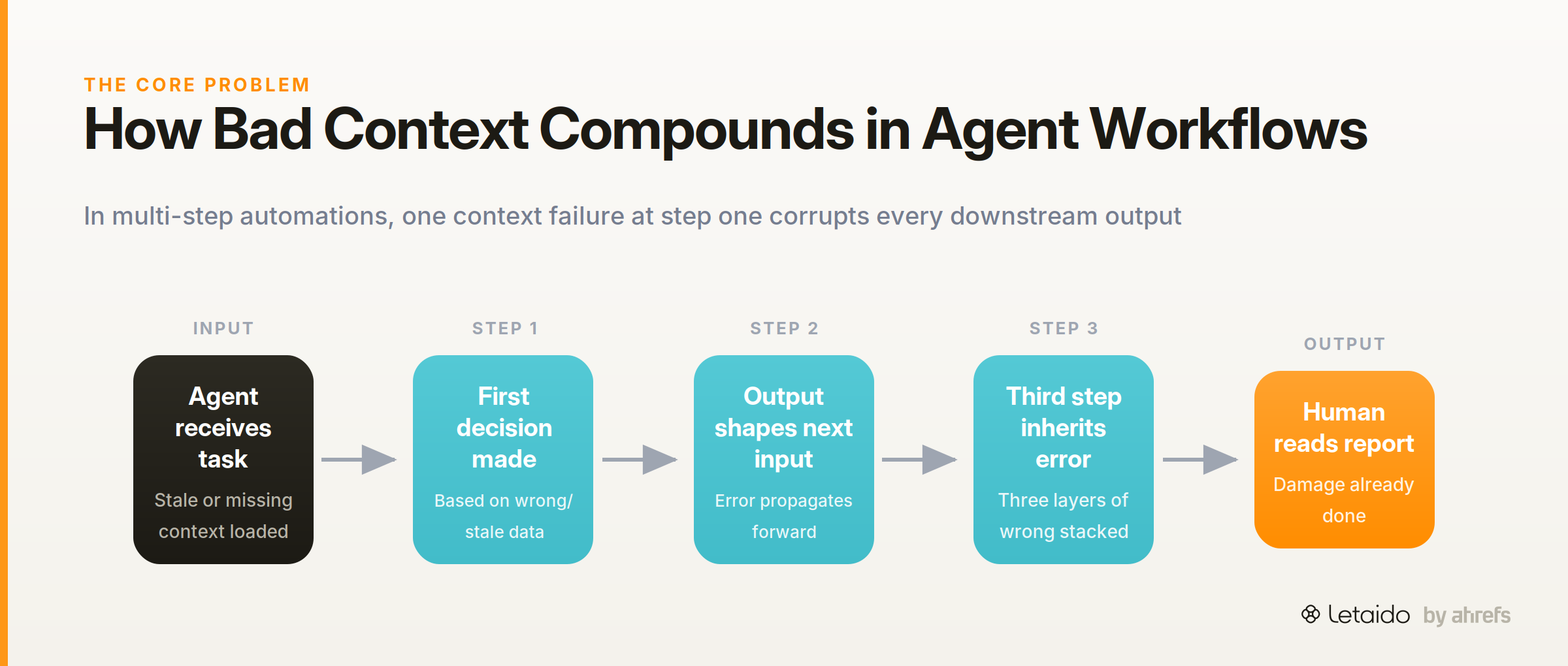
In an autonomous agent running a weekly SEO report at 6am every Monday, bad context compounds silently. The agent makes a decision based on stale data, that decision shapes the next output, and by the time a human reads the report, three steps of wrong have stacked up. Context engineering is what prevents that compounding failure — it is the engineering discipline that makes agent automation reliable rather than lucky.
Why Marketing AI Agents Produce Bad Outputs
Before building a framework, it helps to name the specific ways context failure shows up in real marketing workflows. These are context problems dressed up as model problems.
Four failure modes with real examples
Hallucinated competitor metrics. The agent was never given access to live data or told where to find it. So it filled the gap with plausible-sounding numbers. The output looks polished; the numbers are invented. The root cause is missing data context: the agent had no live source to query and no instruction to flag uncertainty.
Brand-voice drift in recurring reports. The first run looked great because a human had just briefed the agent in detail. By week four, the tone had shifted, the headings had changed format, and the Slack digest was two screens long instead of one. The root cause is missing constraint context: formatting rules and brand voice were never written into a persistent instruction file, so they degraded across runs.
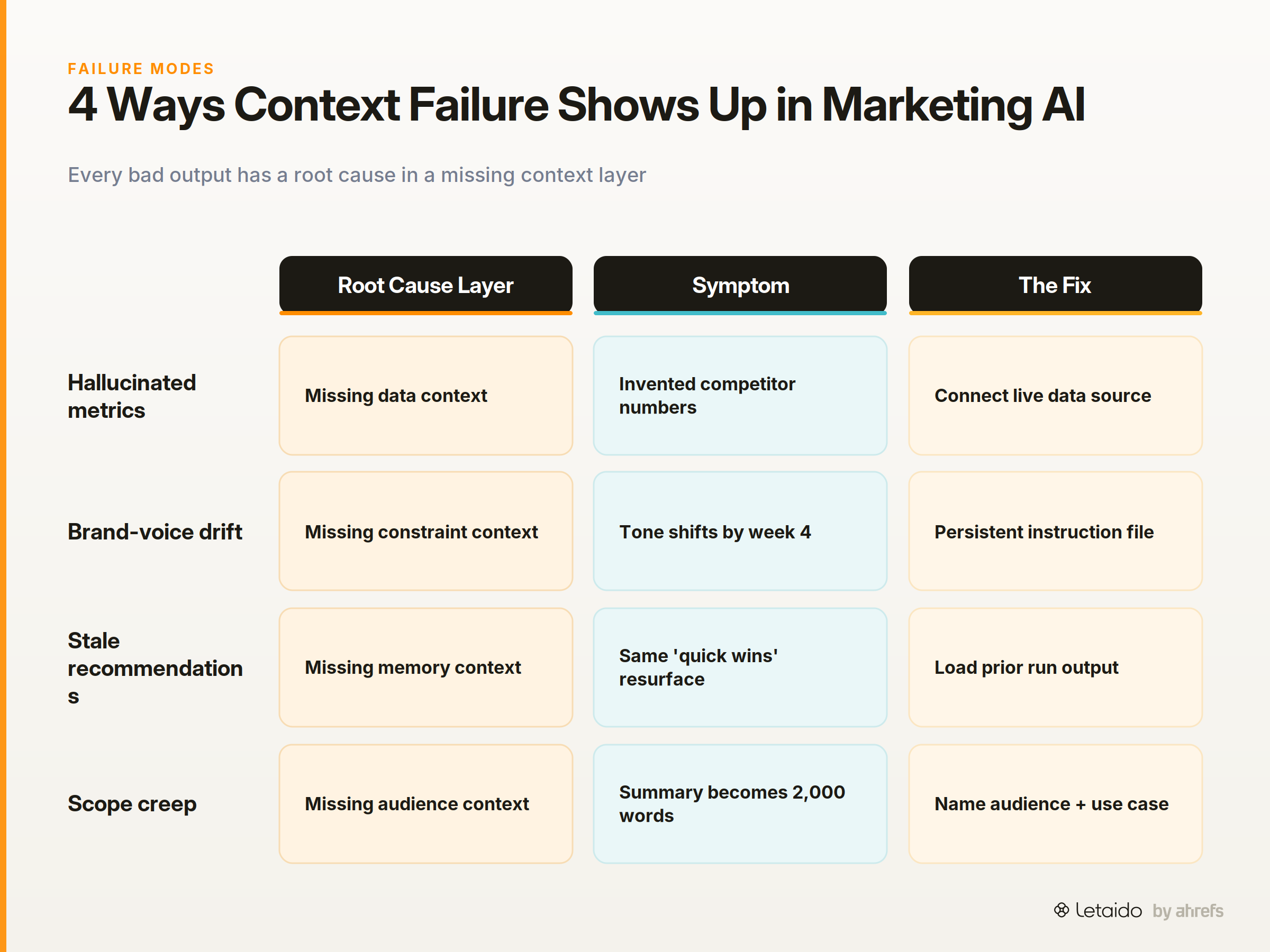
Stale recommendations. The agent surfaced the same three "quick win" pages it flagged three weeks ago — pages the team had already fixed. The root cause is missing memory context: the agent had no record of prior outputs or which recommendations had already been acted on.
Scope creep in outputs. The agent was asked for a summary and produced a 2,000-word analysis. The root cause is missing audience context: no one told it who would read this or how they would use it.
The "garbage in, garbage out" problem at agent scale
A single bad context element in a one-step task produces one bad output. In a multi-step agent workflow — where the output of step one becomes the input of step two — the problem amplifies. An academic paper on sequential decision-making agents found that "agent performance improves with the quality or amount of knowledge engineering invested." In other words, the quality of what you put in directly predicts the quality of what comes out, and that relationship is steeper for agents than for single-turn chat.
The Five Layers of Context Every AI Agent Needs
These five layers form a framework for structuring agent context consistently. Each layer addresses a distinct failure mode from the section above. The goal is to treat context as a designed artifact — something you version, maintain, and audit — not as an ad-hoc note you paste in before hitting run.
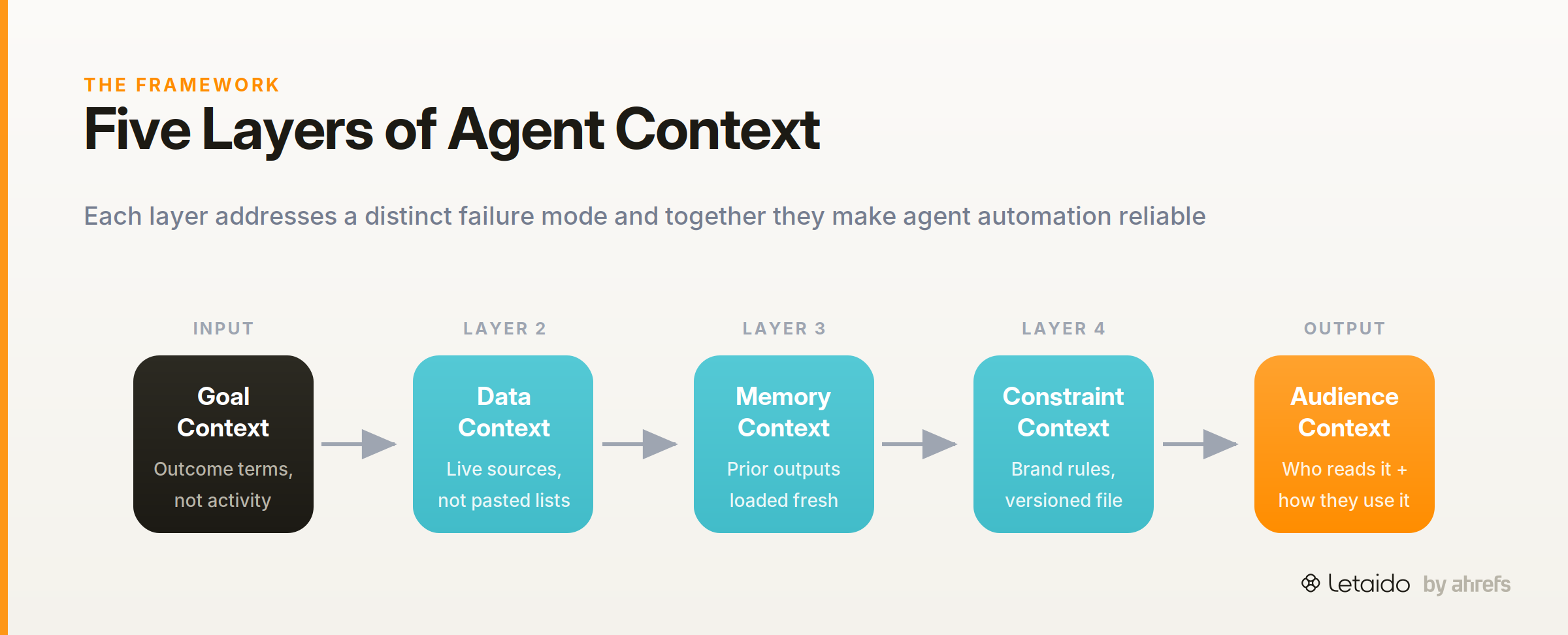
1. Goal context
Goal context defines what success looks like for this specific task, in outcome terms rather than activity terms.
"Write an SEO report" is an activity. "Surface the three pages closest to a top-3 ranking so the team can prioritise link-building this sprint" is a goal. The second version constrains scope, defines the output the audience needs, and gives the agent a way to evaluate whether it has finished.
A vague goal is the single most common context failure. When an agent can't infer success criteria, it defaults to comprehensiveness — which usually means length, not relevance.
2. Data context
Data context specifies the live, structured data the agent can query to do the work.
This is not a pasted keyword list or a copied screenshot. It is the connection between the agent and a live, authoritative source: Ahrefs rank tracking data, Google Search Console impressions, or CRM records. The distinction between static pasted data and live tool access matters enormously for recurring automations, and it gets its own section later in this guide.
3. Memory context
Memory context is the record of what the agent produced before, which recommendations were acted on, and what decisions were made.
Anthropic's project-management agent demonstrates this well: it uses tools including MCPModel Context ProtocolAn open standard for connecting AI models to external tools and data sources through one consistent interface instead of bespoke integrations. connectors and a Files API to "maintain full context throughout" across tasks. For a weekly SEO report agent, memory context means loading last week's report output before running this week's — so the agent can surface what changed, not just what is.
4. Constraint context
Constraint context is the set of rules that keeps recurring automations on-brand and within scope without human re-briefing every time.
This includes brand voice guidelines, formatting requirements, word limits, and explicit "do not do" instructions. A practitioner pattern worth adopting is the CLAUDE.md-style instruction file: a persistent, versioned document that travels with every agent run and encodes the guardrailsGuardrailsThe checks around a model — validation, allowlists, human review — that constrain what its output is allowed to do downstream. you would otherwise have to re-state each time. Without constraint context, agents produce outputs that are technically correct but practically unusable — the right data, in the wrong format, in a voice that doesn't match your brand.
5. Audience context
Audience context defines who the output is for and how they will use it.
A Slack digest for a growth team reads differently from a slide deck for a CMO. The growth team needs scannable bullet points and clear action items. The CMO needs the three-sentence executive summary and the trend line. The same underlying data, without audience context, produces a generic report that serves neither.
How these layers map in Letaido:
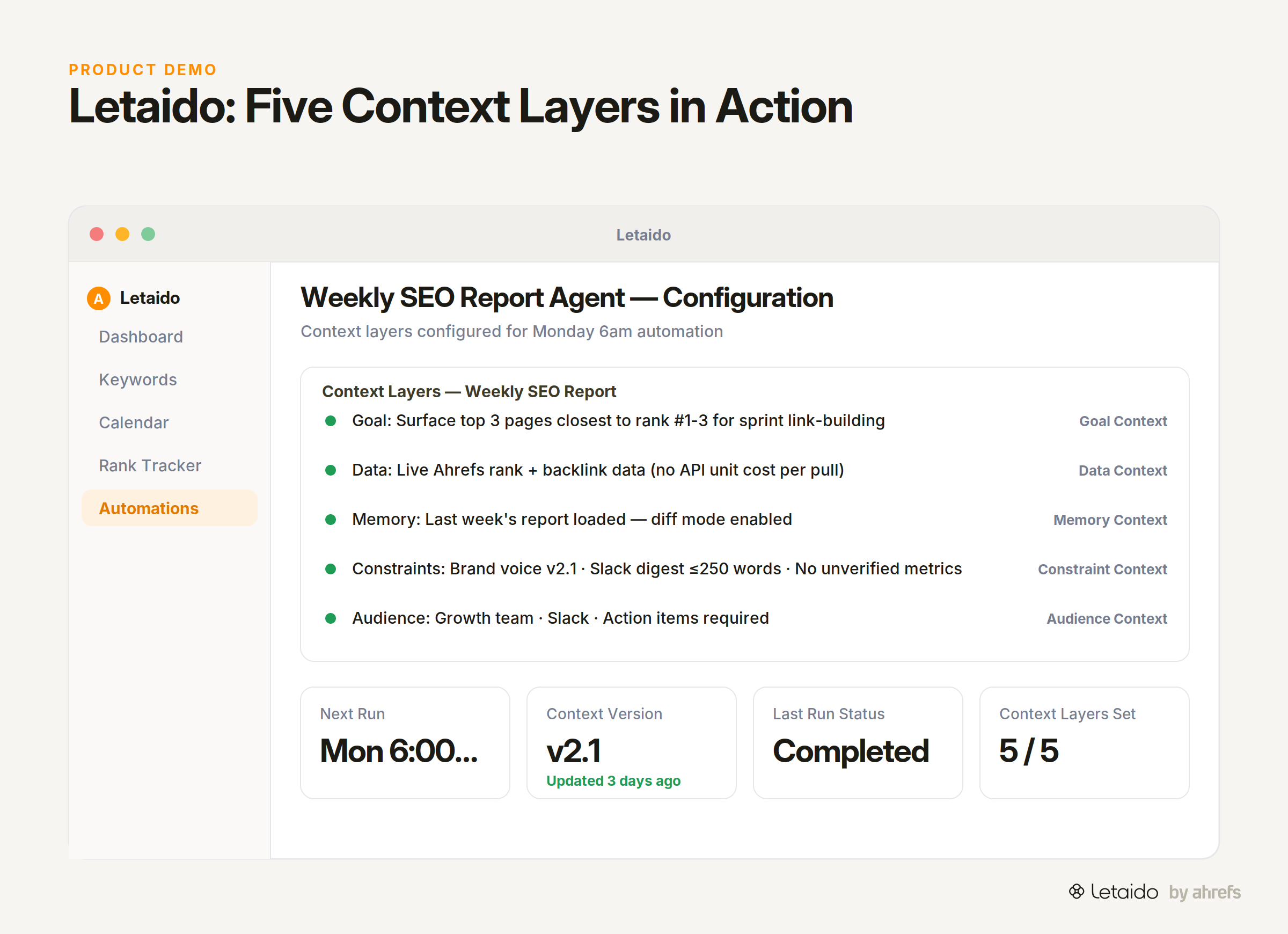
| Layer | What Letaido uses |
|---|---|
| Goal context | Task definition written in outcome terms in the agent's system instructions |
| Data context | Live Ahrefs keyword, backlink, and rank data — no API unit consumption per pull |
| Memory context | Prior run outputs stored in the shared workspace, loadable on the next run |
| Constraint context | Persistent instruction files and formatting rules in the agent's configuration |
| Audience context | Output format specified per automation (Slack digest, HubSpot note, Notion doc) |
Context Engineering Checklist — Before You Run Any Agent Task
Use this before starting any agent workflow, whether it's a one-time audit or a recurring automation. Copy it into your own system promptSystem promptThe standing instruction that sets a model's role, rules, and tone for an entire session, separate from the user's individual messages.Read: System Prompts: What They Are and How to Write Them template or project documentation.
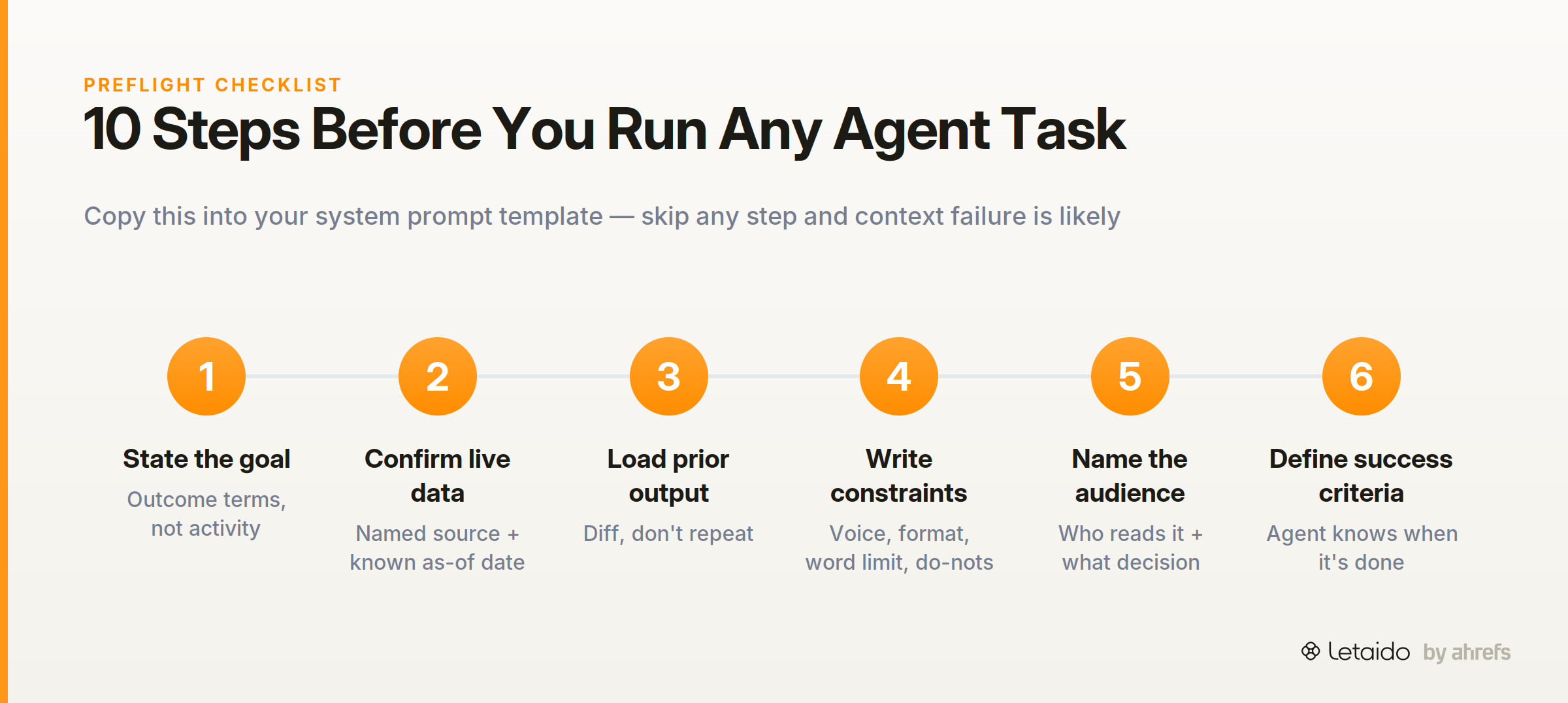
- Goal is stated in outcome terms — not "analyse keywords" but "identify the 10 highest-opportunity gaps where we have domain authority but no content"
- Data source is identified and confirmed live — not a pasted list, but a named connection or file with a known as-of date
- Data is current — if the agent is pulling from a static file, confirm the date; flag if older than your acceptable threshold
- Memory / prior outputs are loaded — last run's output is available so the agent can diff, not repeat
- Constraints are written explicitly — brand voice, output format, word limit, and at least two "do not include" rules
- Audience is named — who reads this output, in what medium, and what decision they need to make
- Success criteria are defined — the agent can tell when it has finished, not just when it has written enough
- Context windowContext windowThe maximum amount of text a model can consider at once, counted in tokens. Everything outside it is invisible to the model. size is checked — if you're loading large datasets, confirm you haven't exceeded the model's usable window; prioritise recency for dynamic data
- Prompt / instruction file is versioned — the context document has a version number or date so you know which configuration produced which output
- One human has reviewed the context before the first run — the agent is not the first reviewer of its own instructions
Context Hygiene: Keep Context Accurate Over Time
A context file that was accurate in January can silently degrade by March. Stale, contradictory, or bloated context is one of the main reasons recurring agent automations start strong and get progressively worse.
Signs your context has drifted
Context drift (the gradual divergence between what your context says and what is actually true) tends to show up in predictable ways. The agent surfaces pages you have already fixed. It uses a brand voice guideline that was updated two months ago. It flags a competitor you stopped tracking.
These are not model failures. They are maintenance failures: the context document was not updated when the underlying reality changed.
When to prune vs. when to restructure
Pruning is appropriate when the context is accurate but bloated: removing outdated examples, cutting superseded instructions, shortening a keyword list that was once comprehensive but is now unfocused. Bloated context wastes space in the model's context window and can dilute the signal of the instructions that matter.
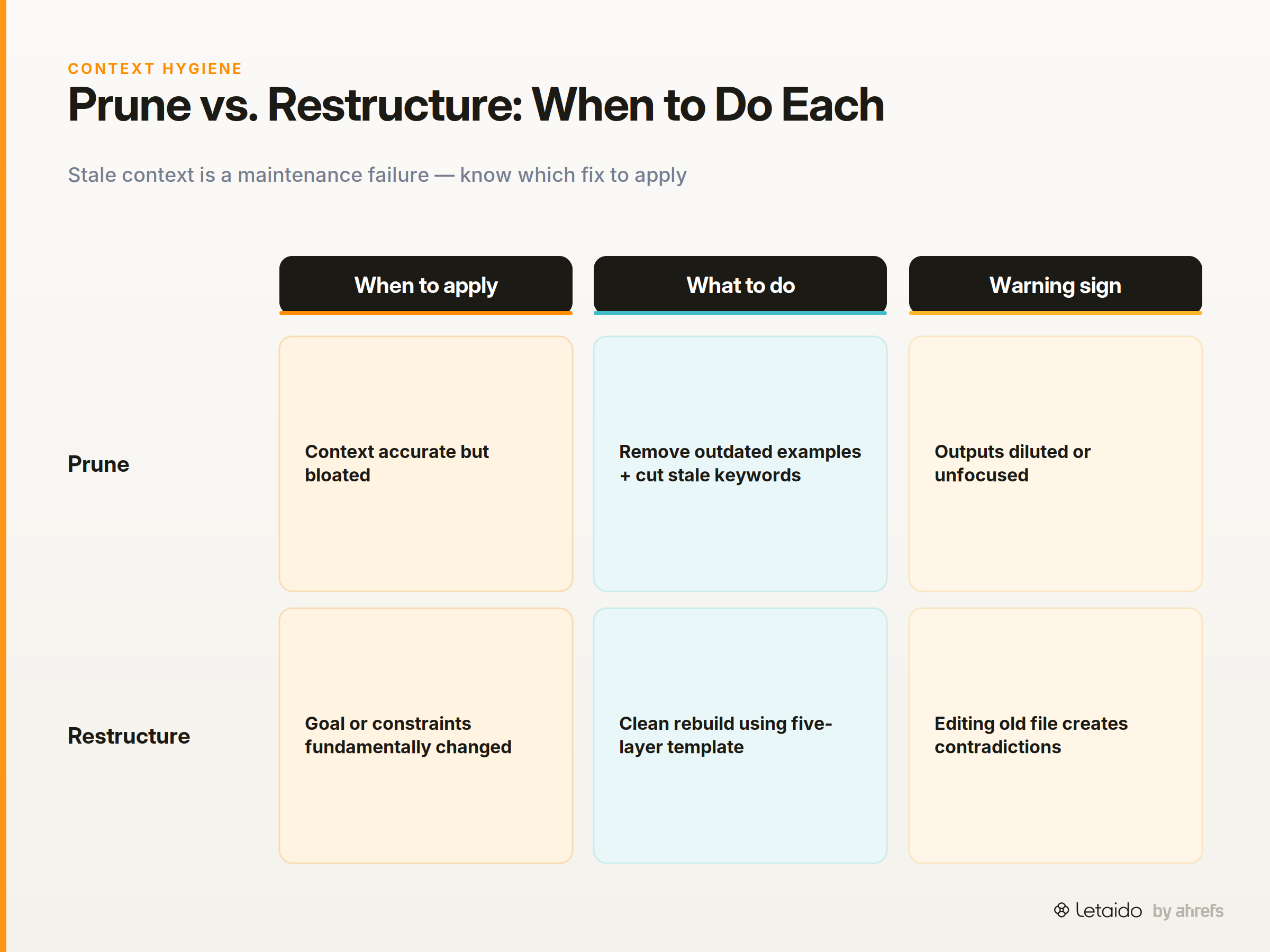
Restructuring is appropriate when the goal or constraints have fundamentally shifted: a new brand voice, a new product category, a new audience. In that case, editing the old file often introduces contradictions. A clean rebuild — using the five-layer framework as a template — is faster and more reliable.
The VS Code context engineering guide treats context curation as an ongoing practice, not a one-time setup: curating project-wide context with custom instructions that are actively maintained rather than written once and forgotten. That posture is the right one for any production agent workflow.
When Tool Access Beats Static Context
There is a common shortcut in early agent workflows: copy the data you want the agent to use, paste it into the context window, and run the task. It works once. It becomes a liability the second week, when the data has changed and the paste has not.
The case for live data over pasted snippets
Google's multi-agent architecture documentation describes this approach as "active context engineering achievable in real systems": rather than baking data into a static prompt, the agent is connected to a live source it can query at runtime. The context is always current because it is always fetched fresh.
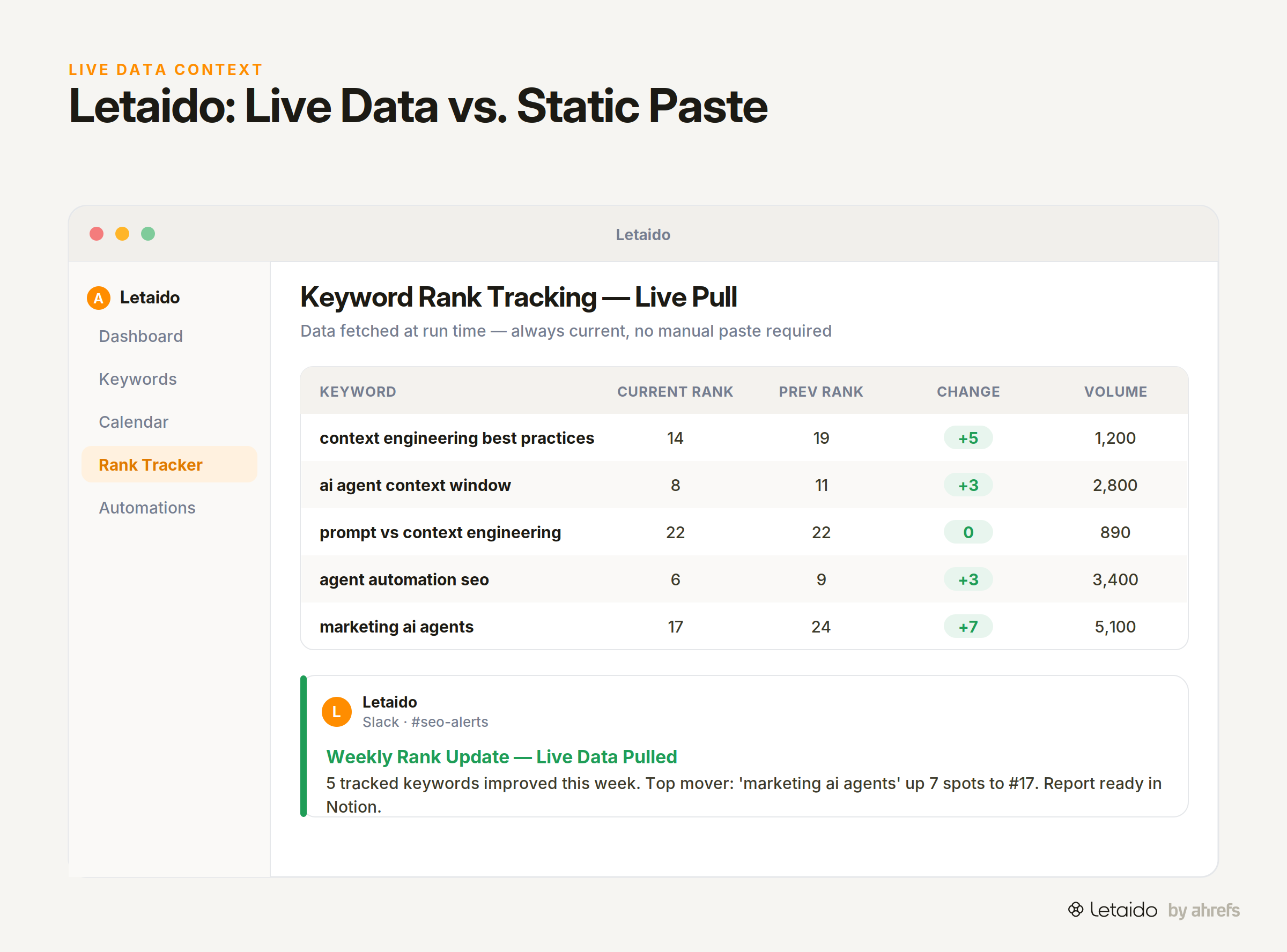
For marketing workflows, the practical cases are straightforward. Ahrefs keyword and backlink data changes daily; a keyword list you pasted last Tuesday is already partially wrong. Google Search Console impressions are meaningless without a comparison period that aligns with the current run. CRM data changes with every deal closed.
What to connect vs. what to hard-code
Connect anything that changes on a schedule shorter than your automation frequency: keyword rankings, traffic data, backlink counts, campaign metrics. These belong in data context as live tool connections, not static pastes.
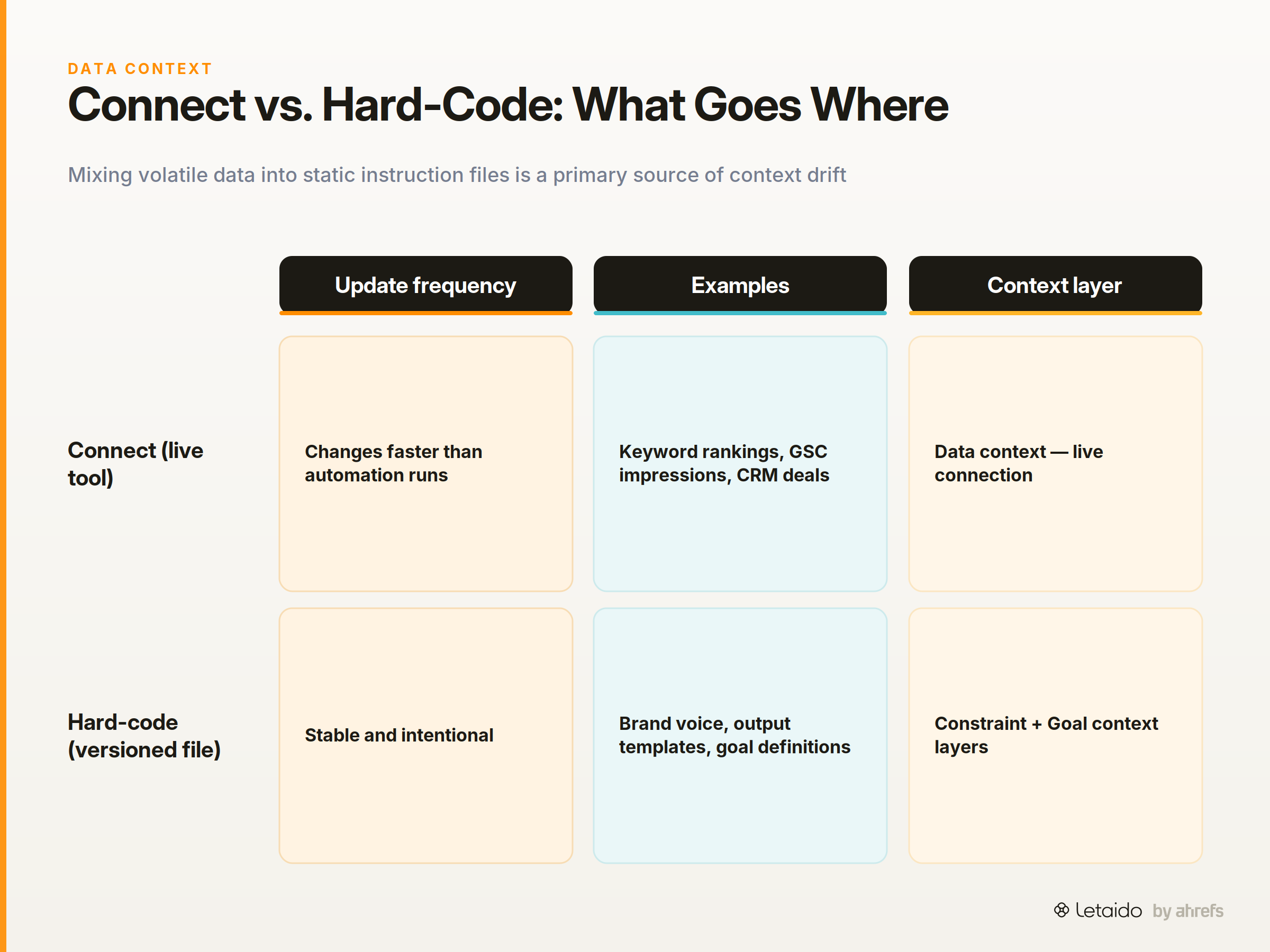
Hard-code anything that is stable and intentional: brand voice guidelines, output format templates, goal definitions, audience descriptions. These belong in a versioned instruction file — the constraint and goal layers of your context stack. Mixing volatile data into your static instruction file is a common source of context drift.
Design Context for Recurring Automations
A recurring automation has a different context problem than a one-off task. The goal and constraints are fixed; only the data and the delta (what changed since last run) should vary. Designing for that distinction is what makes a weekly agent reliable instead of brittle.
What changes week to week vs. what stays fixed
Fixed context includes your goal definition, brand voice rules, output format, and audience description. These should live in a versioned instruction file that the agent loads at the start of every run. They should never be rewritten inside the dynamic data payload.
Dynamic context includes the latest data pull, the prior run's output for comparison, and any threshold alerts or flags generated since the last run. These are loaded fresh each time and should be clearly labelled as "current run data" so the agent does not confuse them with the stable instructions.
Building a context template for agent workflows
A context template is a structured document that separates the fixed from the dynamic explicitly. A minimal template for a recurring marketing agent looks like this:
## Fixed context (version: 2026-08-01)
Goal: [outcome-framed goal statement]
Audience: [who reads this, in what medium, what decision they need]
Constraints: [brand voice, format rules, do-not-include list]
Output format: [exact structure — e.g., Slack digest, 5 bullets max]

## Dynamic context (populated at runtime)
Current data: [live data pull — date stamped]
Prior output: [last run's output for diff]
Alerts: [any threshold triggers since last run]
In Letaido, the agent implements this model through scheduled automations: the fixed context lives in the agent's persistent configuration and instruction files, while the dynamic context is populated from live Ahrefs data and prior workspace outputs on each run. The human only touches the fixed layer when something genuinely changes — a new brand guideline, a revised goal, a different audience.
Common Context Engineering Mistakes
These are the errors that appear most consistently in early agent workflows. Each has a one-sentence fix.
-
Over-stuffing the context window. Loading every document you have because you are unsure what the agent needs. Fix: load only what is relevant to this specific task and run date; treat the context window as a finite resource, because it is.
-
Vague goal statements. Writing "analyse our SEO performance" instead of a specific, outcome-framed objective. Fix: write the goal as the output you would hand to a stakeholder, not as a description of the activity.
-
Skipping constraint context. Assuming the agent will figure out tone and format from examples. Fix: write explicit formatting rules and at least two "do not include" directives into every instruction file.
-
Not versioning the instruction file. Editing the context document without tracking what changed, so you cannot diagnose why the output quality shifted. Fix: treat your instruction file like code — date-stamp it, and note what changed on each revision.
-
Treating context as a one-time setup. Building the context file once and never revisiting it as the business, the data, or the audience changes. Fix: schedule a quarterly context audit as a standing calendar item, separate from any individual agent run. As the academic research on agent decision-making confirms, "agent performance improves with the quality or amount of knowledge engineering invested" — that investment is not made once.
-
Conflating prompt engineering with context engineering. Spending time rewording the task instruction when the real problem is missing data or absent constraints. Fix: run the five-layer checklist before editing the prompt; most output failures trace to a missing layer, not a badly worded sentence.
A Context Engineering Workflow in Practice: The Weekly SEO Report Agent
Here is what all five layers look like when populated for a real, recurring task.
The task: A weekly agent that identifies ranking drops and surfaces actionable priorities for the growth team, delivered as a Slack digest every Monday morning.
Goal context: "Surface any tracked pages that dropped more than 5 positions week-over-week, identify the three with the highest recovery potential based on current keyword difficultyKeyword DifficultyAn estimate (0-100) of how hard it is to rank on page one for a keyword, based mainly on the backlinks the current top pages hold. and existing backlink profile, and recommend one specific action for each."
That is an outcome-framed goal. The agent knows what "done" looks like and can stop when it has produced three prioritised recommendations — not when it has written 800 words.
Data context: Live Ahrefs rank tracking data for the priority page set, pulled at runtime. Not last week's export — the live feed, so position changes reflect actual current state. Letaido pulls this from Ahrefs directly without consuming API units per pull, which matters for automations running at weekly frequency.
Memory context: Last week's Slack digest is loaded as a reference. The agent can see which pages it flagged previously, which recommendations were already surfaced, and whether the drops it is seeing now are new or ongoing. Without this layer, the report repeats itself.
Constraint context: A versioned instruction file specifying: Slack digest format, maximum five bullets, no raw data tables, action items only (no exploratory analysis), brand voice (direct, no hedging). Two explicit "do not include" rules: no pages that are already in active link-building sprints, no branded keyword traffic.
Audience context: The output is read by the growth team lead on a Monday morning, in Slack, before the weekly standup. They need to walk into the meeting knowing what to prioritise — they do not need a full analysis, they need three decisions.
With all five layers populated, the output is a focused five-bullet Slack digest that surfaces genuinely new drops, recommends a specific action for each, and skips everything the team already knows. Without even one of these layers — say, without memory context — the agent would surface the same pages it flagged last month, and the report becomes noise the team learns to ignore.
If you are running agents on real marketing data and want to see this model implemented end-to-end, Letaido is built around it: persistent context, live Ahrefs data access, scheduled automations, and native delivery to Slack, Notion, HubSpot, and the other tools your team already uses. The trial starts at $99/month including $50 in AI credits — you bring the Ahrefs subscription if you want the keyword and backlink data layers.
Context engineering is not a one-time configuration task. It is an ongoing practice of designing, maintaining, and auditing the information your agents carry into every run. Get the five layers right, run the preflight checklist, and keep the context current — and the gap between an agent that works and one that wastes your time closes considerably.