
Every time you open ChatGPT and type "Write me a meta description for this page," you're doing zero-shot prompting. No examples, no demonstrations — just an instruction and an output. Most marketers are already doing it; they just don't have a name for it.
This guide gives you the name, the theory behind why it works, and — more usefully — a practical framework for writing zero-shot prompts that produce consistent, usable output. You'll also get five copy-paste-ready prompts for real marketing tasks.
What Zero-Shot Prompting Is
Zero-shot prompting means giving a large language modelLarge language modelA model trained on vast amounts of text to predict the next token, which is what lets it write, summarise, and reason over language. (LLM) a task instruction with no worked examples included in the prompt. You describe what you want, and the model produces an output based purely on that instruction. No "here's a sample input and output, now do the same" — just "do this."
The "zero" refers to zero in-prompt demonstrations. It's the simplest possible prompt structure, and for a wide range of tasks, it's also the most efficient.
Why Modern LLMs Can Follow Instructions Without Examples
This wasn't always reliable. Early language models needed examples to understand what format or style of output was expected. Modern LLMs can follow plain instructions without them because of a training process called instruction tuning.
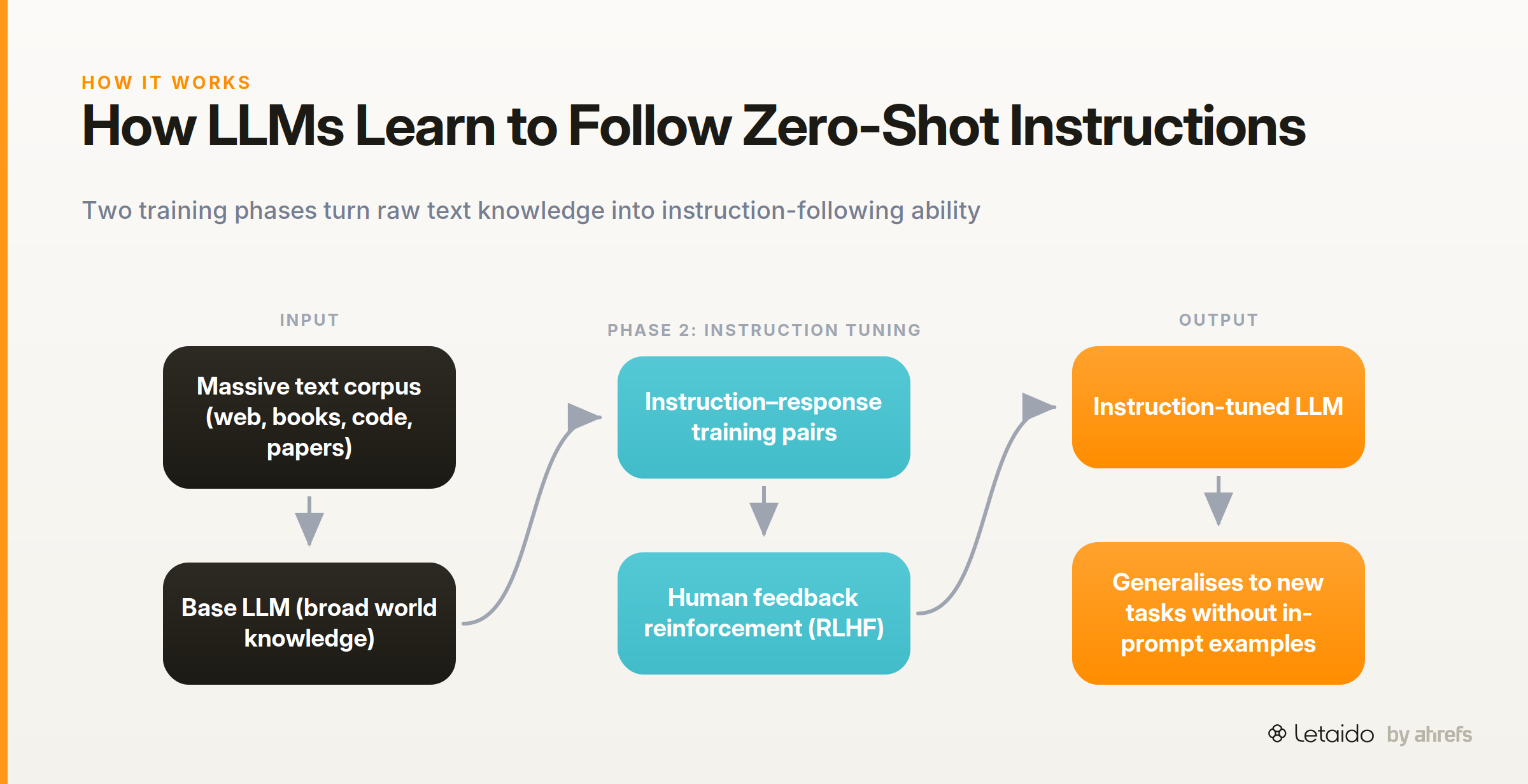
Here's the short version: the base model is pre-trained on an enormous amount of text — web pages, books, code, academic papers. That gives it broad knowledge. Then it goes through a second training phase where it's fine-tuned on thousands of instruction-and-response pairs, often with human feedback used to reinforce helpful, accurate outputs.
The result is a model that has effectively seen so many variations of "summarise this" or "write a list of" that it can generalise to new instructions without needing an in-prompt demonstration. It's pattern recognition at a scale that makes examples optional for most well-defined tasks.
Zero-Shot vs. Few-Shot vs. Chain-of-Thought Prompting
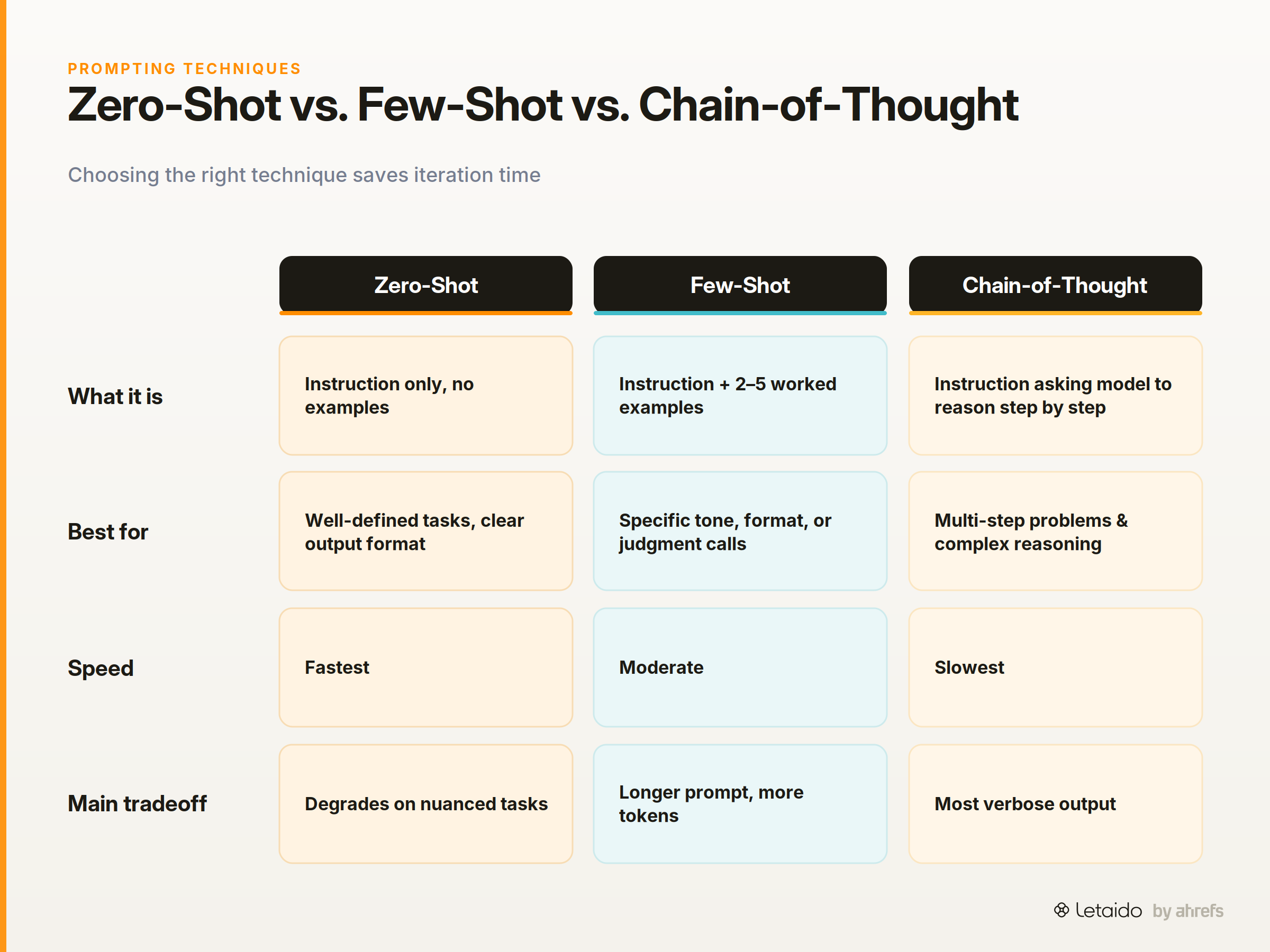
Zero-shot is one of three core prompting techniques. Knowing when to use each saves a lot of iteration time. Here's how they compare at a glance, followed by guidance on when to reach for each.
| Technique | What it is | When to use it | Tradeoff |
|---|---|---|---|
| Zero-shot | Instruction only, no examples | Well-defined tasks with clear output format | Fastest; degrades on nuanced or ambiguous tasks |
| Few-shot | Instruction + 2–5 worked examples | Tasks needing a specific tone, format, or judgment call | More reliable output; longer prompt, more tokens |
| Chain-of-thought (CoT) | Instruction that asks the model to reason step by step | Multi-step problems, analysis, decisions with multiple factors | Best for complex reasoning; slowest and most verbose |
When Zero-Shot Is the Right Call
Zero-shot works best when the task is well-defined and the expected output format is unambiguous. If you can describe what you want in one clear sentence and there's only one sensible way to interpret it, zero-shot will almost certainly be good enough.
Good candidates include: generating title variants from a brief, writing a meta description to a character limit, summarising a page in three bullets, classifying a keyword as informational or transactional.
When to Reach for Few-Shot or Chain-of-Thought Instead
Zero-shot starts to degrade when the task requires judgment that's hard to express in an instruction alone. If you need output in a very specific brand voice, few-shot promptingFew-shot promptingIncluding a handful of worked examples in the prompt so the model infers the pattern you want instead of being told it in prose.Read: Few-Shot Prompting: How to Teach AI With Examples (giving the model two or three examples that demonstrate the tone) will outperform any amount of instruction refinement.
Chain-of-thoughtChain-of-thought promptingAsking a model to work through its reasoning in steps before answering, which measurably improves accuracy on multi-step problems.Read: Chain-of-Thought Prompting: Make AI Reason Step by Step is worth the extra tokensTokenThe unit models actually read and generate — roughly a word-piece. Context limits and API pricing are both measured in tokens. when the task involves sequential reasoning: prioritising a content calendar against multiple criteria, evaluating whether a page satisfies search intent, or working through a competitor's positioning. Asking the model to "think step by step" before answering genuinely improves accuracy on these tasks.
How to Write a Strong Zero-Shot Prompt
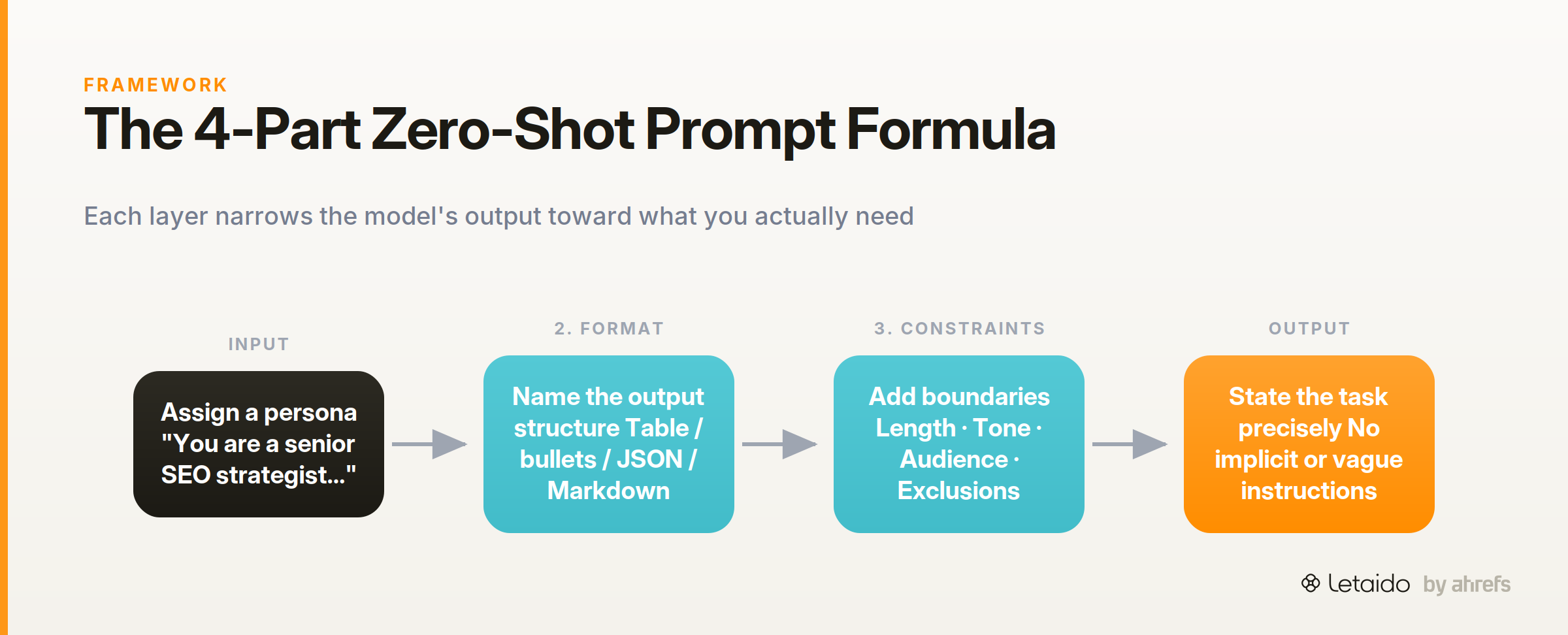
The difference between a prompt that works and one that produces vague or inconsistent output usually comes down to four things: role, format, constraints, and explicitness. Adjusting any one of these can significantly change what you get back.
Assign a Role
Opening with a role narrows the model's frame of reference. "You are a senior SEO strategist" produces different output than no role at all — the model adjusts vocabulary, assumed knowledge level, and what it chooses to include.
Before:
Write a content brief for an article about link building.
After:
You are a senior SEO strategist writing for an in-house content team
at a B2B SaaS company. Write a content brief for a 1,500-word article
targeting the keyword "link building for startups."
The role isn't magic — it's shorthand for a bundle of context the model can now apply without you spelling out every assumption.
Specify the Output Format
If you don't tell the model what format to return, it will guess. Sometimes it guesses correctly; often it produces flowing prose when you wanted a table, or a numbered list when you wanted JSON.
Be explicit: "Return a bulleted list," "Format your answer as a Markdown table with three columns," "Output only the meta description text, no preamble." The more precisely you define the container, the less cleanup you do afterwards.
Add Constraints
Length, tone, audience, and exclusions are all constraints that sharpen output. "Under 160 characters," "written for a non-technical founder," "do not mention price or competitors" — these narrow the solution space before the model starts generating.
Constraints also reduce what's sometimes called output drift: the tendency for a model to include adjacent but unrequested content when it hasn't been told to stay within a boundary.
State the Task Explicitly, Not Implicitly
Vague instructions produce vague output. "Write something about our product launch" leaves the model to decide the format, angle, length, and audience. It will make choices, but they may not be your choices.
Compare:
Implicit:
Help me with the title for our new blog post about keyword research.
Explicit:
Generate 5 H1 title options for a blog post targeting the keyword
"keyword research for beginners." Each title should be under 60 characters,
written for a non-technical audience, and follow a "how to" or question format.
The explicit version constrains the output so precisely that most models will return something usable on the first attempt.
Zero-Shot Prompting Examples for Marketing Tasks
Here are five prompts you can copy, adapt, and use immediately. Each maps to a task most SEO and content teams run regularly.
Write a Content Brief
You are an SEO content strategist. Write a content brief for a 1,800-word
blog post targeting the keyword "B2B email marketing best practices."

Include:
- Target audience (1 sentence)
- Search intent (informational / commercial / transactional)
- Recommended H2 structure (5–7 headings)
- 3 competitor angles to differentiate from
- Key terms to include naturally throughout
- A suggested meta title and meta description

Format each section with a bold label. Write for a content writer, not an editor.
Good output will return a structured brief a writer can act on immediately, with enough specificity to reduce back-and-forth.
Generate Meta Description Variants
You are a conversion copywriter. Write 5 meta description variants for
a blog post titled "How to Do a Technical SEO Audit."

Each variant must:
- Be between 140 and 155 characters (including spaces)
- Include a clear benefit or outcome for the reader
- Avoid starting with the article title
- End with a soft call to action

Output only the 5 variants as a numbered list. No explanations.
Summarise a Competitor Page
You are an SEO analyst. Below is the text content of a competitor's
blog post about [TOPIC]. Summarise it in exactly 5 bullet points.

For each bullet, note:
1. The main claim or argument
2. Whether they cite evidence (yes/no)
3. One gap or weakness in their coverage

[PASTE PAGE TEXT HERE]
Replace [TOPIC] and paste the page text directly. This prompt works well for competitive content reviews before briefing your own writer.
Cluster Keywords by Search Intent
You are an SEO strategist. Below is a list of 20 keywords related to
[TOPIC]. Group them into clusters by search intent: Informational,
Commercial Investigation, and Transactional.

For each cluster:
- List the keywords
- Write a one-sentence summary of what a searcher in this cluster wants

Format as a Markdown table with three columns: Cluster, Keywords, Searcher Goal.

Keywords:
[PASTE LIST HERE]
Score Content Against an Editorial Rubric
You are a senior content editor. Score the article below against the
following rubric. Return a score out of 10 for each criterion and a
one-sentence justification.

Criteria:
1. Search intent match
2. Introduction quality (hooks the reader, no throat-clearing)
3. Use of concrete examples
4. Scannability (headers, bullets, tables)
5. Call to action clarity

Return your scores as a table. Below the table, write a 3-bullet
summary of the most important improvements.

[PASTE ARTICLE TEXT HERE]
Common Zero-Shot Prompting Mistakes
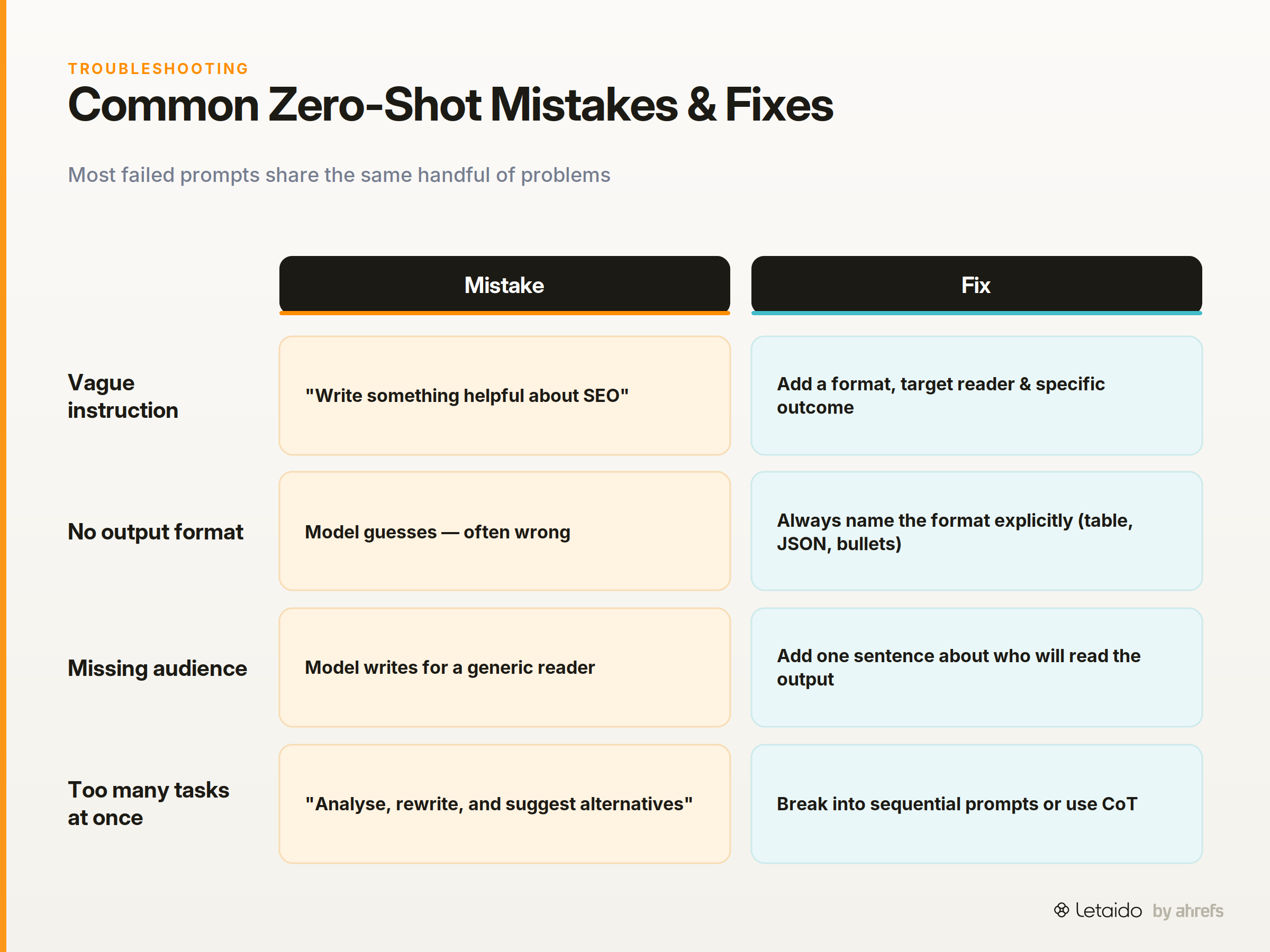
Most failed prompts share the same handful of problems. Here's what to look for when your output isn't working.
-
The instruction is vague. "Write something helpful about SEO" is not a task — it's a topic. Fix: add a format, a target reader, and a specific outcome.
-
No output format specified. The model defaults to whatever format it judges most common for the task. Fix: always name the format explicitly (bulleted list, table, numbered steps, JSON).
-
Missing audience or context. Without a stated audience, the model writes for a generic reader. Fix: add one sentence about who will read or use the output.
-
Too many tasks in one prompt. Asking the model to "analyse, rewrite, and suggest alternatives" in a single instruction splits its attention. Fix: break multi-step work into sequential prompts, or use chain-of-thought structure.
-
HallucinationHallucinationA confident, fluent model output that is simply false. It's a property of next-token prediction, not a bug to be patched out. in factual tasks. Zero-shot prompts that ask for specific data points (statistics, named sources, product features) without providing the data are an invitation to invent. Fix: either provide the source data in the prompt or restrict the task to reasoning and formatting rather than recall.
-
Output drift across repeated runs. The same prompt can produce different formats on different runs if the instruction is ambiguous. Fix: add a line like "always return output in exactly this format" and include a structural template in the prompt itself.
Run Zero-Shot Prompts at Scale in Automated Workflows
Writing a good zero-shot prompt is a one-time problem. Running that prompt manually, every week, across dozens of pages or keywords, is a different problem — and it's where most teams lose the gains.
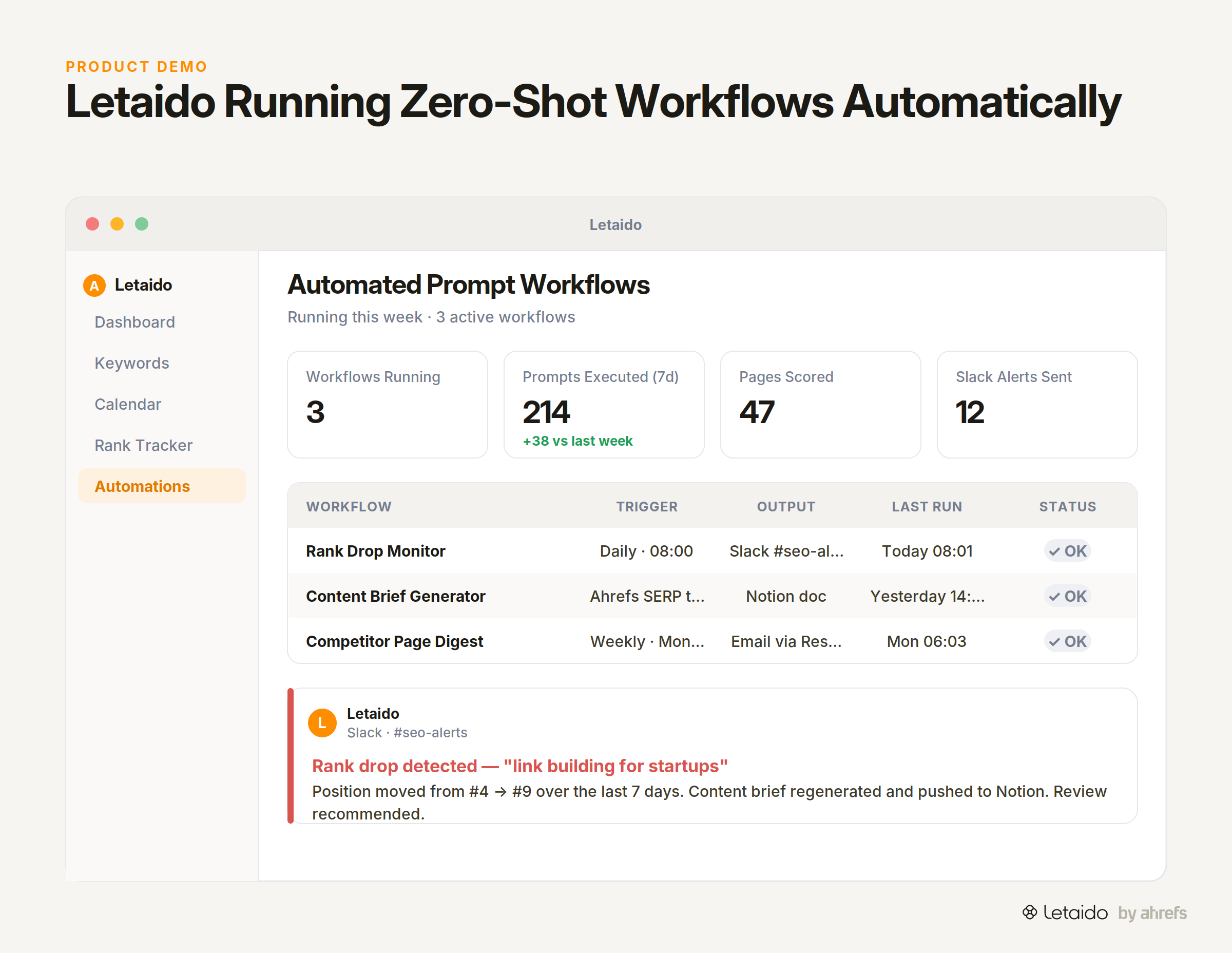
The shift worth making is from one-off prompting to the same prompt running automatically inside an agent on a schedule. Instead of you opening ChatGPT to score last week's content against your editorial rubric, an agent does it every Monday and posts the results to Slack. Instead of summarising five competitor pages before a planning call, an agent does it the night before and drops a Notion document in your workspace.
This is what Letaido is built for. Letaido runs zero-shot (and few-shot) prompts inside automated workflows with full access to Ahrefs data, so the inputs are always fresh. A content scoring workflow, for example, can pull the live SERPSERPThe search engine results page — the full set of organic listings, ads, and features returned for a query. structure for a target keyword, compare your existing page against it, and push a scored report to your team, without anyone manually copying and pasting.
A few things teams use Letaido to automate with zero-shot prompts:
- Weekly rank monitoring: Letaido tracks keyword positions and posts a Slack alert when a page drops more than a set threshold.
- Content brief generation: Pull current SERP structure from Ahrefs, run the brief prompt above, and push the output to Notion or HubSpot — on a trigger or a schedule.
- Competitor page summaries: Set up a recurring workflow that pulls competitor content, runs the summarisation prompt, and emails the digest each week via Resend or SendGrid.
The underlying prompts are the same ones you'd write manually. The difference is that they run 24/7, on real data, without you being the trigger.
If your team is spending time on repeatable research and reporting tasks that a well-written zero-shot prompt could handle, that's the gap Letaido closes. You can try it at $99/month flat, which includes $50 in AI credits.