
You saw "Claude Skills" mentioned in the Anthropic docs, a product changelog, or a Reddit thread, and now you want to know what the feature actually is. Here's the short answer: a Claude Skill is a packaged, reusable set of instructions and tools that Claude can discover and invoke automatically, rather than something you re-explain every time in a chat window.
This article covers what Skills are, how they work mechanically, what types exist, and where they fall short — then connects the concept to what a purpose-built agent layer adds on top.
What Claude Skills Are
A Claude Skill is a self-contained folder of instructions, scripts, and resources that Claude can load and use for a specific task. Think of it as a saved workflow: instead of pasting the same 400-word prompt every time you want Claude to, say, analyze a competitor's pricing page, you package that workflow into a skill once. Claude finds it, loads it when relevant, and follows it consistently.
Anthropic describes Skills as "organized folders of instructions, scripts, and resources" — the key word being organized. The folder structure is what makes a skill discoverable and repeatable, not just a long system promptSystem promptThe standing instruction that sets a model's role, rules, and tone for an entire session, separate from the user's individual messages.Read: System Prompts: What They Are and How to Write Them .
How a Skill Differs from a Prompt
A prompt is a one-off instruction. You write it, Claude responds, and the next conversation starts blank. A Skill persists. It lives in a folder, has metadata Claude can read at startup, and gets loaded automatically when Claude decides it's relevant to the task at hand.
The mechanism that makes this work is a file called SKILL.md, paired with YAML frontmatter that Claude reads to discover the skill. As one Hacker News commenter put it: "Skills are basically easiest way of creating your 'ai agentAI agentA system that combines a language model with tools and a goal, so it can decide what to do next and act — not just generate text.Read: What Are AI Agents? Definition, Types, and Examples '." That's a reasonable summary — a skill turns a repeatable workflow into something Claude can find and execute reliably, without you re-teaching it each session.
How Claude Skills Work Under the Hood
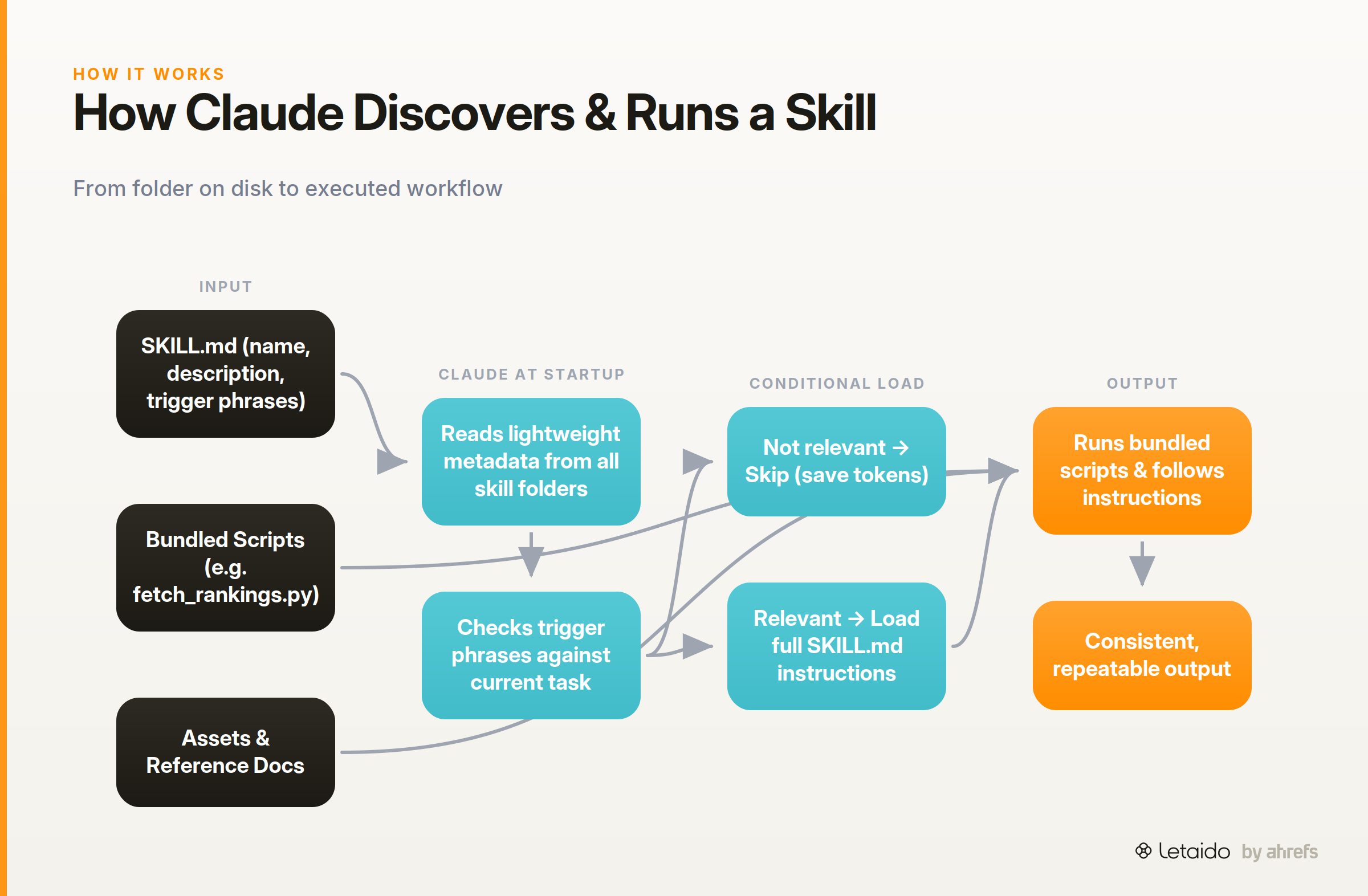
The mechanism is simpler than it sounds. Each skill is a folder containing a SKILL.md file, optional scripts or reference documents, and any assets the workflow needs. Claude reads the folder metadata at startup, then decides whether to load the full instructions based on what the conversation requires.
The SKILL.md File — A Concrete Example
Here is what a minimal skill directory looks like in practice. Imagine a skill for pulling a weekly SEO digest:
/skills/weekly-seo-digest/
├── SKILL.md
└── fetch_rankings.py
And the SKILL.md file itself:
---
name: Weekly SEO Digest
description: Pulls ranking changes for a tracked keyword list and formats a Slack-ready summary.
tools:
  - python
trigger_phrases:
  - "weekly SEO report"
  - "ranking digest"
  - "keyword summary"
version: 1.0
---

# Weekly SEO Digest

Run `fetch_rankings.py` to pull current ranking positions for the tracked keyword list.

Compare against the previous week's snapshot saved in `data/last_week.json`.

Format the output as a bullet list grouped by: improved, declined, new entries, dropped out of top 10.

Close with a one-sentence summary suitable for pasting into Slack.
The YAML block at the top is the metadata Claude reads to decide when this skill is relevant. The Markdown below the --- separator is the actual instruction set Claude loads when it triggers the skill. Scripts referenced in the instructions (here, fetch_rankings.py) are bundled in the same folder and run as part of the workflow.
This structure means the skill is self-documenting, portable, and shareable across a team — anyone with access to the folder gets the same behavior.
Progressive Disclosure — Why Claude Only Loads What It Needs
Claude doesn't load every skill's full instructions into context on every message. It reads the lightweight metadata (name, description, trigger phrases) at startup, then pulls the full SKILL.md content only when the skill is actually relevant.
Anthropic calls this pattern progressive disclosure: "This progressive disclosure minimizes tokenTokenThe unit models actually read and generate — roughly a word-piece. Context limits and API pricing are both measured in tokens. usage while maintaining specialized expertise." A Reddit commenter identified the practical upside cleanly: "The only benefit I see is conditional loading — instead of stuffing all guidance into system prompt upfront, you load only what's relevant per conversation." That's accurate, and it's the key reason skills scale better than a single enormous system prompt.
Where Skills Run Today
Skills are supported across Claude.ai, Claude Code, the Claude Agent SDK, and the Claude Developer Platform. Claude Code — Anthropic's terminal-based coding agent — is currently the most natural home for custom skills, since it operates directly on files and can run bundled scripts as part of a workflow. Claude.ai supports skills for document-editing and browser-based tasks.
Types of Claude Skills
Skills exist on a spectrum from Anthropic-published to fully custom. It helps to understand the three main categories before deciding which applies to your use case.
Anthropic-published skills cover specific professional domains. The finance bundle is the most fully realized example: Anthropic added six skills for financial services tasks including comparable company analysis, DCF models, and diligence packs — each packaged so analysts can invoke a consistent, documented workflow rather than prompting from scratch each time.
Community-built skills are published in the public anthropics/skills GitHub repository. These cover a range of tasks and serve as both ready-to-use tools and reference implementations for building your own.
User-defined custom skills are skills you write yourself. Common examples include: summarizing a document and extracting action items in a consistent format, calling an internal API to pull data and format it as a report, or filling a PDF form from structured input. These are where most marketers and ops teams will spend their time.
Why Claude Skills Matter for Marketing and Ops Teams
The core value is consistency at scale. If you brief Claude on how to analyze a content gap once and save it as a skill, every team member gets the same quality output without re-explaining your methodology.
For marketing teams specifically, the repeatable-workflow pattern fits naturally onto the tasks that eat the most time: weekly performance reports, keyword research pulls, competitor content monitoring, and brief generation. A skill that formats a competitive content analysis the same way every time — pulling from the same sources, using the same structure — is more reliable than hoping yesterday's prompt still works today.
The operational angle matters too. If you run an agency or manage a content team, shared skills mean a junior analyst can trigger a complex workflow and get output that matches your standards, without needing to understand every step of the process.
Claude Skills vs. Just Prompting Claude
Prompting is the right tool for one-off or exploratory tasks. If you want to quickly summarize a document you just received, a prompt is faster and cheaper than setting up a skill folder.
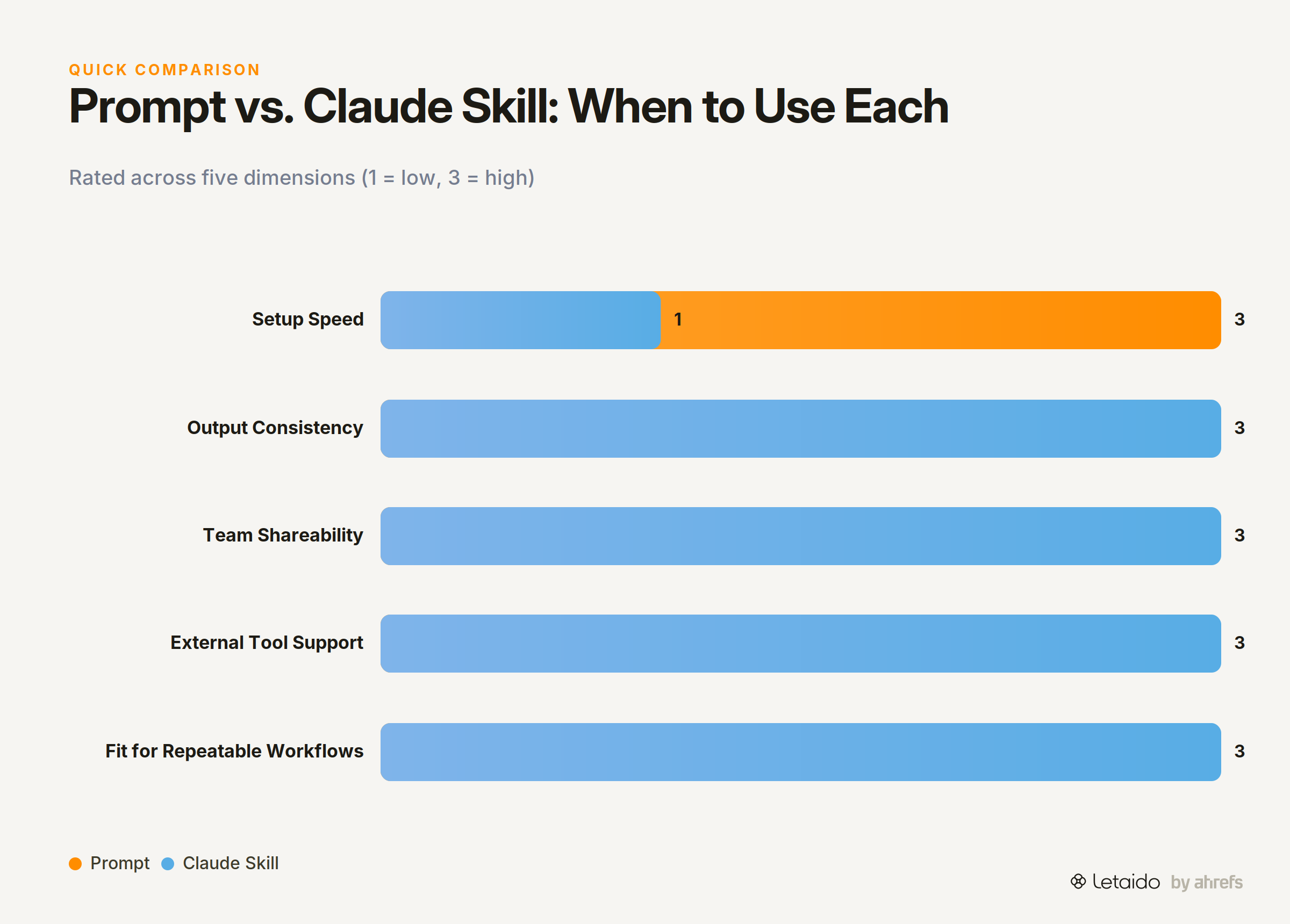
A skill pays off when the same workflow runs repeatedly, needs to be shared across a team, or must invoke external tools (scripts, APIs) reliably. The two-column version:
| Prompt | Skill | |
|---|---|---|
| Setup time | Seconds | Minutes to hours |
| Consistency | Varies with phrasing | Locked to the skill's instructions |
| Team sharing | Copy-paste | Shared folder |
| External tools | Manual | Bundled scripts/references |
| Best for | One-off tasks | Repeatable workflows |
The maintenance overhead is real: skills need to be updated when the underlying task changes. For a task you run once a quarter, a prompt is probably fine.
What Claude Skills Can't Do on Their Own
Skills are a meaningful step up from raw prompting, but three gaps matter if you're evaluating them for operational use.
No native scheduling. Skills run when you trigger them. There is no built-in timer, cron job, or calendar integration. If you want a weekly ranking digest, you have to remember to ask for it every week.
No out-of-the-box connection to marketing data sources. A skill can call an API if you write the script and manage the credentials, but there's no native connector to Ahrefs, Google Search Console, or your CRM. Data access is a DIY problem.
Setup and maintenance sit with you. Writing the SKILL.md, bundling the scripts, testing the outputs, updating the instructions when the workflow changes — that's all manual work. The conditional-loading benefit a Reddit commenter called out is real, but it's also the ceiling: you still have to build and maintain what gets loaded.
These aren't criticisms of the feature — they're the natural boundaries of what a skill is. A skill is a workflow container, not an autonomous agent.
Agent Skills — Claude Skills with Persistence and Live Data
The skill-as-reusable-workflow concept is sound. What Letaido adds is the operational layer that makes skills actually run without you babysitting them.
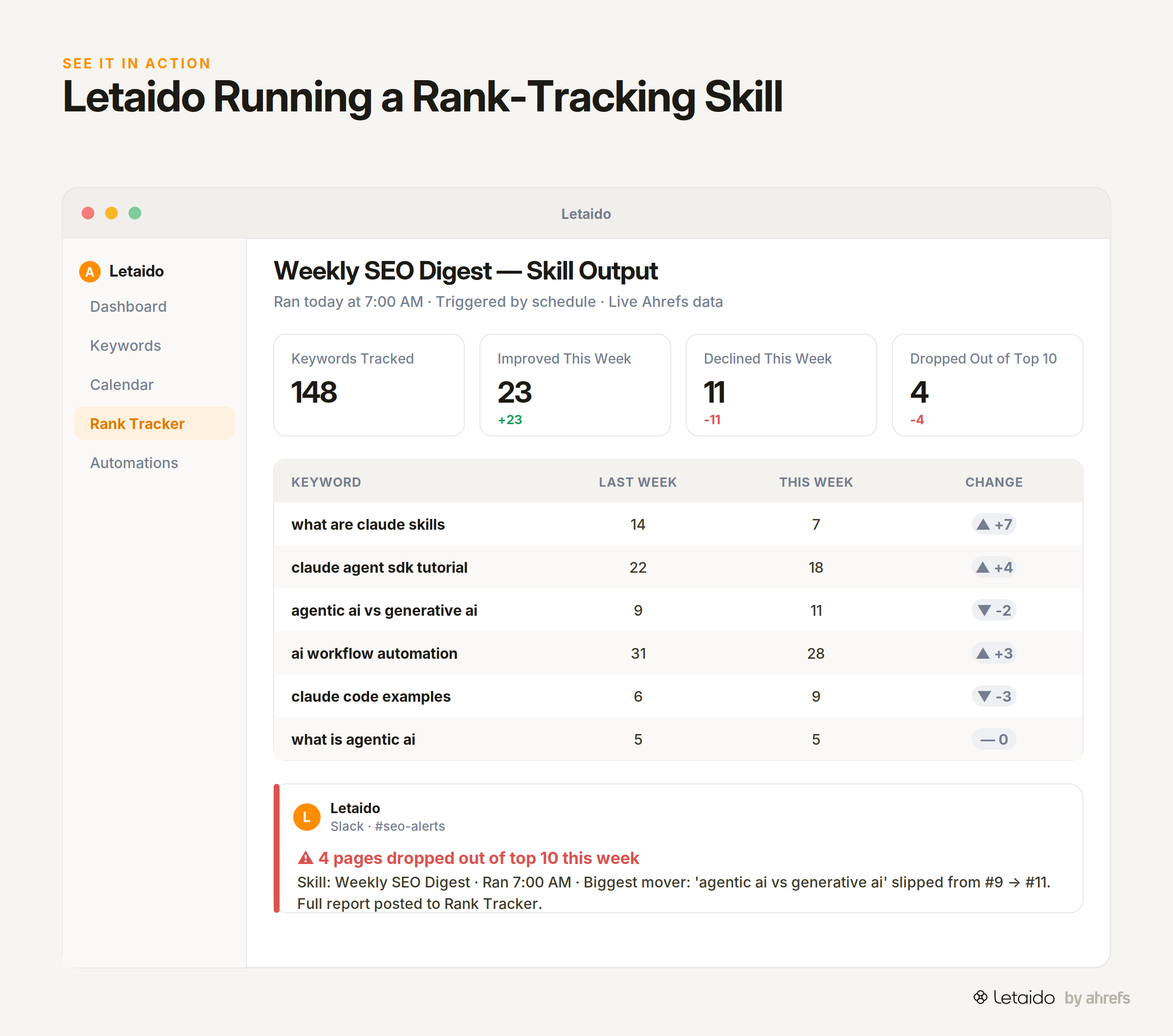
In Letaido, the agent can build a rank-tracking skill that monitors a keyword list against live Ahrefs data, compares rankings week over week, and posts a formatted Slack alert whenever a tracked page drops more than three positions — set it once, and it runs every day at 7 a.m. without a manual trigger. The same skill structure applies: instructions, bundled logic, defined outputs. The difference is persistence, live data access, and delivery via native connectors (Slack, HubSpot, email via Resend or SendGrid) rather than a chat window you have to open.
If that's the kind of always-on workflow you're trying to build, the Letaido trial is the practical next step.
The Short Version
Here's the recap for skimmers.
- What they are: Claude Skills are folders of instructions, scripts, and resources that Claude loads automatically when a task matches the skill's metadata.
- How they're stored: Each skill lives in a directory with a
SKILL.mdfile containing YAML frontmatter (name, description, trigger phrases) and plain-English instructions below. - Prompt vs. skill: Use a prompt for one-off tasks; use a skill when the same workflow runs repeatedly, needs consistent outputs, or must be shared across a team.
- Key limitations: No native scheduling, no built-in marketing data connections, and all setup and maintenance is on you.
- The next layer: Letaido applies the same skill pattern with scheduled execution, live Ahrefs data, and delivery to Slack or email — so the workflow runs without manual triggering.