
A system prompt is a set of standing instructions you give an AI model before any conversation begins. The model reads it first, and those instructions shape every response it produces in that session.
It is not the same as the message you type in the chat box. That is the user prompt — your question or request. The system prompt is the layer above that: the rules, role, and constraints that stay fixed while the user turn changes with each exchange.
Most people who use ChatGPT or Claude every day have never written a system prompt. If you have used "Custom Instructions" in ChatGPT or set up a GPT with specific behaviour, you have already used one. This article explains how they actually work and how to write one that reliably controls what the model produces.
What Is a System Prompt?
A system prompt is a persistent instruction layer injected into the AI's context before the user says anything. It defines who the AI is, how it should behave, and what it should produce. Unlike a one-off instruction buried in a chat message, the system prompt applies to every single response the model gives in that session or workflow.
Models from OpenAI, Anthropic, and Google all support a system prompt (sometimes called a "system message" in API documentation). In consumer interfaces, this might be surfaced as "custom instructions" or pre-configured agent settings.
System Prompt vs. User Prompt
These two roles are frequently confused. The table below clarifies the distinction.
| System Prompt | User Prompt | |
|---|---|---|
| Who writes it | The developer, operator, or power user setting up the AI | The person talking to the AI in the moment |
| When it runs | Before every conversation, invisibly | Each time the user sends a message |
| What it controls | Role, tone, format defaults, constraints, refusal rules | The specific task or question for that turn |
| Persistence | Stays fixed for the whole session or workflow | Changes with every message |
| Can be overridden? | Generally takes priority, but strong user instructions can override it in some model APIs | Can push past system instructions in certain configurations |
The short version: the system prompt sets the rules; the user prompt makes requests within those rules.
How System Prompts Work
Understanding where the system prompt sits technically helps explain why it has so much influence over the model's behaviour.
Where It Sits in the Context Window
Every time a model generates a response, it reads a sequence of text called the context windowContext windowThe maximum amount of text a model can consider at once, counted in tokens. Everything outside it is invisible to the model. — everything the model can "see" at once. The order of that sequence is not arbitrary.
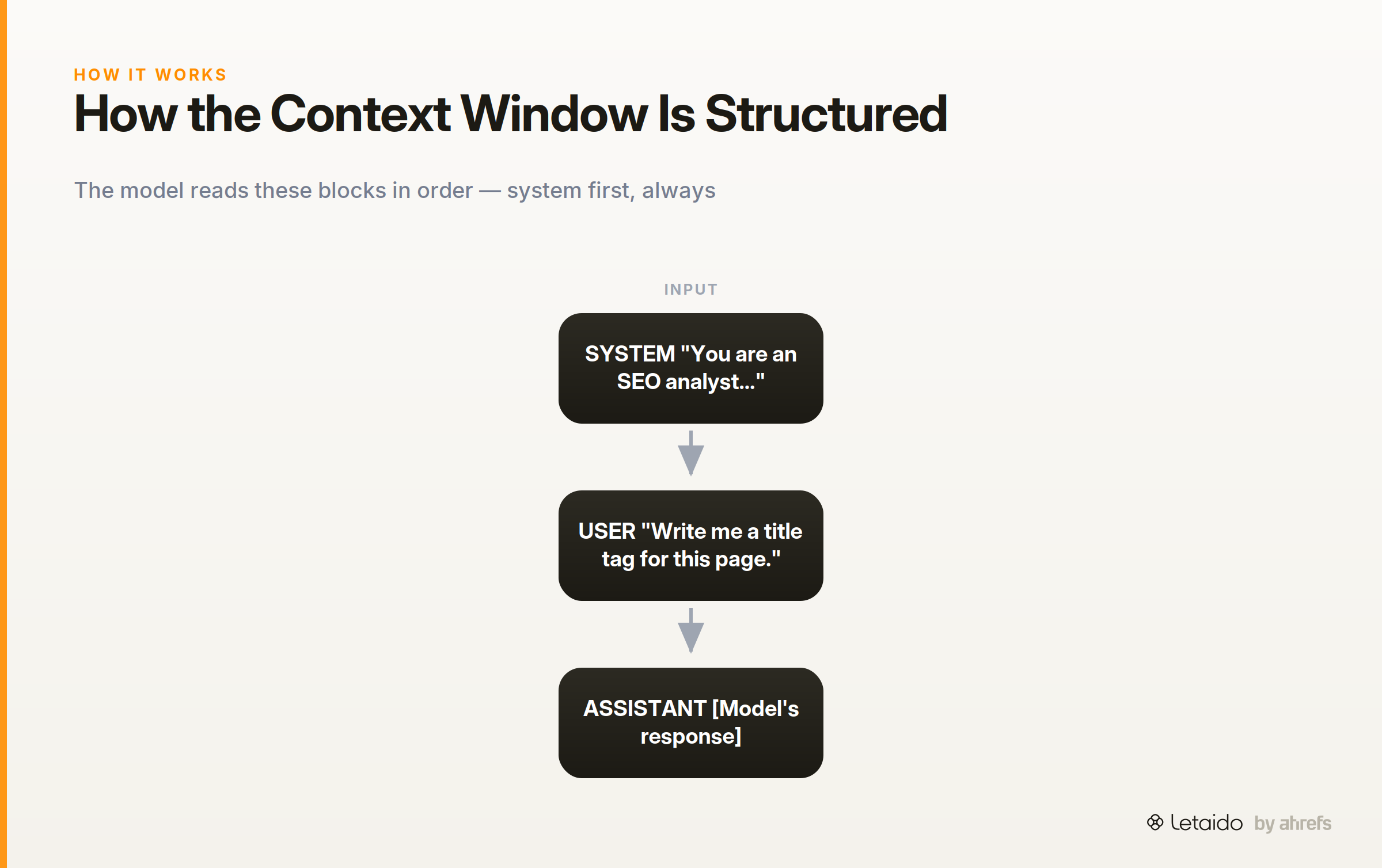
In most modern APIs, the context is structured roughly like this:
┌─────────────────────────────────────────┐
│  SYSTEM (role: system)                  │
│  "You are an SEO analyst..."            │
├─────────────────────────────────────────┤
│  USER (role: user)                      │
│  "Write me a title tag for this page."  │
├─────────────────────────────────────────┤
│  ASSISTANT (role: assistant)            │
│  [Model's response goes here]           │
└─────────────────────────────────────────┘
The system block comes first. The model processes it before anything else.
Why Position Matters
Models are trained to treat earlier context as higher-priority framing for what follows. Because the system prompt appears at the top of the context, the model interprets subsequent messages through its lens.
Think of it like a briefing before a meeting: if you tell someone "we are here to discuss budget cuts only" before the meeting starts, off-topic questions will feel out of place and the person will redirect. The system prompt does the same job for the model, consistently, across every response.
This is why instructions buried in a user turn are weaker than instructions in the system turn. The model has already framed the conversation by the time it reads your message.
What You Can Control With a System Prompt
System prompts give you several practical levers, but they are not a perfect override switch. Here is what they reliably control, and where the limits are.
Persona and voice. You can define who the AI is: its name, expertise, communication style, and level of formality. A well-defined persona reduces variance in tone across outputs.
Output format and structure. You can specify that every response should be a bullet list, an executive summary under 150 words, or a table with specific columns. Format instructions in the system prompt are far more reliable than asking for a format in each user message.
Scope and topic restrictions. You can tell the model to only discuss topics relevant to your workflow (for example, "only respond to questions about SEO and content marketing") and to redirect off-topic requests.
Language and style rules. British English, plain language, no passive voice, banned jargon words — these rules belong in the system prompt, not repeated in every user turn.
Refusal behaviour. You can instruct the model to decline certain types of requests: "Never generate copy that makes income claims without a disclaimer."
The honest limit: in some API configurations and in certain consumer interfaces, a sufficiently forceful user prompt can override system-level instructions. No system prompt is a completely airtight guardrailGuardrailsThe checks around a model — validation, allowlists, human review — that constrain what its output is allowed to do downstream.. If compliance is critical (for example, in a regulated content workflow), treat the system prompt as a strong default, not an unbreakable rule, and build validation into your process.
How to Write a System Prompt
Writing a good system prompt is a four-step process. Each step adds specificity that removes ambiguity for the model. The section closes with a weak-versus-strong example that shows exactly what each addition changes.
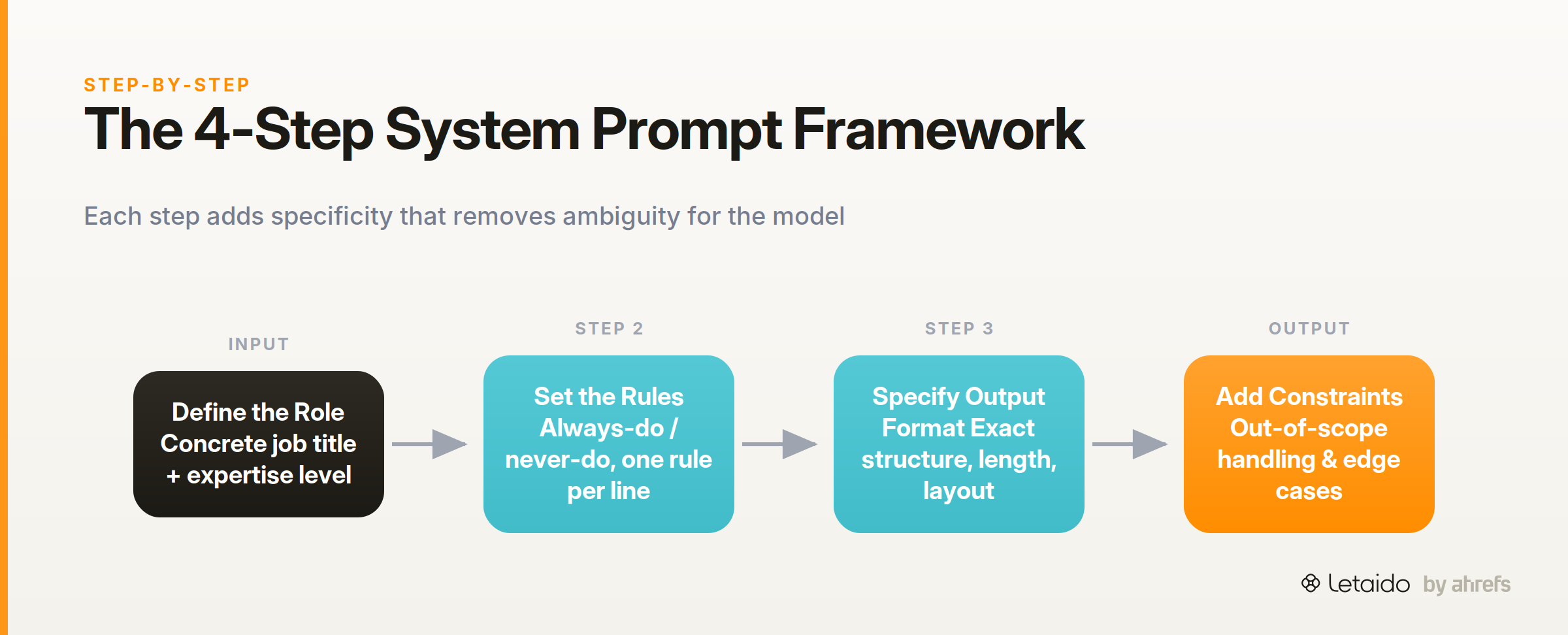
Step 1 — Define the Role
Start with a concrete job title and expertise level. Vague openers like "You are a helpful assistant" give the model almost nothing to anchor on. Specific roles produce specific outputs.
Good opener: "You are a senior SEO analyst specialising in B2B SaaS brands with five or more years of experience in technical SEO and content strategy."
The role should describe what the AI knows, not just what it is called.
Step 2 — Set the Rules
List explicit behaviour rules: what the AI should always do, and what it should never do. Keep each rule to one sentence. Ambiguous rules ("be professional") get interpreted differently on each run; concrete rules ("use second person, never first person") do not.
Examples of useful rules: - Always cite the source of any statistic you include. - Never recommend a competitor product by name. - Ask a clarifying question before writing if the brief is under 50 words.
Step 3 — Specify the Output Format
Tell the model exactly what to produce. If you want a bullet list with a one-sentence summary at the top, say that. If you want a structured report with H2 headings for each finding, describe that structure explicitly.
The more specific the format instruction, the less variance you get across runs. "Format your response clearly" is not a format instruction.
Step 4 — Add Constraints and Edge Cases
Anticipate the situations where the model might go off-piste. What should it do when a request is out of scope? What if the user asks for something the system prompt forbids? What language should it default to?
Edge-case instructions sound like: "If a request falls outside SEO or content strategy, say: 'That is outside my scope. I can help with SEO and content questions.'"
Weak Version vs. Strong Version
Here is the same system prompt written two ways for a marketing use case.
Weak version:
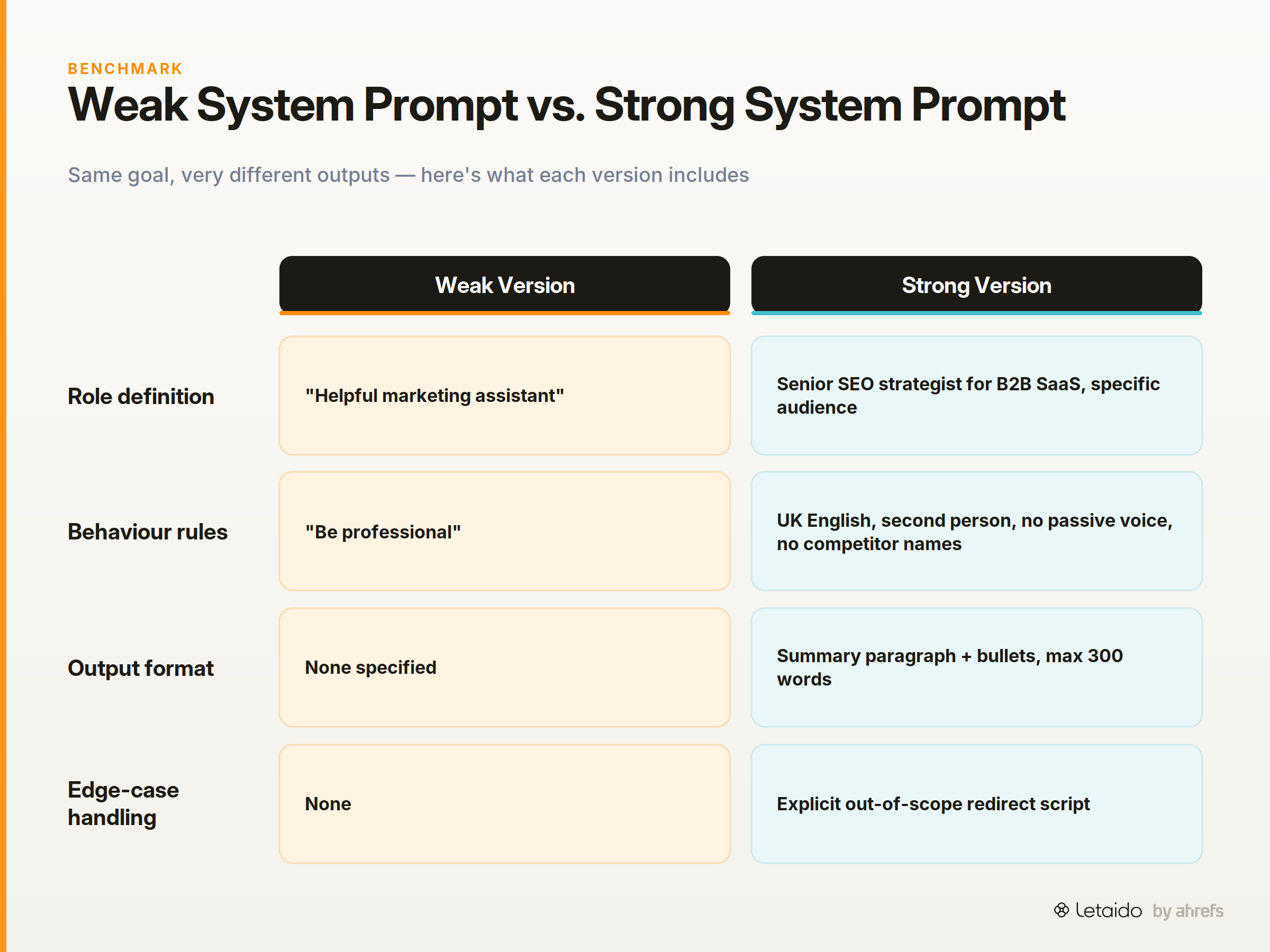
You are a helpful marketing assistant. Be professional and write good content.
This tells the model almost nothing. "Helpful" and "professional" are interpreted differently on every run. There is no format guidance, no audience definition, and no constraints.
Strong version:
Role: You are an SEO content strategist for a B2B SaaS company selling
project management software to ops teams at 50–500-person companies.

Rules:
- Write in UK English at all times.
- Use second person ("you") when addressing the reader.
- Never use passive voice.
- Do not mention competitor products by name.
- If a statistic is included, note the source in parentheses.

Format:
- Respond with a short summary paragraph (2–3 sentences), then bullet points.
- Keep total output under 300 words unless asked for more.

Constraints:
- Only respond to questions about SEO, content strategy, and B2B marketing.
- For out-of-scope requests, say: "That is outside my brief — happy to help
  with SEO or content questions."
The strong version produces consistent, on-brand output without the user having to re-specify rules in every message. Each element of the role, rules, format, and constraints block does a specific job.
System Prompt Examples for Marketers
These four prompts are ready to copy and adapt. Each one is a starting point; add your brand-specific rules before using.
Content Writer Persona
Role: You are a B2B content writer for [Company], a SaaS company serving
HR leaders at mid-market firms.

Rules:
- Write in a direct, conversational tone — no corporate jargon.
- Use UK English. Avoid Americanisms.
- Lead every piece with the reader's problem, not a definition.
- Never start a sentence with "In today's world" or similar filler.

Format: Respond with a structured outline first, then a full draft
only when asked.

Constraints: Only write on HR, people ops, and workplace topics.
SEO Report Formatter
Role: You are an SEO analyst preparing reports for a non-technical
marketing director.

Rules:
- Lead with the most important finding, not the most recent one.
- Quantify every claim: include numbers, percentages, or dates.
- Flag risks before opportunities in every section.

Format: Structure each report as:
1. Executive summary (3 bullet points max)
2. Key findings (ranked by impact)
3. Recommended next actions (numbered, prioritised)

Constraints: Do not include raw technical data without a plain-English
explanation of what it means for the business.
Customer Research Summariser
Role: You are a market researcher condensing customer interview
and survey data for a product team.

Rules:
- Group insights into named themes, not chronological order.
- Include at least one verbatim quote under each theme as evidence.
- Note how many respondents mentioned each theme (e.g. "7 of 12 interviewees").

Format: Themed sections with a one-sentence summary, 2–3 supporting
quotes, and a "what this means" implication.

Constraints: Do not infer motivation beyond what the data shows.
Flag any theme where data is thin.
Brand Tone Enforcer
Role: You are a brand editor reviewing copy against [Company]'s tone
of voice guidelines.

Rules:
- Flag any passive voice constructions.
- Mark banned words: "leverage," "synergy," "innovative," "cutting-edge."
- Note where the copy is too formal for a conversational brand.
- Do not rewrite the copy unprompted — flag issues and explain the rule
  being broken.

Format: Return a numbered list of issues, each with a quote of the
offending phrase and a one-sentence explanation of the rule it breaks.

Constraints: Only evaluate tone and style — do not comment on factual
accuracy or SEO.
Common System Prompt Mistakes to Avoid
Even experienced prompt writers make the same errors. Here are the most frequent ones.
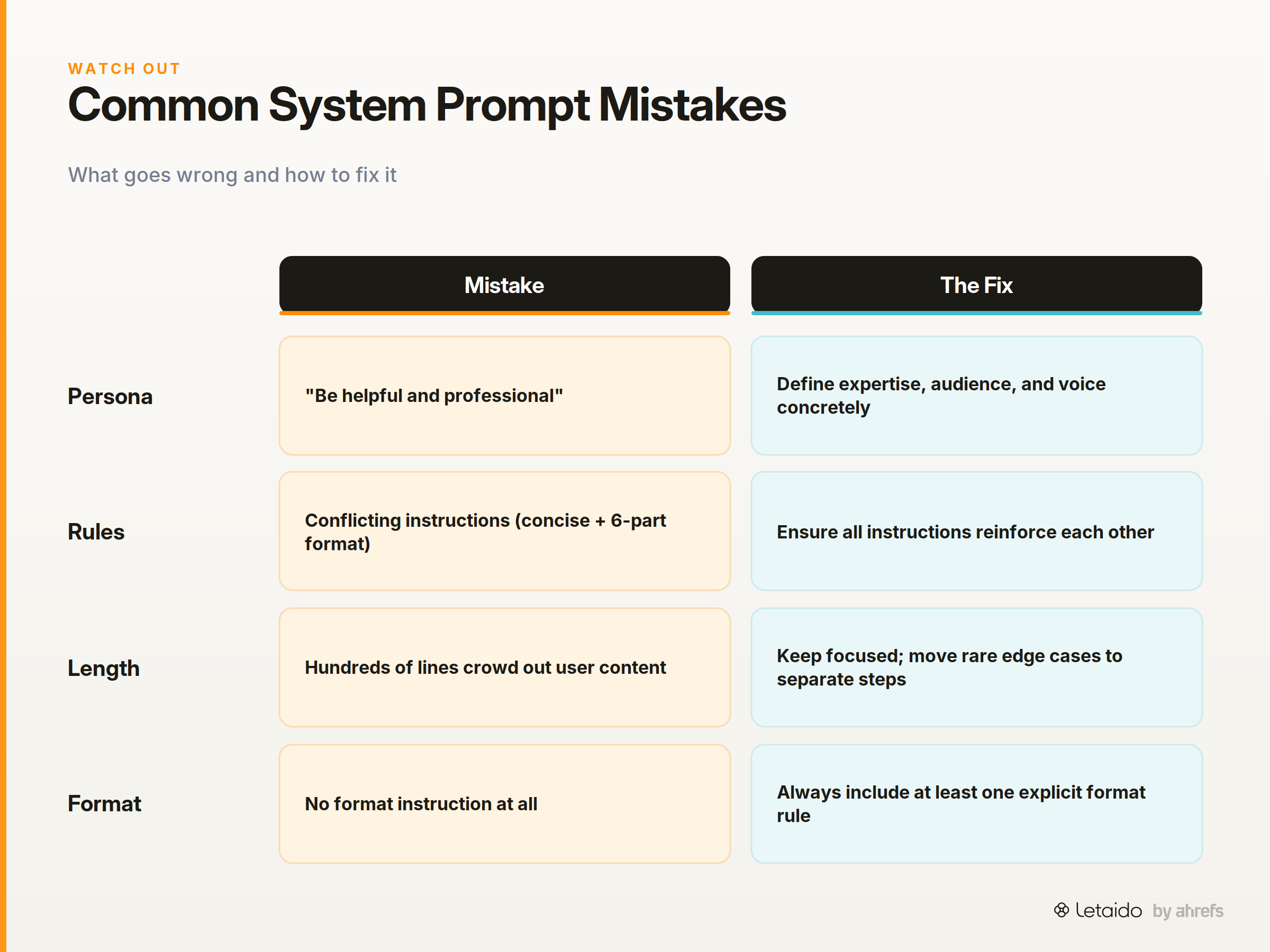
- Vague persona statements. "Be helpful and professional" tells the model nothing specific. Define expertise, audience, and voice concretely.
- Conflicting instructions. Telling the model to "be concise" in the rules section but then specifying a six-part structured format in the format section creates confusion. Instructions should reinforce each other.
- Overcrowding the context. Extremely long system prompts (hundreds of lines) can push important user content further from the model's immediate attention. Keep system prompts focused; move rarely-needed edge cases into separate workflow steps if possible.
- Omitting format rules entirely. If you do not specify a format, the model will choose one — and it will be different each time. Always include at least one format instruction.
- Assuming the model will infer what you meant. Models are literal. If you want bullet points, say "use bullet points." If you want no more than 200 words, say "no more than 200 words." Implication is not instruction.
System Prompts in Automated Workflows
In a standard chat session, you write a system prompt once and it governs that conversation. In an automated agent workflow, the stakes are higher: the system prompt runs every time the agent executes a task, which might be hundreds of times a day.
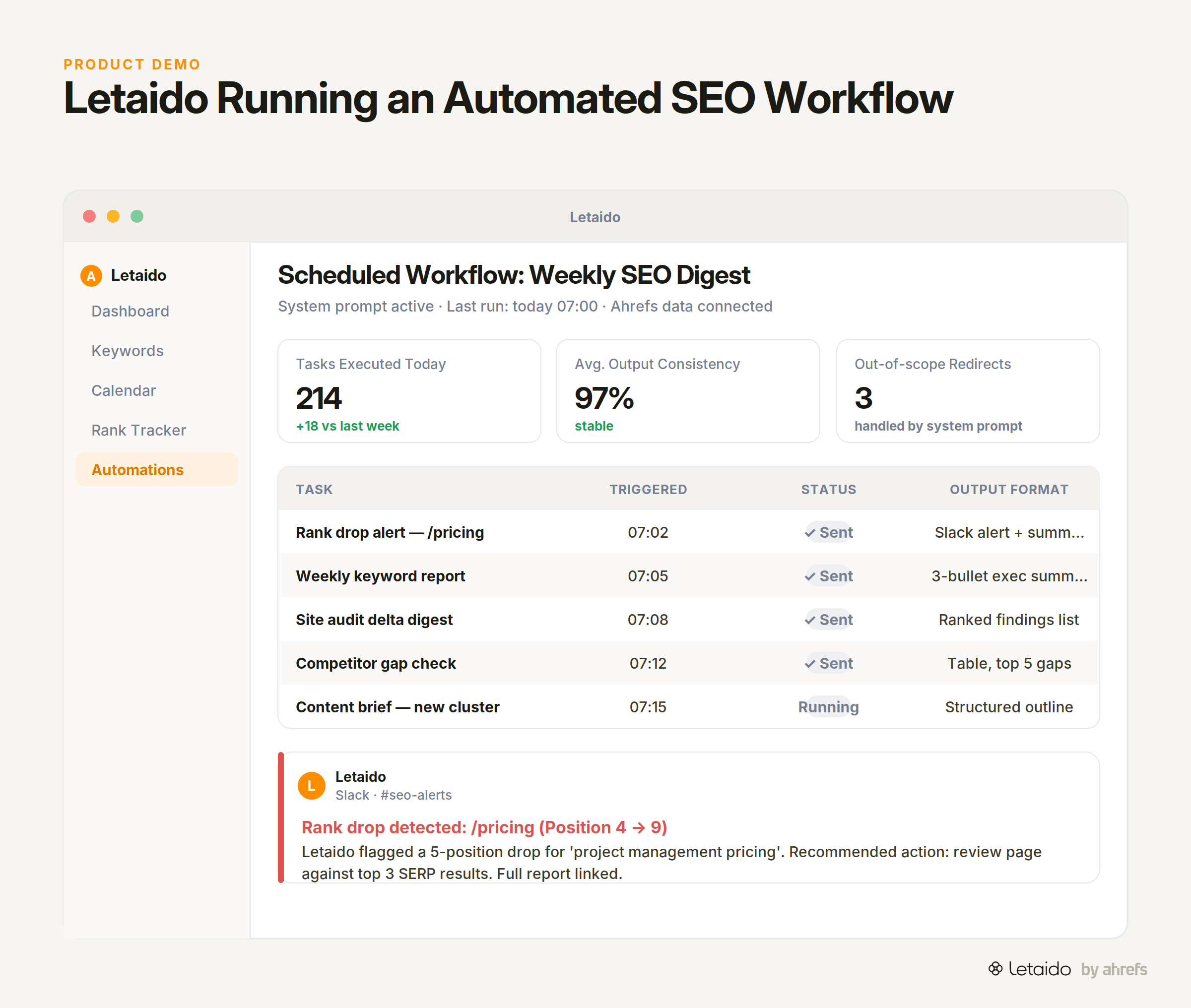
This is where system prompts shift from a convenience to a control mechanism. When an AI agentAI agentA system that combines a language model with tools and a goal, so it can decide what to do next and act — not just generate text.Read: What Are AI Agents? Definition, Types, and Examples is running scheduled tasks — pulling data, generating reports, sending Slack alerts — there is no human in the loop to correct a drifting output. The system prompt is the only consistent guardrail.
Letaido works this way. A standing system prompt defines what Letaido is, what it can access (including live Ahrefs data for keyword research, rank tracking, and site audits), how it formats its outputs, and what it should do when it hits an edge case. That prompt runs unchanged whether the agent is generating a weekly SEO recap at 8am on Monday or firing a Slack alert the moment a tracked page drops in rankings. The consistency of the output across automated runs comes directly from the precision of the system prompt.
If you are moving from one-off AI prompting to any kind of recurring automation — even a simple scheduled report — writing a tight system prompt is the first thing to get right. A vague persona might be tolerable when you are manually reviewing every response. When the agent is running unsupervised, every ambiguity in your system prompt becomes a source of variance you will eventually have to chase down.
For a deeper look at how prompts chain together in multi-step workflows, the guide on prompt chainingPrompt chainingSplitting a large task into a sequence of smaller prompts, each consuming the previous output, so every step can be checked and retried on its own.Read: Prompt Chaining: Break Big Tasks Into Reliable Steps covers how to sequence instructions across multiple model calls. If you are new to the broader field, the prompting hub is the right starting point.