
Claude skills let you package a repeatable workflow into a named folder that Claude loads automatically whenever the right task comes up. This guide walks through every step — from creating the folder to writing instructions that produce consistent output — and ends with a worked SEO example you can adapt immediately.
It's written for SEO, content, and growth marketers who want to stop re-explaining the same task in every chat and start running it as a reliable, reusable workflow.
What a Claude Skill Actually Is
A Claude skill is a filesystem-based resource: a folder containing a SKILL.md file with instructions, optional scripts, and supporting assets that Claude loads on demand when a task matches the skill's description. As Anthropic puts it, "Skills are reusable, filesystem-based resources that provide your agent with domain-specific expertise: workflows, context, and best practices that transform general-purpose agents into specialists."
That distinction matters. A skill is not a saved prompt, and it is not an MCPModel Context ProtocolAn open standard for connecting AI models to external tools and data sources through one consistent interface instead of bespoke integrations. tool.
Skills vs. Prompts vs. MCP Tools
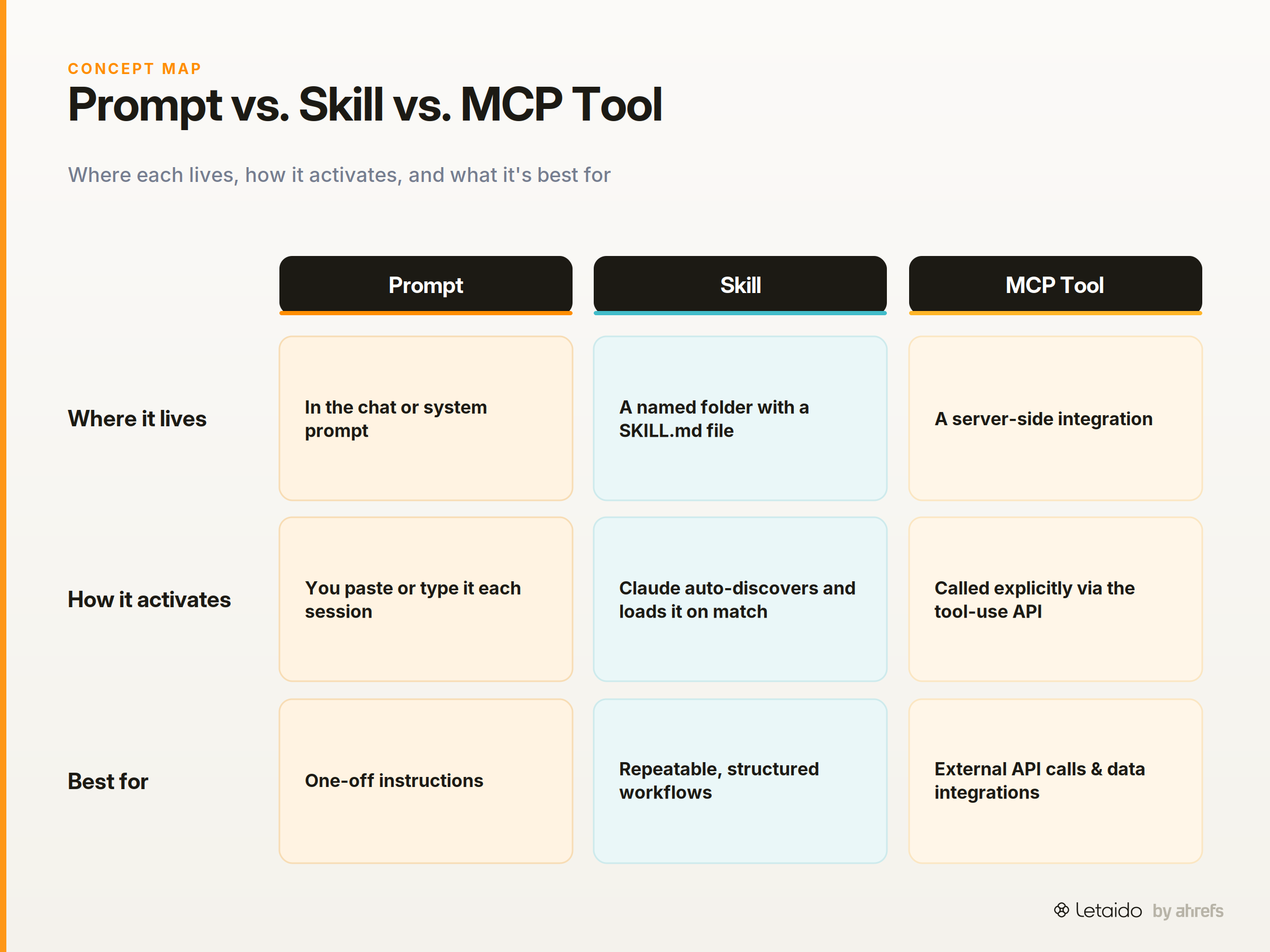
Here is how the three differ in practice:
| Prompt | Skill | MCP Tool | |
|---|---|---|---|
| Where it lives | A chat turn or system prompt | A named folder with SKILL.md |
A server-side integration |
| How it activates | You paste or type it | Claude auto-discovers and loads it when the task matches | Called explicitly via a tool-use API |
| Reusability | Copy-paste per session | Persistent; any session can trigger it | Persistent but requires server infrastructure |
| Best for | One-off instructions | Repeatable, structured workflows | External API calls and data integrations |
A skill is the middle ground: more durable than a prompt, simpler to build than a full tool integration.
What You Need Before You Start
Before writing a single line of SKILL.md, confirm you have the right access and a clear idea of what the skill should do. The two paths are the Claude.ai UI (requires a paid plan: Pro, Team, or Enterprise) and the Skills API (requires an Anthropic API key). Anthropic notes that example skills from the public repository are already available to paid Claude.ai plans.
If you are building programmatically for agents or automations, the API path gives you more control.
Pick One Job for One Skill
Skills fail when they try to cover too much ground. Before you open an editor, answer three questions:
- What is the input? (a keyword, a URL, a CSV row)
- What triggers this skill? (the user asks for a content brief, a competitor summary, a rank-change report)
- What should the output look like? (a JSON object, a Markdown table, a numbered list)
Writing those three answers down first is the real first step. Everything after it is mechanics.
Create a Claude Skill — Step by Step
The walkthrough below follows the Skills API Quickstart and the Anthropic skills template repo. Each step builds on the last, so work through them in order.
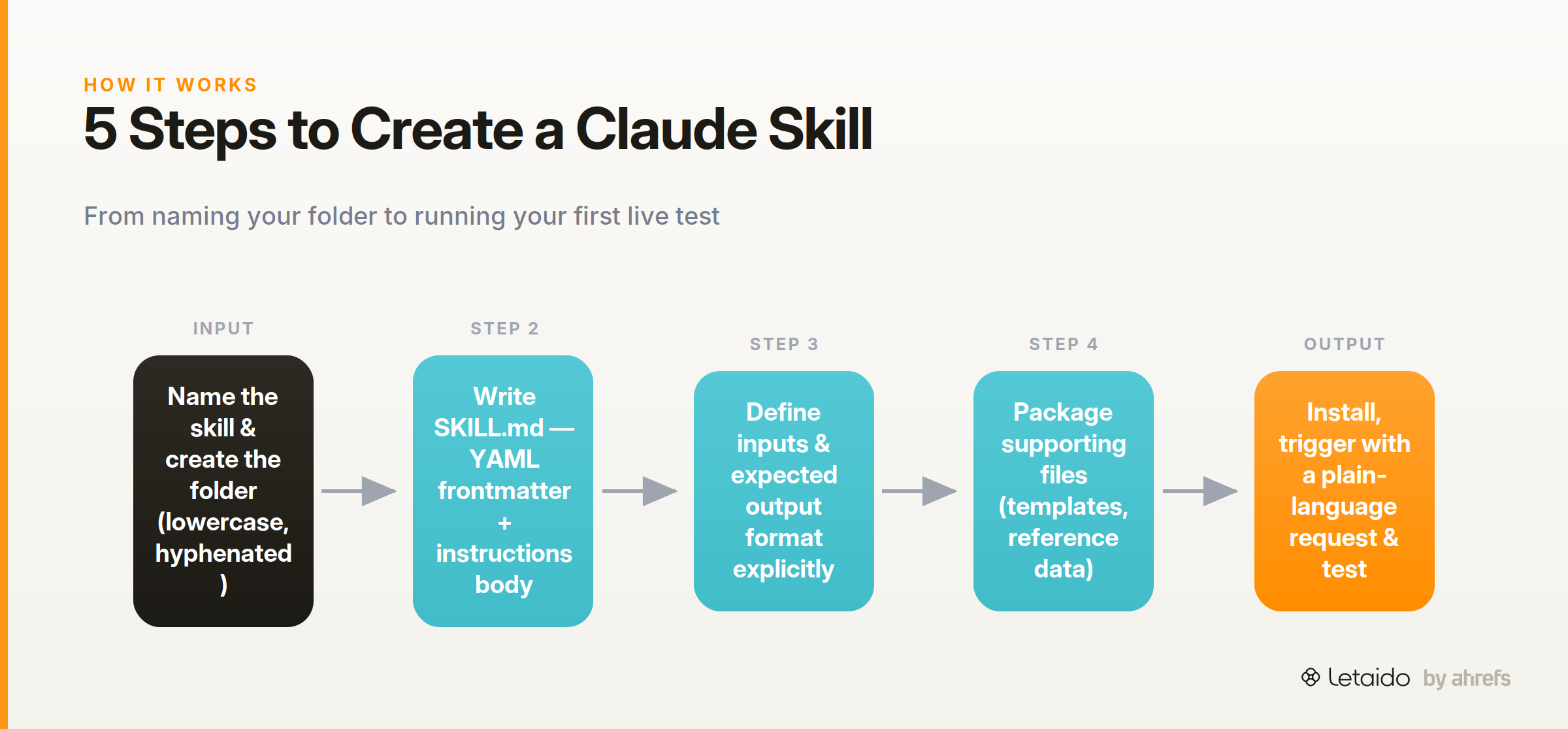
Step 1 — Name the Skill and Create the Folder
Use lowercase, hyphenated names that describe the job: keyword-brief, competitor-summary, rank-alert. One skill, one folder.
skills/
└── keyword-brief/
    └── SKILL.md
The folder name becomes the skill's identity. Keep it specific enough that you will know what it does six months from now.
Step 2 — Write the SKILL.md File
The SKILL.md file has two parts: YAML frontmatter at the top, and an instructions body below it. As Anthropic's README states, "Skills are simple to create — just a folder with a SKILL.md file containing YAML frontmatter and instructions."
The frontmatter tells Claude when to load the skill. The instructions tell it what to do once loaded.
---
name: keyword-brief
description: Generates a structured content brief from a target keyword
when_to_load: >
  Use this skill when the user provides a keyword or topic and asks for
  a content brief, outline, or page structure.
---

## Keyword Brief Skill

Given a target keyword, return a structured content brief with the following sections:
1. Search intent label (informational / navigational / commercial / transactional)
2. Suggested H2 skeleton (3–5 headings)
3. Recommended word count range
4. Two to three closely related secondary keywords

Return output as Markdown. Do not include preamble or sign-off.
The when_to_load field is the trigger. Write it as a natural-language description of the user request that should activate this skill.
Step 3 — Define Inputs and Expected Output Format
The instructions body should specify exactly what the skill receives and what shape it returns. An explicit output schema is what separates a reusable skill from a one-time prompt.
Specify the input type ("a single keyword string"), any constraints ("do not invent volume figures"), and the output format ("return Markdown, not JSON") in the body. If the skill should handle variations, state them explicitly: "If the user provides a URL instead of a keyword, extract the primary topic from the title tag first."
Step 4 — Package Supporting Files (If Needed)
If your skill needs reference data, a script, or a template, add those files to the same folder. Claude uses three-level progressive disclosure loading: it reads the frontmatter first, pulls in the full instructions only when the task matches, and loads additional files only when the task requires them. You do not pay context costs for files the current task does not need.
skills/
└── keyword-brief/
    ├── SKILL.md
    ├── intent-reference.md   ← loaded only when needed
    └── output-template.md    ← loaded only when needed
Step 5 — Install and Test the Skill
For Claude Code, place the skills/ folder in your project root. Claude Code automatically scans for installed skill folders and activates the matching skill when a user task fits the when_to_load description.
For the Skills API path, upload the skill via the API and reference it in your agent's configuration.
To run your first test, give Claude a plain-language request that should trigger the skill: "Give me a content brief for the keyword 'technical SEO audit'." If the skill activates, you will see it load in the tool-use trace. If it does not, tighten the when_to_load language to match the phrasing your users will actually type.
Write Skill Instructions That Produce Consistent Output
The step-by-step above gets the file created. This section is about getting the file to produce output you can rely on. Marius Buleandra from Anthropic's Applied AI team frames the goal well: "Learn how to turn Claude from a conversational assistant into a specialized agent that executes complex, repeatable workflows tailored to your specific needs."
That only happens when the instructions are written precisely.
Use Imperative, Not Descriptive, Language
Write instructions as direct commands, not as descriptions of intent. The difference is small in wording and large in output consistency.
Describe what to return, not what the skill "should" do. State the output format as a constraint, not a suggestion. Handle edge cases explicitly rather than leaving them to inference.
A Bad Instruction vs. a Good Instruction
The two blocks below show the same skill written both ways.
Vague — produces inconsistent output:
The skill should help users understand the search intent behind a keyword
and suggest some headings they could use. It can also mention related keywords
if that seems useful.
Specific — produces reliable output:
Given a target keyword, return the following in Markdown:

1. **Intent:** One word from this set only: informational / navigational /
   commercial / transactional. No explanation.
2. **H2 skeleton:** Three to five headings as a numbered list. Each heading
   must be a complete phrase, not a fragment.
3. **Secondary keywords:** Exactly two related keyword phrases. No volume figures.
4. **Word count range:** A numeric range (e.g., 1,200–1,600 words).

Do not include a preamble, greeting, or closing sentence.
The second version gives Claude a fixed schema. Every run returns the same structure, which means you can pipe the output into another tool or template without manual cleanup.
Test, Refine, and Version Your Skill
Run the skill against five to ten representative inputs before treating it as production-ready. Look for two failure modes: outputs that include content you did not ask for, and outputs that omit content you did ask for. Both are instruction gaps, not model failures.
When you find a gap, edit the instructions body directly. The SKILL.md format handles versioning simply: keep a SKILL.md.v1 copy before making changes if you want to roll back. For more structured iteration, the Skill Creator plugin inside Claude Code lets you evaluate skill outputs against defined expectations, compare two instruction versions side by side, and grade runs automatically. One practitioner who spent a month building skills noted: "I did use the skill creator to create all my skills."
The A/B comparison feature is particularly useful when you have a working skill but suspect a rewritten instructions block would perform better — you can run both against the same input set and compare scores before committing.
A Worked Example — SEO Content Brief Skill
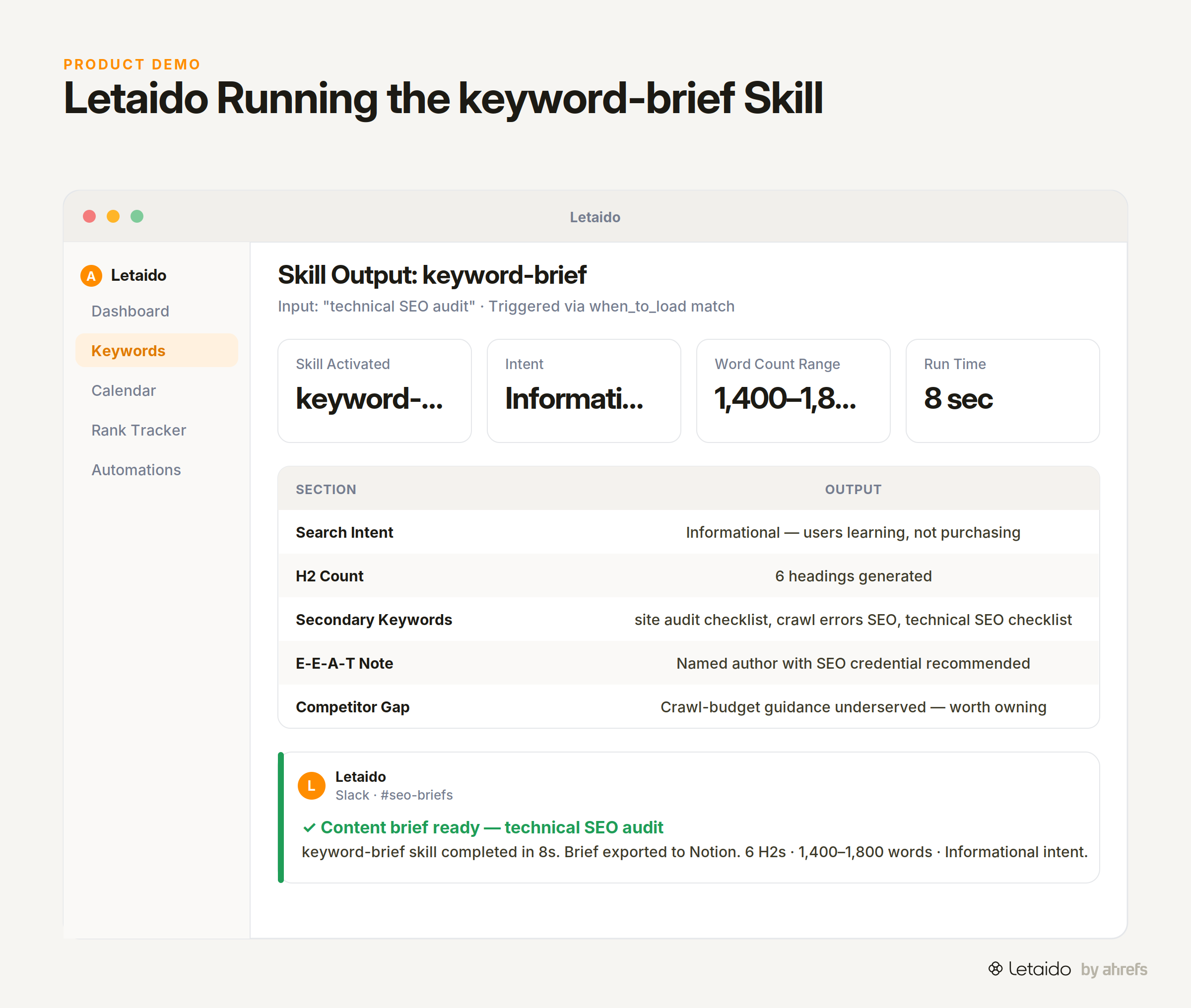
Here is a complete, ready-to-use skill for an SEO content brief. The folder is keyword-brief/, and the full SKILL.md is below.
---
name: keyword-brief
description: Produces a structured SEO content brief from a target keyword
when_to_load: >
  Activate when the user provides a keyword, topic, or URL and asks for
  a content brief, page outline, or article structure.
---

## Instructions

Input: One target keyword string.

Return a Markdown content brief with exactly these sections:

### Search Intent
One label: informational / navigational / commercial / transactional.
One sentence explaining the dominant intent signal.

### Suggested H2 Skeleton
Four to six H2 headings as a numbered list. Each heading must be a complete
phrase that a reader would recognise as a section title. No fragment headings.

### Word Count Range
A numeric range matching the intent label:
- Informational: 1,200–2,000 words
- Commercial / transactional: 800–1,200 words
- Navigational: 400–600 words

### Secondary Keywords
Three closely related keyword phrases. No search volume figures.

### Content Notes
Two to three sentences flagging any E-E-A-T considerations, likely competitor
angles, or structural risks for this keyword.

Do not include a preamble, greeting, or sign-off. Return only the five sections above.
Sample input: technical SEO audit
Sample output:
### Search Intent
Informational. Users are learning what a technical SEO audit involves and
how to conduct one, not comparing vendors or ready to purchase.

### Suggested H2 Skeleton
1. What a Technical SEO Audit Covers
2. How to Crawl and Inventory Your Site
3. Core Web Vitals and Page Experience Checks
4. Indexability and Crawl Budget Issues
5. Structured Data and Schema Validation
6. Building and Prioritising Your Fix List

### Word Count Range
1,400–1,800 words

### Secondary Keywords
- site audit checklist
- crawl errors SEO
- technical SEO checklist

### Content Notes
Strong E-E-A-T signal: include a named author with an SEO credential or
case-study reference. Competitor pages often skip crawl-budget guidance —
that gap is worth owning. Avoid listicle padding; the query rewards depth
over breadth.
This is a skill you can install today and run against any keyword in under ten seconds. If you want this brief generated automatically every week against your full Ahrefs keyword list, that is the point where an agent layer earns its keep.
Run Skills Automatically with an Agent Layer
Native Claude skills are genuinely powerful, but they share one constraint: a human has to trigger them. You open Claude, type the request, the skill fires, and you get the output. That is fine for occasional use and perfect for personal workflows.
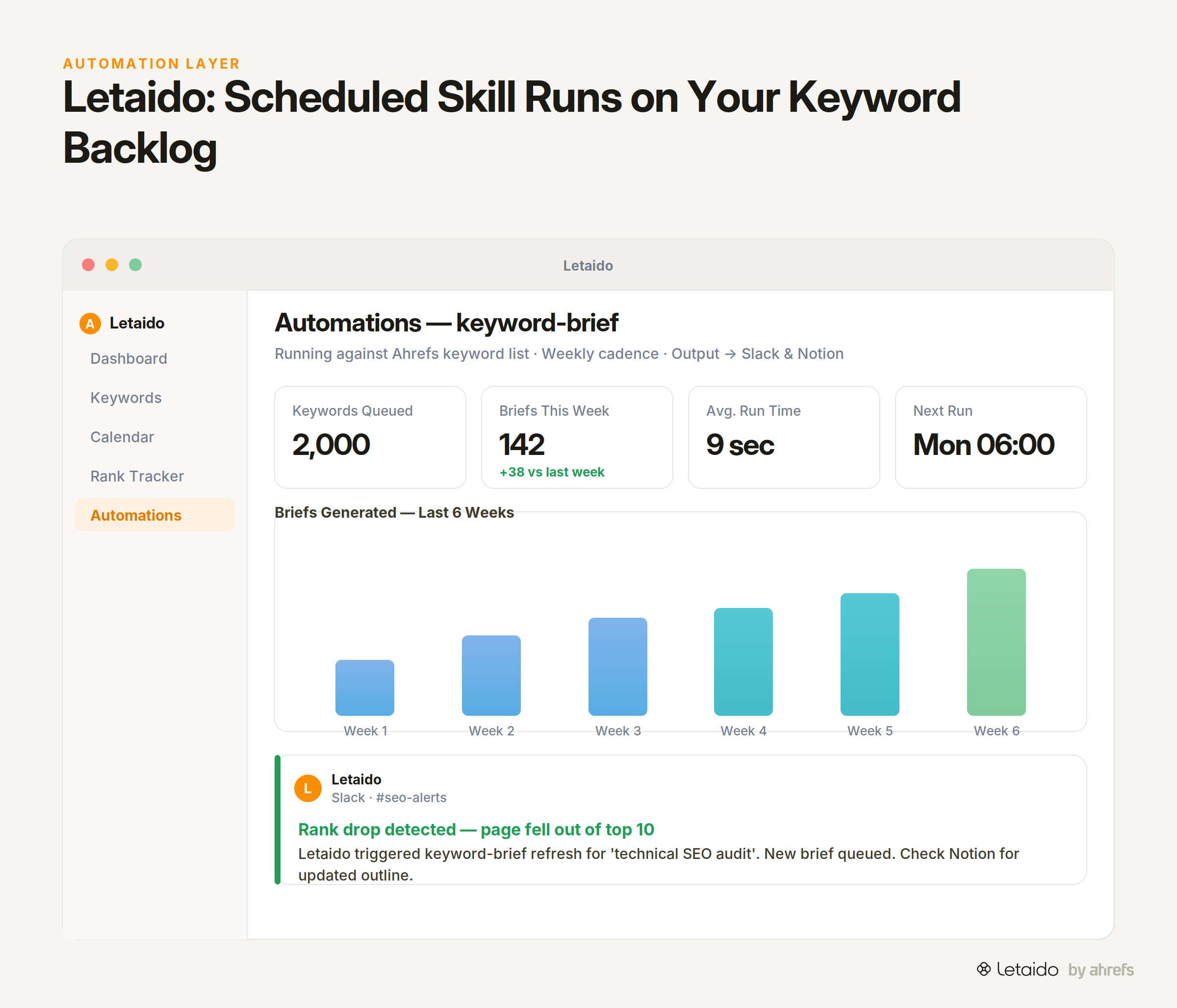
It becomes a ceiling when you have a content team working from a keyword backlog of 2,000 terms, or when you need a rank-drop alert to fire the moment a page falls out of the top 10, not when someone remembers to check.
An agent-powered workspace solves this by sitting between the skill and the trigger. Letaido can load the same SKILL.md instructions, pull live Ahrefs data directly without consuming API credits, and run the skill on any schedule you set — daily, weekly, on a threshold event. The output lands in Slack, Notion, HubSpot, or wherever your team actually works.
The skills you build manually are the building blocks. An agent is the engine that runs them 24/7, with real data, for the whole team. You do not need to pick one or the other: start with the manual skill, prove the workflow, then hand it to the agent.
Ready to stop triggering skills by hand? Try Letaido on Letaido — flat $99/month, includes $50 in AI credits, and your Ahrefs data is already wired in.