
You spent days fine-tuningFine-tuningFurther training a base model on your own examples so it internalises a style or task, rather than being told about it in the prompt each time. a Claude skill. It worked beautifully in testing. Then you deployed it, and over the next few weeks the output got weirder, wobblier, and less useful with every passing run -- until you're spending more time fixing outputs than the skill ever saved you. The problem almost certainly lives in the skill file itself — not the model.
This guide is for SEO, content, and growth practitioners building agent workflows. It covers how to structure skill files so they execute reliably, the failure modes that appear at scale, and how to test before you deploy. By the end, you'll have a clear framework for writing skills that hold up across hundreds of runs.
What a Claude Skill File Actually Is
Anthropic describes a skill as "a set of instructions — packaged as a simple folder — that teaches Claude" how to handle a specific type of task. That packaging distinction matters.
A one-off prompt lives in a conversation and disappears. A skill file persists — it carries its own instructions, metadata, and optional resources, and Claude loads it automatically when a task matches its scope.
Skill files vs. general prompts
A general prompt depends on the user framing every request correctly, every time. A skill file encodes that framing once: the role, the task boundaries, the expected output format, and the constraints. Claude reads the whole file before acting, so it isn't reconstructing intent from scratch on each run.
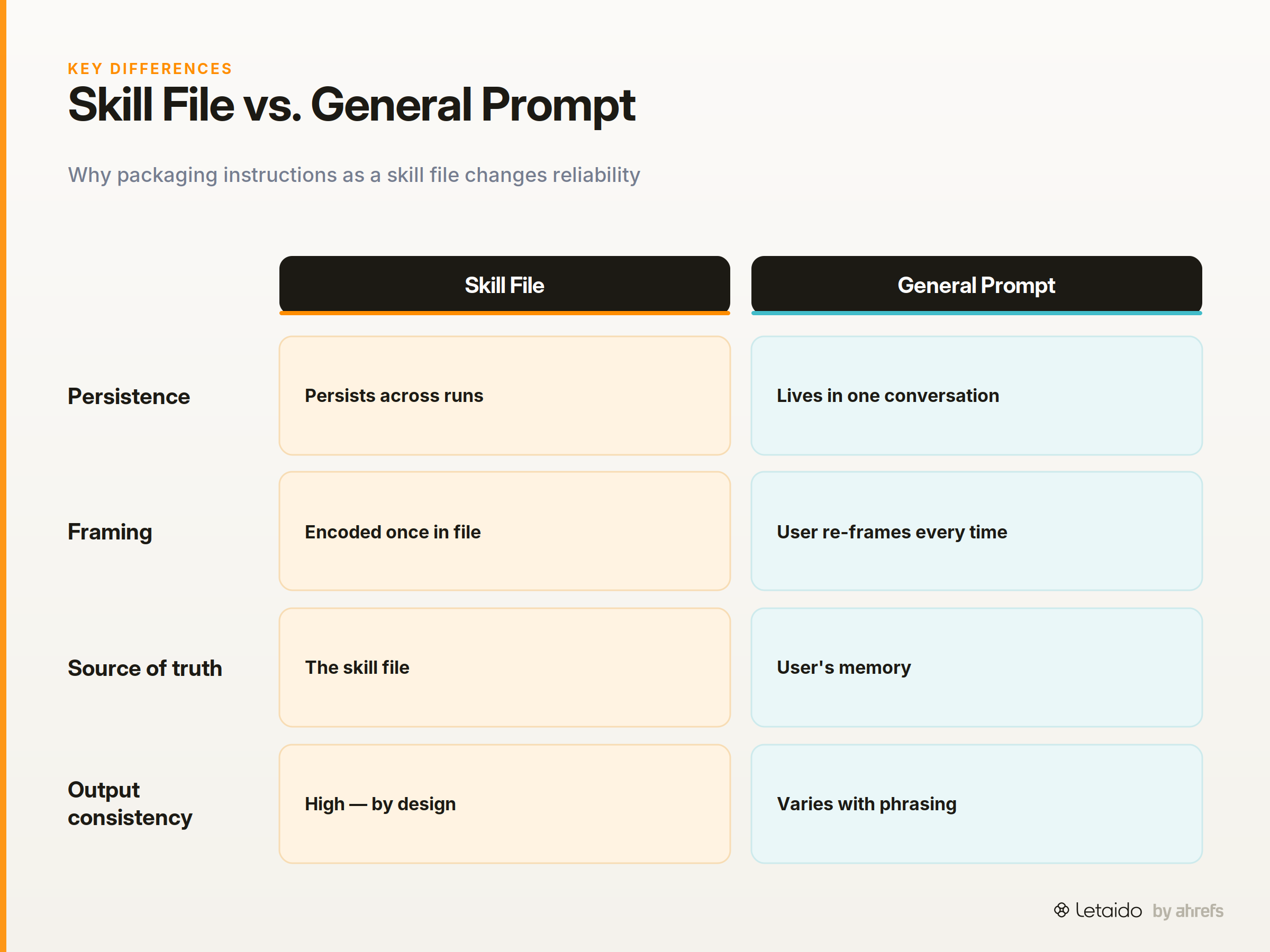
The practical upside is repeatability. The risk is that any ambiguity you bake into the file will repeat faithfully too.
How an agent reads and executes a skill
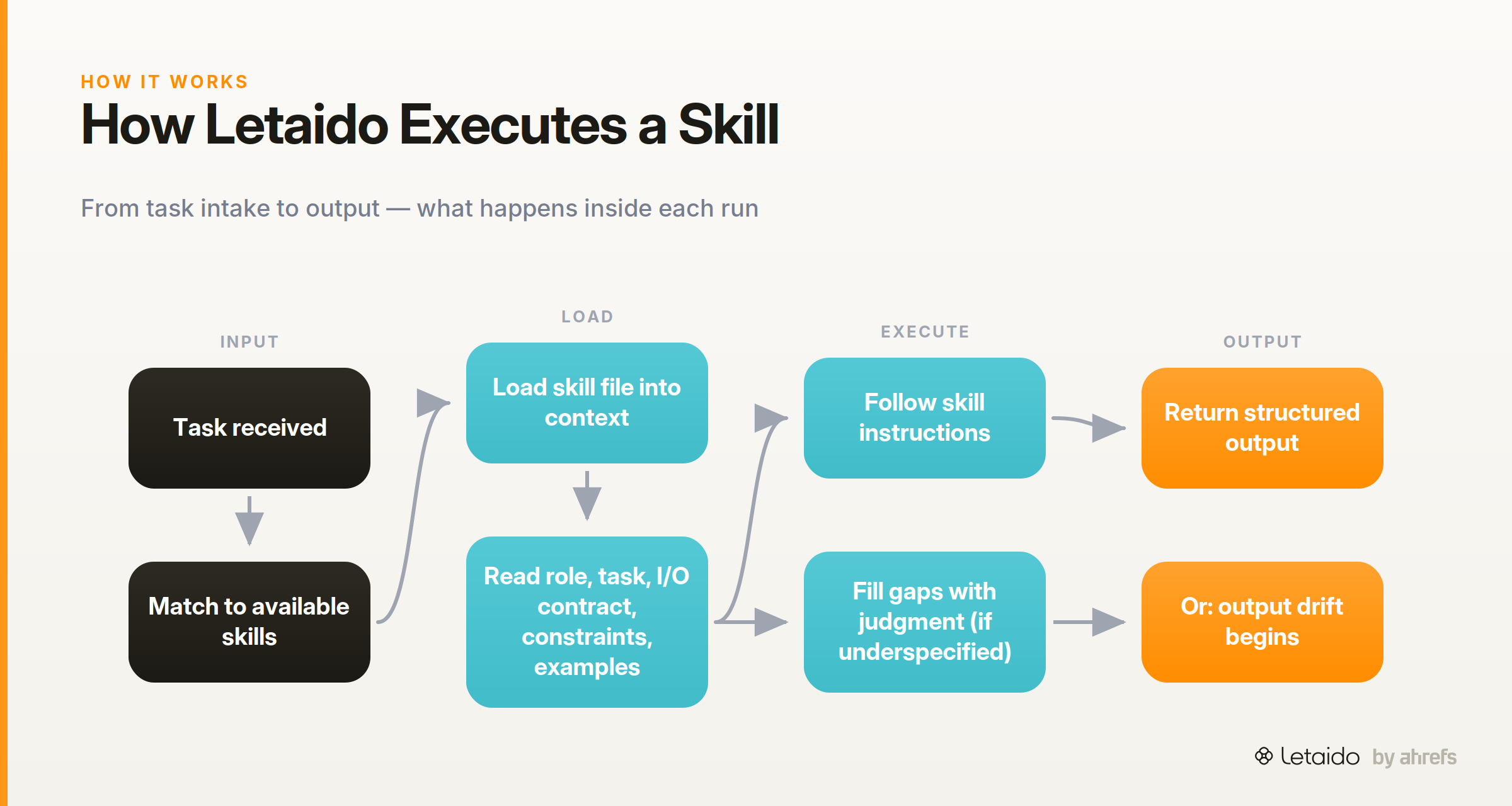
When Letaido picks up a task, it matches the request against available skills and loads the relevant file into context. It then follows the skill's instructions — not the user's memory of what the skill should do. This means the file is the source of truth: if it's underspecified, the agent fills the gaps with its own judgment, which is exactly when output drift starts (where the skill's responses become increasingly inconsistent across runs).
1. Build the Anatomy Before You Write a Word
A reliable skill file has five layers, and they matter in the order Claude processes them. Here's the structure — and a before/after example at the end of this section.
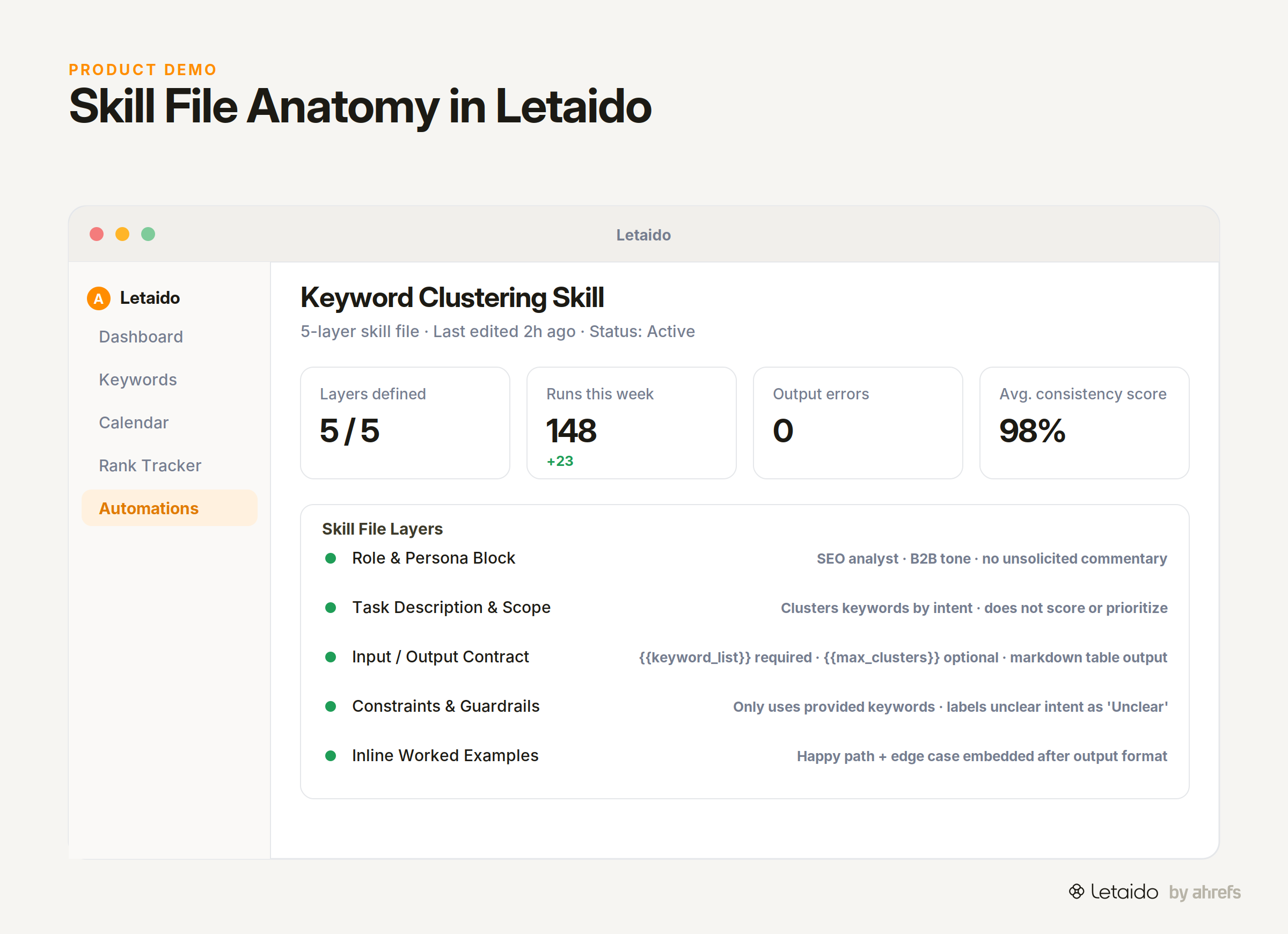
The five layers are: role and persona block, task description and scope, input/output contract, constraints and guardrailsGuardrailsThe checks around a model — validation, allowlists, human review — that constrain what its output is allowed to do downstream., and inline worked examples. Missing any one of them is usually enough to introduce inconsistency.
Role and Persona Block
Open every skill file with a clear identity statement. This isn't about personality — it's about anchoring tone, expertise level, and the lens Claude uses to interpret everything that follows.
You are an SEO analyst. You write for B2B marketing managers, not developers.
You are precise, direct, and never add commentary the user didn't ask for.
Without this block, Claude picks a persona from context, and context changes between runs.
Task Description and Scope
Write a single sentence that defines what the skill does — and what it does not do. That sentence doubles as a pass/fail test: if an input falls outside it, the skill should decline or return a defined response, not improvise.
This skill takes a list of keywords and groups them into topical clusters.
It does not score, prioritize, or recommend content for those clusters.
Scoring and prioritizing sound adjacent, but mixing them in produces worse clustering and worse scoring.
Input/Output Contract
Declare your inputs explicitly, with variable names, expected types, and which ones are required. Then declare the output format in equal detail.
INPUTS:
- {{keyword_list}}: comma-separated list of keywords (required)
- {{max_clusters}}: integer (optional, default: 10)

OUTPUT: a markdown table with columns: Cluster Name | Keywords | Intent Type
Making the contract explicit in the file — not assumed from the prompt — is the single biggest lever for consistent output.
Constraints and Guardrails
Write constraints as scope statements, not prohibitions. Prohibitions ("do not hallucinateHallucinationA confident, fluent model output that is simply false. It's a property of next-token prediction, not a bug to be patched out.") are vague and can trigger over-refusal. Scope statements tell Claude what it is and isn't responsible for.
This skill only processes the keywords provided in {{keyword_list}}.
If a keyword's intent is unclear, label it "Unclear" — do not infer or guess.
That framing directs behavior rather than just warning against it.
Before (underspecified):
Cluster these keywords into groups based on topic. Output a table.
[keyword list pasted inline]
After (full anatomy):
ROLE: You are an SEO analyst. Write for marketing managers, not developers.

TASK: Group the provided keywords into topical clusters based on search intent.
This skill does not score, rank, or recommend content — only cluster.

INPUTS:
- {{keyword_list}}: comma-separated list of keywords (required)
- {{max_clusters}}: integer, maximum clusters to return (optional, default: 10)

OUTPUT FORMAT:
Return a markdown table with exactly three columns:
| Cluster Name | Keywords | Intent Type |

CONSTRAINTS:
- Only use keywords from {{keyword_list}} — do not add new ones.
- If intent is ambiguous, label Intent Type as "Unclear".
- If {{keyword_list}} is empty, return: "ERROR: No keywords provided."

EXAMPLE:
Input: "rank tracker, keyword ranking tool, track google rankings, seo rank monitor"
Output:
| Cluster Name | Keywords | Intent Type |
|---|---|---|
| Rank Tracking Tools | rank tracker, keyword ranking tool, seo rank monitor | Commercial |
| Ranking Monitoring | track google rankings | Informational |
The after version takes three minutes longer to write. It saves hours of debugging in production.
2. Scope Each Skill to One Job
Claude for Small Business ships with 15 purpose-built skills, each targeting a single repeatable task. That design choice is deliberate, and it applies just as much to custom skills you build yourself.
A skill that does multiple things will do none of them consistently.
Why Multi-Task Skills Drift
When a skill is asked to research, synthesize, and format in a single pass, Claude allocates attention unevenly. The step with the least explicit instruction gets the least consistent output. Across dozens of runs, that inconsistency compounds — the skill produces recognizably different results depending on minor variations in input length or phrasing.
The failure is invisible until you're comparing outputs side by side.
Decompose a Workflow into Focused Skills
The decision rule is simple: if a skill needs two different output formats, it should be two skills.
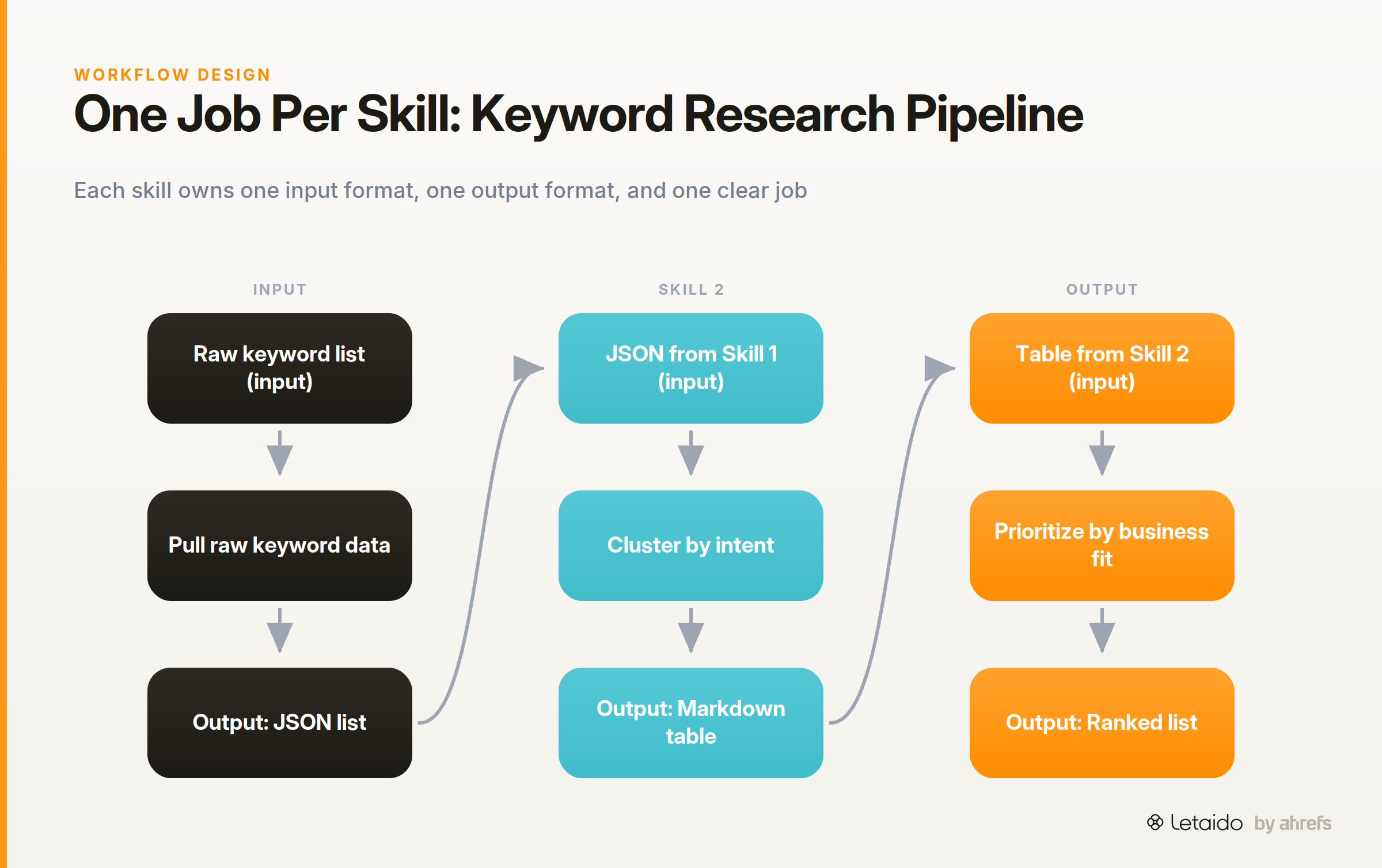
A keyword research workflow might look like this:
- Skill 1: Pull raw keyword data and return a structured list (output: JSON)
- Skill 2: Cluster keywords by intent (input: JSON from Skill 1, output: markdown table)
- Skill 3: Prioritize clusters by business fit (input: table from Skill 2, output: ranked list)
Each skill has one clear job, one input format, and one output format. Any of them can be updated or replaced without touching the others.
3. Define Inputs and Outputs Like a Contract
A practitioner in the Agent Skills community flagged a real production failure: a default skill for creating Excel files preferred openpyxl, which destroyed data validation and triggered "auto-repair / recovery" warnings in Excel. The skill was working as instructed — it just wasn't instructed well enough.
Explicit input and output contracts are how you prevent that class of problem.
Typed Inputs and Variable Syntax
Use named variables with double-brace syntax and specify the type. This prevents Claude from inventing a value when the variable is absent.
{{target_url}}: string, full URL including https:// (required)
{{depth}}: integer, crawl depth (optional, default: 2)
When variables are named and typed, substitution is deterministic. When they're implied from context, it isn't.
Output Format and Schema
Pick one format and enforce it in the instruction block. JSON works well for skills that feed downstream processes. Markdown tables work for human-readable reports. Plain numbered lists work for sequential instructions.
Mixing formats — "return JSON or a table depending on the data" — is a reliable path to format drift.
Handle Missing or Malformed Inputs
Specify what Claude should return when a required input is absent or unusable. The key principle: tell it what to return, not what to avoid.
If {{target_url}} is missing or not a valid URL, return exactly:
ERROR: Invalid input — {{target_url}} must be a full URL starting with https://
Do not attempt to infer or guess the URL.
That instruction produces a clean error tokenTokenThe unit models actually read and generate — roughly a word-piece. Context limits and API pricing are both measured in tokens. a downstream skill can handle. Silence or improvisation does not.
4. Prompting Patterns That Improve Consistency
Three patterns move the needle more than anything else in a skill file. Anthropic's guidance on using Claude efficiently reinforces the same principles: be specific, batch related information, and structure requests so Claude doesn't need to reconstruct intent.
Embed Few-Shot Examples in the Skill File
Two or three examples embedded in the skill file outperform zero examples on every consistency metric. Place them after the output format declaration, in the exact format you expect back.
One example covers the happy path. A second covers an edge case — a short input list, an ambiguous keyword, a missing field. A third example is rarely necessary unless the output is highly structured.
Use Chain-of-Thought Selectively
Explicit reasoning steps ("first identify the intent, then group by topic, then label each cluster") reduce hallucination on tasks that require inference. They add token cost without accuracy gain on tasks that are straightforwardly mechanical — like formatting a list or applying a template.
Use chain-of-thoughtChain-of-thought promptingAsking a model to work through its reasoning in steps before answering, which measurably improves accuracy on multi-step problems.Read: Chain-of-Thought Prompting: Make AI Reason Step by Step when the skill involves judgment calls. Skip it when the skill is purely transformational.
Anchor the Format and Enforce It
End the instruction block with a locked output template Claude must fill in, not paraphrase. This is the single most effective guard against format drift.
Your response must match this template exactly. Do not add commentary before or after it.

| Cluster Name | Keywords | Intent Type |
|---|---|---|
| [value] | [value] | [value] |
A model that has a template to fill in will fill it. A model that has a format described in prose will approximate it — differently each time.
5. Common Failure Modes and How to Fix Them
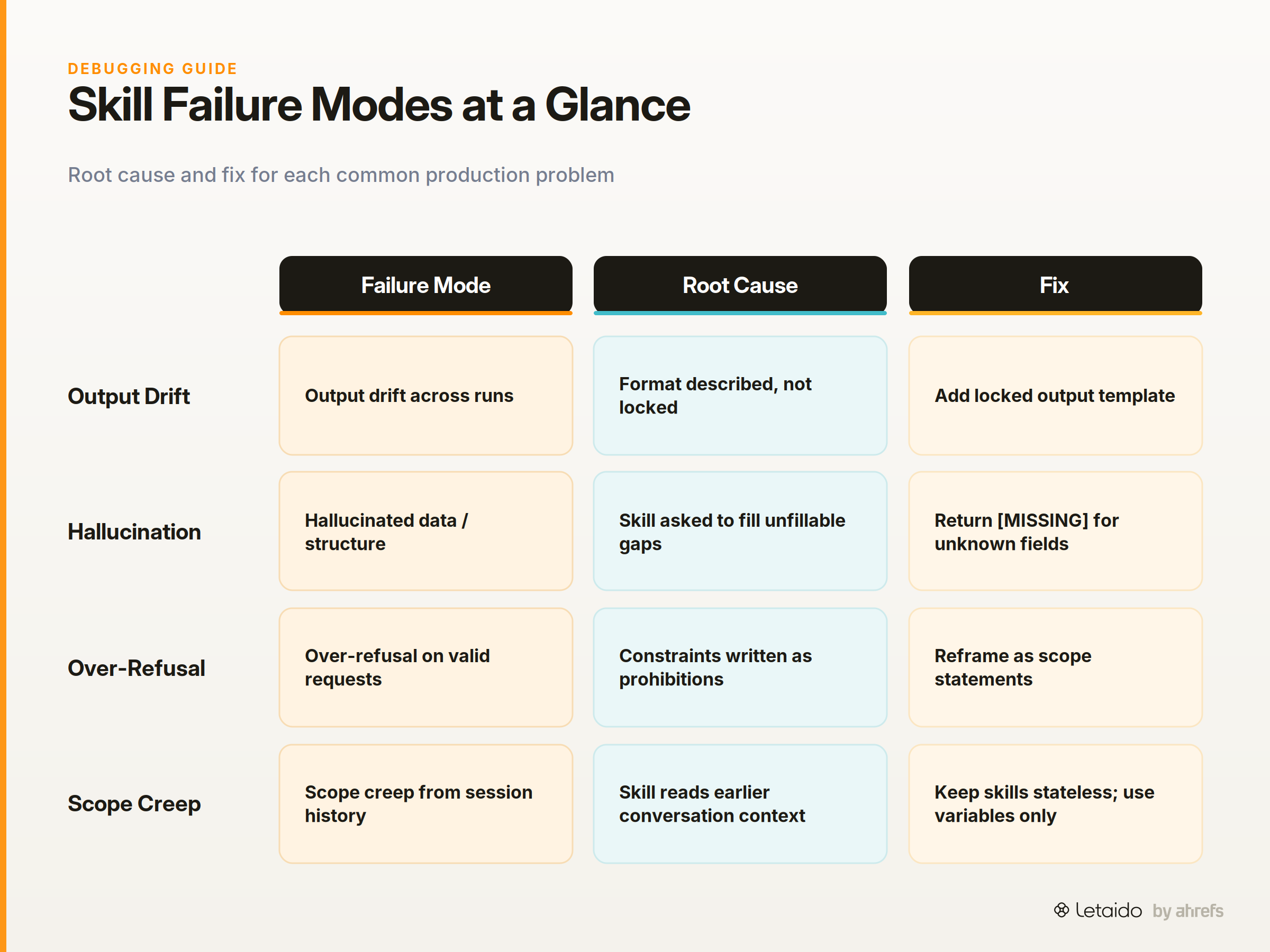
Each failure mode below has a root cause in the skill file and a specific fix. Most can be diagnosed by diffing two runs of the same skill against the same input.
Output Drift Across Runs
The root cause is almost always the same: the output format was described in prose but never locked as a template. The fix is straightforward: add the locked output template from the pattern above, and instruct Claude to fill it rather than paraphrase it.
Hallucinated Data or Invented Structure
This happens when the skill asks Claude to fill a gap it simply cannot fill from the provided context, so it invents something plausible instead. The fix is to remove that ambiguity explicitly: add “if you don't have X, return [MISSING]” instructions for every required data point.
If search volume data is not provided, return [MISSING] in that column.
Do not estimate or infer search volume from keyword phrasing.
Over-Refusal
Root cause: constraints written as broad prohibitions ("do not discuss competitors") that Claude interprets conservatively. Fix: reframe as scope statements.
Change "do not discuss competitors" to "this skill covers [Brand] products only." The second version tells Claude what to do; the first tells it what to avoid, which it often interprets more broadly than intended.
Scope Creep as Context Grows
Root cause: conversation history from earlier in a session bleeds into skill execution, adding context the skill wasn't designed to handle. Fix: keep skills stateless. Pass only the minimum required inputs as variables — never rely on the skill picking up context from earlier turns.
6. Test a Skill Before You Deploy It
Claude Code best practices make the point that CLAUDE.md — the structured instruction file that Claude pulls automatically on startup — rewards upfront discipline in exactly the same way skill files do. The more precisely you specify intent before running, the less you debug afterward.
The same logic applies to skill testing: invest five minutes before deployment to avoid hours of incident response.
A Manual Testing Checklist
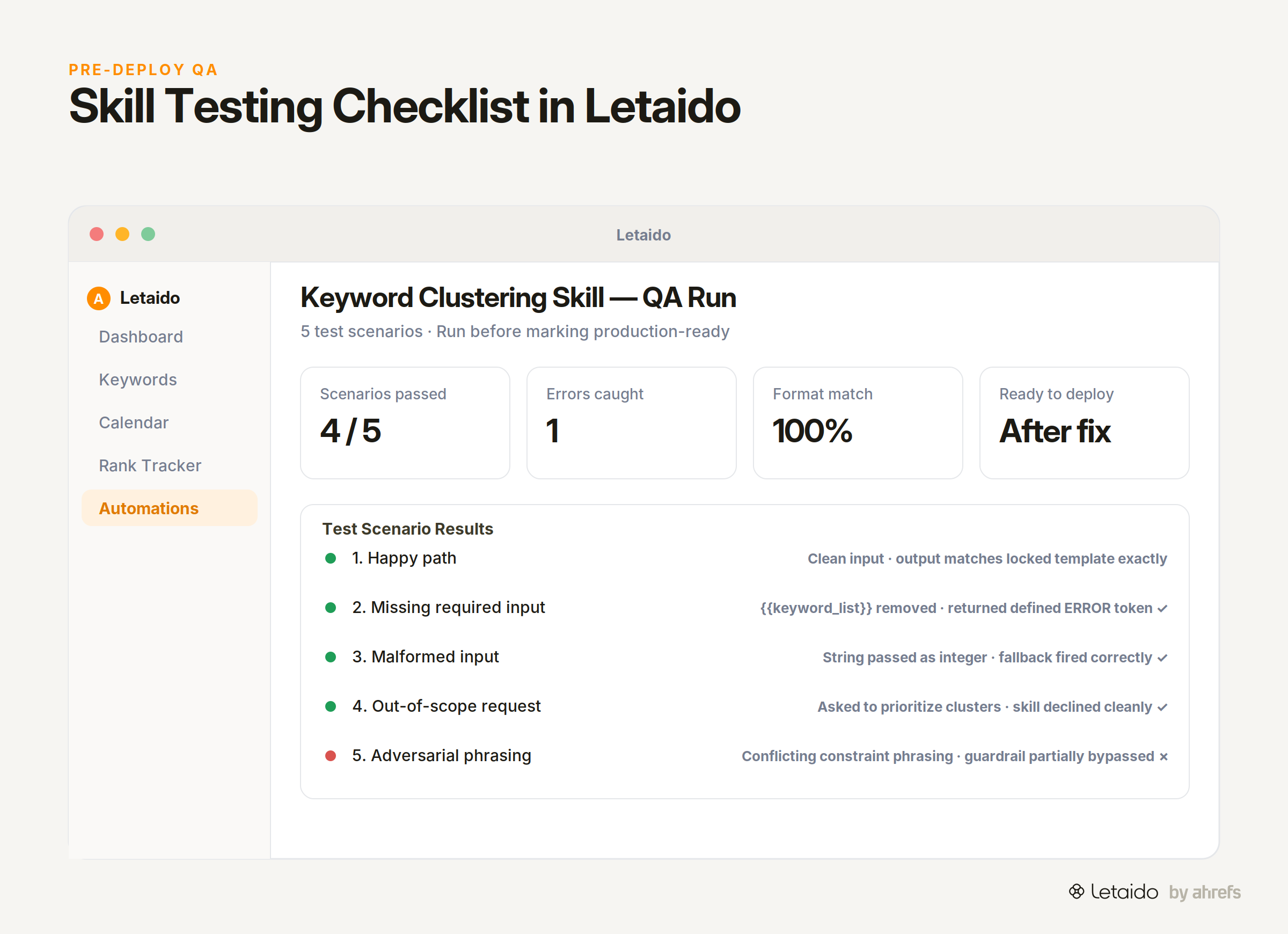
Run the skill against each of these five scenarios before marking it production-ready:
- Happy path — a clean, complete, typical input. Verify the output matches the locked template exactly.
- Missing required input — remove one required variable. Verify the skill returns your defined error token, not an improvised response.
- Malformed input — pass a value of the wrong type (a string where an integer is expected). Check the fallback behavior.
- Out-of-scope request — ask the skill to do something adjacent but outside its task statement. Verify it declines or redirects cleanly.
- Adversarial phrasing — rephrase the request in a way that conflicts with the constraints. Check that guardrails hold.
Edge Case Prompts to Run Before Going Live
Three prompt categories stress-test boundaries most effectively:
- Extreme brevity: a one-word or one-keyword input that gives Claude almost nothing to work with
- Conflicting instructions: an input that implies the skill should do two incompatible things at once
- Ambiguous scope: a request that sits on the boundary of the task statement — close enough to seem valid, different enough to cause problems
Version Skill Files as They Evolve
Add a comment block at the top of every skill file:
# Skill: Keyword Clusterer
# Version: 1.2
# Last updated: 2026-07-01
# Changes: Added fallback for empty keyword lists; locked output template
This takes thirty seconds and makes it possible to roll back a change without guessing what you changed. No external tooling required.
7. Chain Skills Without Breaking the Workflow
Claude Tag, Anthropic's Slack-based Claude identity, breaks requests into steps and tracks progress in threads — the same principle that governs skill chains. Each step receives the output of the previous one and acts on it without re-litigating earlier decisions.
That only works if outputs are structured for consumption, not just for reading.
Pass Outputs Cleanly as Inputs
Design Skill A's output to be Skill B's input without a parsing step. If Skill A returns a markdown table and Skill B expects JSON, one of them needs to change. Agree on the format at the workflow design stage, not after the first integration failure.
A clean handoff looks like:
Skill A output (JSON):
{"clusters": [{"name": "Rank Tracking", "keywords": [...], "intent": "Commercial"}]}

Skill B input declaration:
{{cluster_json}}: JSON array of cluster objects from keyword clustering skill (required)
Handle Upstream Failures Downstream
When a downstream skill receives a [MISSING] or ERROR: token from upstream, it has two options: fail loudly with its own error token, or degrade gracefully with a defined fallback.
Define which behavior is correct in the skill file itself:
If {{cluster_json}} contains an ERROR token, return:
UPSTREAM_ERROR: Keyword clustering step failed — cannot proceed.
Do not attempt to process partial data.
Failing loudly is almost always the right choice in an automated workflow. Silent degradation produces outputs that look valid but aren't, which is harder to detect and fix.
Run Skills at Scale with Letaido
These practices — narrow scope, explicit contracts, locked formats, pre-deployment testing — work in any Claude environment. They work especially well when the skills run on a schedule, against live data, without manual intervention each time.
Letaido is built exactly for this. It's the workspace where skill files like the ones above run 24/7 against live Ahrefs data: keyword clustering on your full keyword universe, rank-change alerts that ping Slack when a page drops, content briefs generated from live SERPSERPThe search engine results page — the full set of organic listings, ads, and features returned for a query. structure, and site audit reports delivered on whatever schedule you set. All of it runs on the same skill-file principles described here — and Ahrefs data pulls don't consume API credits.
If you've just spent time building reliable skills and want a home where they run autonomously, this is it.
See how Letaido runs skills like these against live Ahrefs data → Try Letaido