
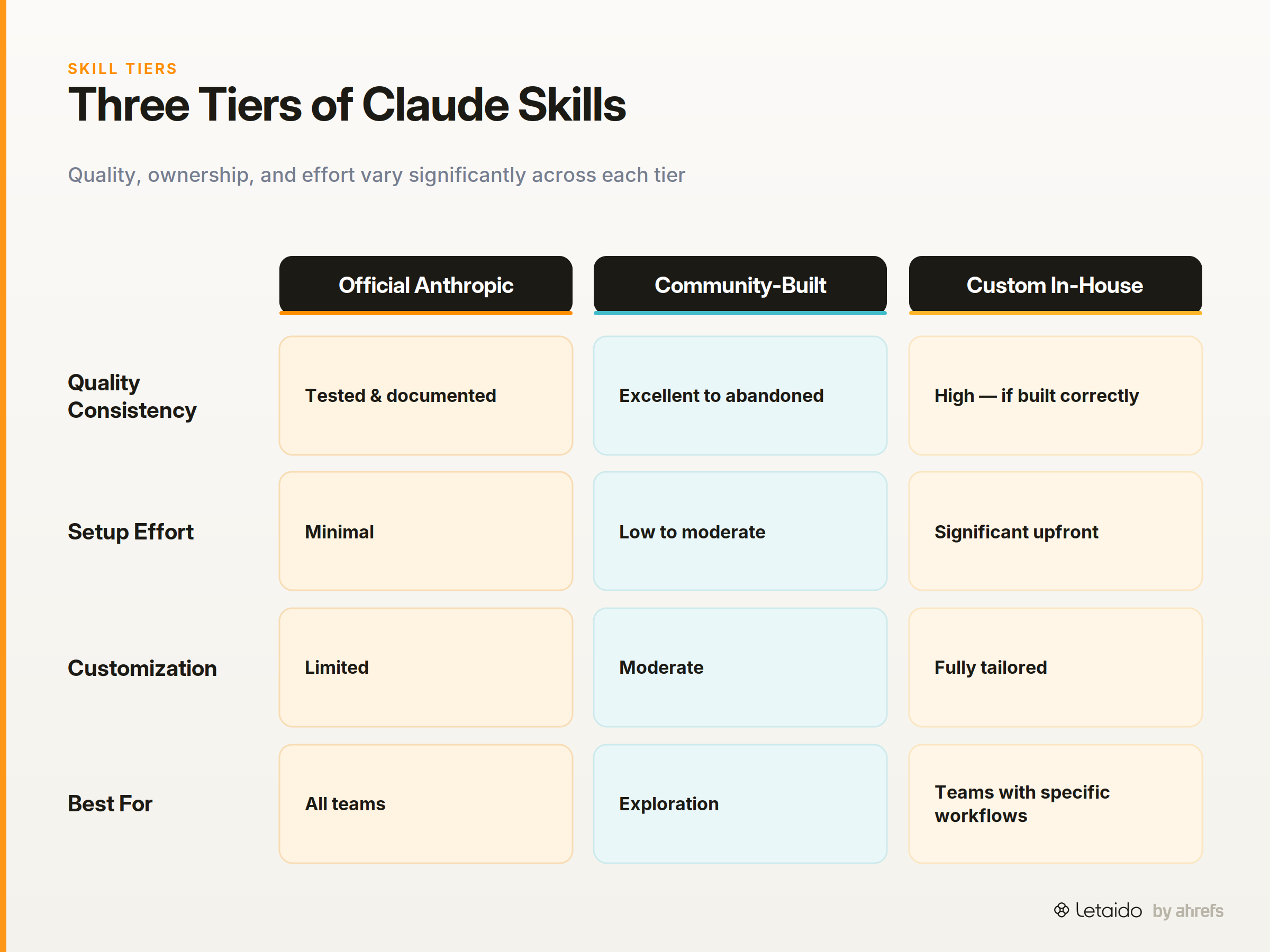
Claude skills are SKILL.md files that give Claude persistent, reusable instructions — loaded automatically when a matching task arises, not typed out fresh each session. Since Anthropic opened the official skills repo in 2025, the ecosystem has grown into hundreds of community-built and custom skills across marketing, development, ops, and research.
This list is for marketers, growth ops professionals, developers, and agencies. It's editorially filtered: Reddit's r/ClaudeAI and GitHub awesome lists are useful raw signals, but they don't answer which skills are actually worth building into a repeatable workflow. That's the gap this piece fills.
How we picked these: we spent several weeks digging through Anthropic's official skills repo, dozens of community GitHub repositories, pinned threads on r/ClaudeAI, and curated "awesome lists" maintained by active contributors. We read the actual SKILL.md files, checked commit histories to see what was still actively maintained, and prioritised skills with documented, real-world use over ones that looked impressive in a README. Every skill on this list is either from Anthropic's official repo, a community project with meaningful uptake, or a named GitHub project with its capabilities clearly documented and verifiable. Where something has a limitation or narrow use case, we say so.
One thing worth noting upfront: skills running on a schedule compound the ROI significantly. More on that at the end.
New to Claude skills? Read our primer on how Claude skills work first, then come back.
Install a Claude Skill in Two Minutes
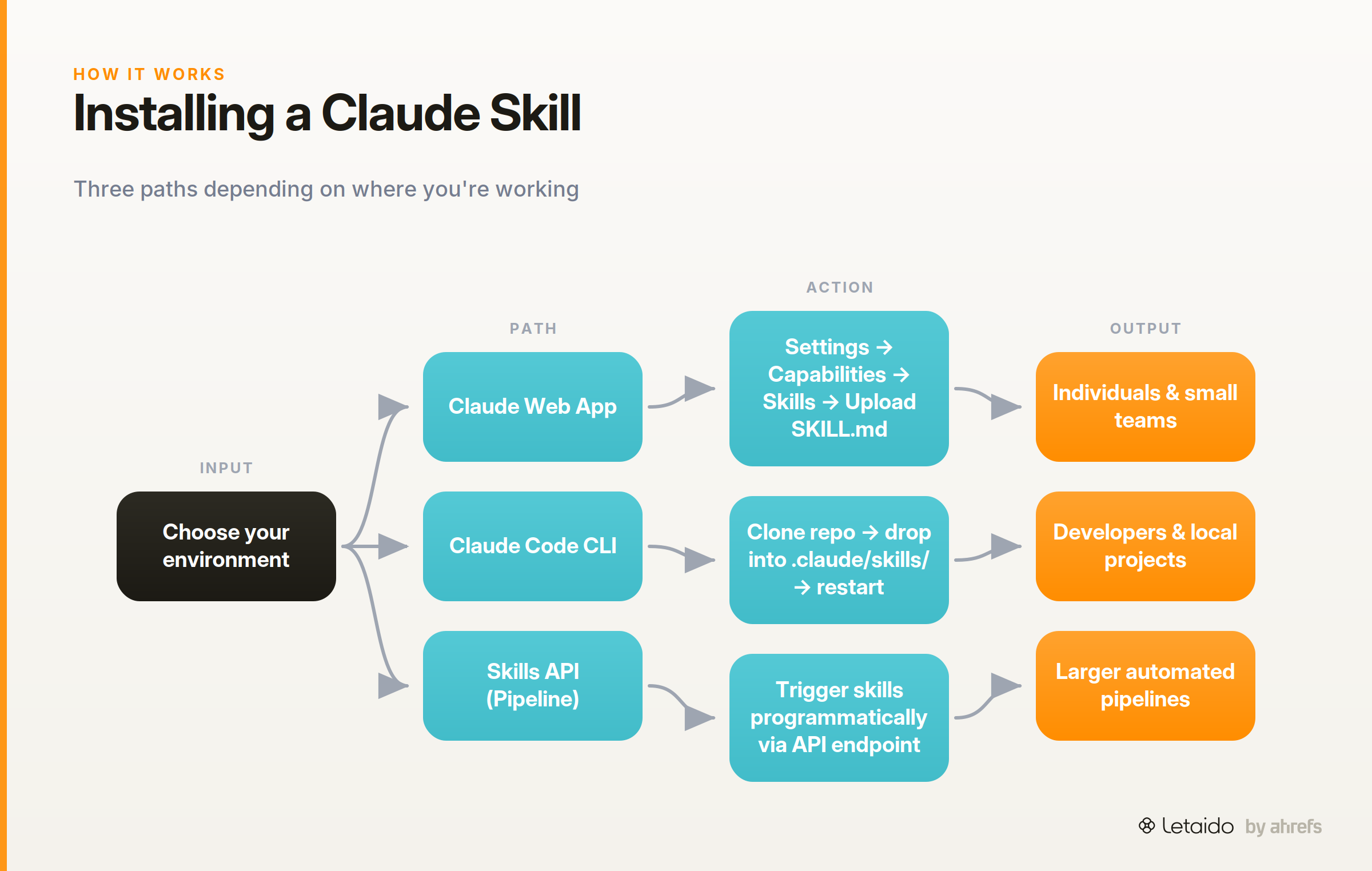
Installation is straightforward, but the right method depends on where you're working. The three paths below cover the most common scenarios.
Via the Claude web app
Go to Settings → Capabilities → Skills and paste or upload your SKILL.md file. This is the simplest route for individuals and small teams. For Team or Enterprise plans, an admin can deploy skills workspace-wide so every member gets access without individual setup.
Via Claude Code CLI
Clone the anthropics/skills repo locally and drop the skill folder into your project's .claude/skills/ directory. Restart Claude Code to load it. Check the skill's README for any script dependencies before running — some skills pull in external libraries or expect specific file structures.
Via the Anthropic skills repo and Claude Cookbooks
The anthropics/skills repo is the canonical starting point. For deeper integration, the Claude Cookbooks - Skills section documents the Skills API endpoint, which lets you trigger skills programmatically as part of a larger pipeline rather than through the chat interface.
The Best Claude Skills by Category
The skills below are grouped by the role that gets the most value from them. Each entry covers what the skill does, why it's worth adding, and where to find it. Not every skill will fit every team — the notes are honest about scope.
For Marketers and Content Teams
This is the category most skills repositories underserve. The tools below go beyond "write better copy" to encode actual marketing workflows Claude can execute end-to-end. (If you want copy-pasteable starting points, we maintain a free library of marketing skill files you can grab and adapt.)
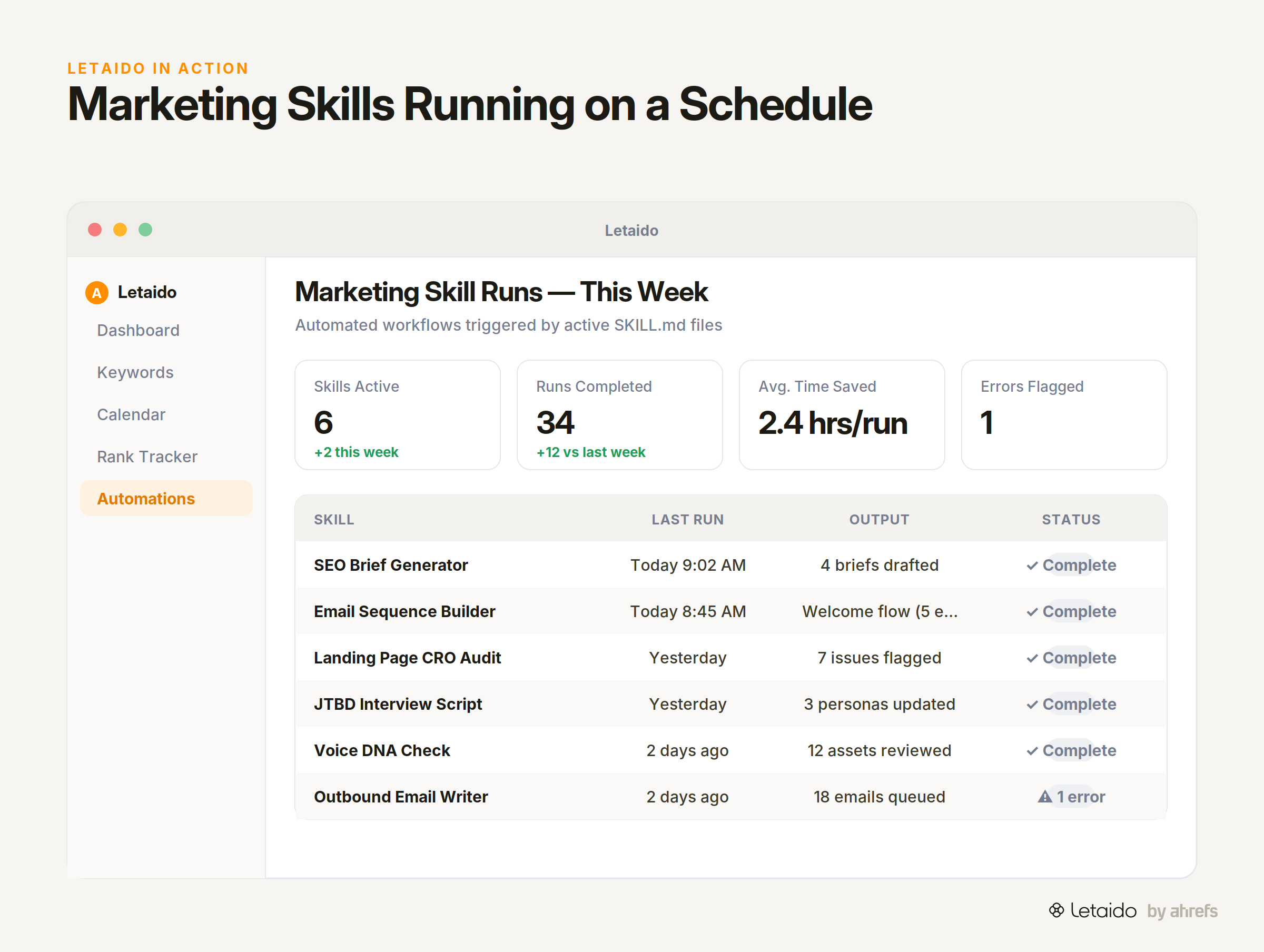
Corey Haines Marketing Skills is the most complete marketing skill set currently available in the community. The key difference from generic writing prompts: these are Markdown SOPs (standard operating procedures) that turn Claude from an advisor into an operator. It executes conversion copywriting using direct-response frameworks, generates SEO briefs with meta descriptions, audits landing pages for CRO improvements, and builds email sequences across welcome, launch, and re-engagement flows. Drop the relevant folder into .claude/skills/ and it runs the workflow, not just describes it.
wondelai/skills includes a Jobs-to-be-Done interview skill and a StoryBrand 7-part narrative skill. The JTBD skill is particularly underrated: it runs a structured customer interview using the full Jobs-to-be-Done methodology — forces of progress, Big Hire vs Little Hire — which most teams apply inconsistently, if at all. The same collection includes StoryBrand and Hooked skills for messaging and habit-loop design.
extruct-ai/gtm-skills is purpose-built for go-to-market work. It builds a persistent company and ICP context file that carries across sessions, generates testable pain hypotheses from that context, assembles target lists, and writes and sends outbound email. Each step reads the previous step's output, so the campaign stays internally consistent rather than drifting between sessions.
Anthropic's knowledge-work-plugins collection covers the Claude Cowork side — the non-coding, knowledge-worker workflows. The marketing plugin ships /draft-content for blog posts, newsletters and announcements, /campaign-plan for rollout planning, /brand-review to check output against your voice, and /seo-audit for on-page optimization. It pairs with connectors for Slack, Notion, Asana, Linear and Microsoft 365, so Claude can act across your marketing stack rather than just draft in isolation.
For Developers and Technical Teams
The development skill ecosystem is more mature than the marketing one, partly because Claude Code's CLI made it easier for developers to adopt skills early. The skills below have survived real production use.
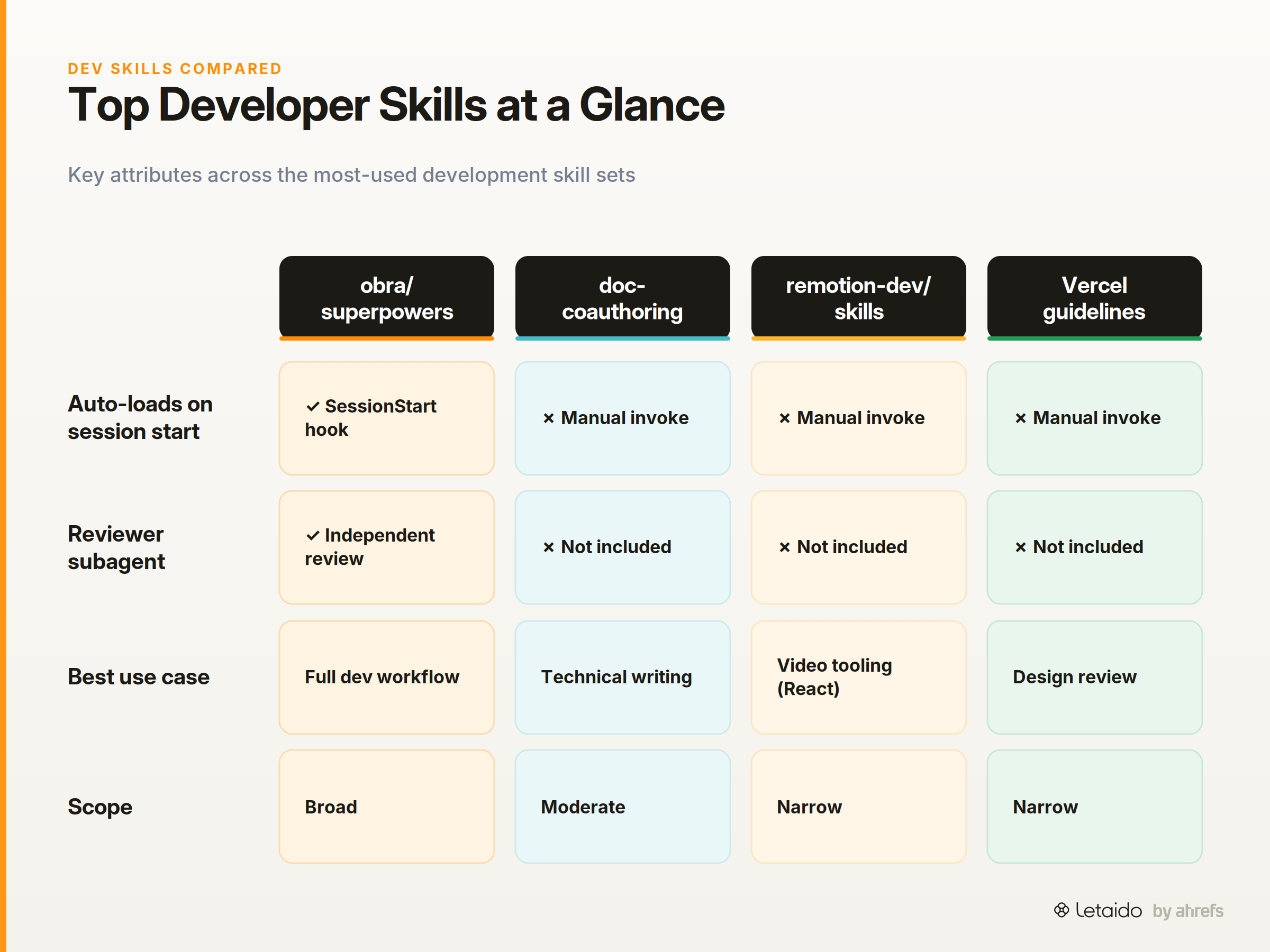
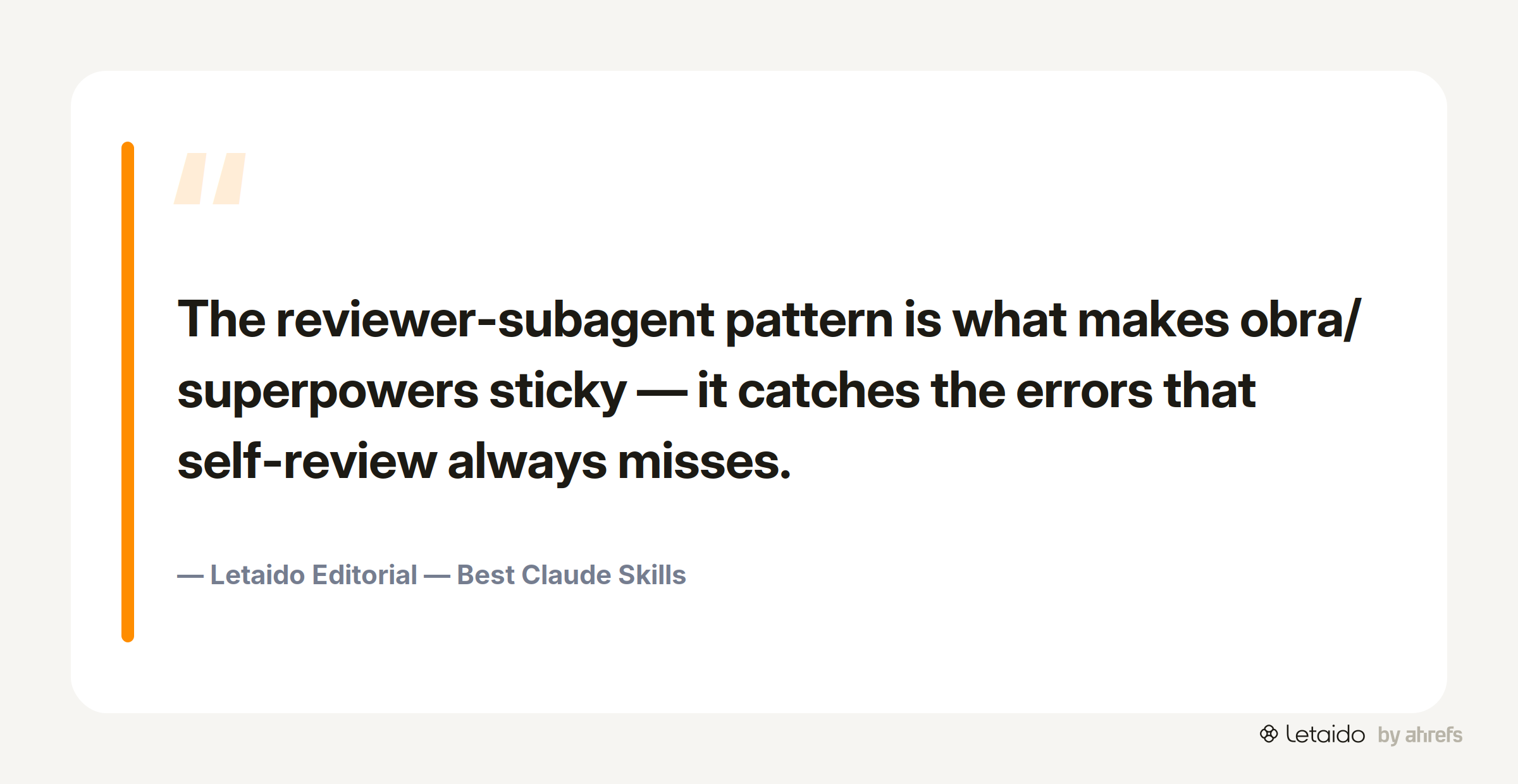
obra/superpowers is the most thoughtfully architected development skill set available. A SessionStart hook auto-loads the workflow, so you don't need to invoke it manually. Natural-language cues like "let's plan this feature" trigger a structured brainstorm-to-spec flow: numbered plan generation, test-first execution, and then an independent code-review subagent that evaluates the output separately from the agent that wrote it. The reviewer-subagent pattern is what makes this sticky — a fresh subagent reads the diff cold, without the framing of the agent that wrote it, and catches errors self-review misses.
The /review and structured code review skills are the entry point for most teams. They're available in the official Anthropic repo and in obra/superpowers. The TDD skill and debugging workflow in the same collection are worth adding alongside them; on their own they're useful, but the value compounds when they're part of the same session workflow.
Anthropic's doc-coauthoring skill forces a human-guided drafting process instead of one-shot generation. It transfers context before writing, requires outline sign-off, and then drafts section-by-section. Technical writers who've used it report fewer revisions than with standard generation — the process slows the model down in a useful way.
remotion-dev/skills is narrow by design: programmatic video from React, with specific rule files for subtitles, audio visualization, animation, and transitions. Only relevant if your team is already building video tooling with Remotion. If you are, it's essential.
Vercel web-interface-guidelines fetches Vercel's own design guidelines and checks your code against them, outputting concrete violations: visual hierarchy issues, spacing problems, accessibility gaps. Honest note: only useful if you're already working in a Vercel/React context. For those teams, it eliminates a class of design review cycles that usually happen in PR comments.
For Planning, Ops, and Research
Planning and ops skills are the most underrated category. They encode the connective tissue of project work — the steps teams skip because they're not glamorous.
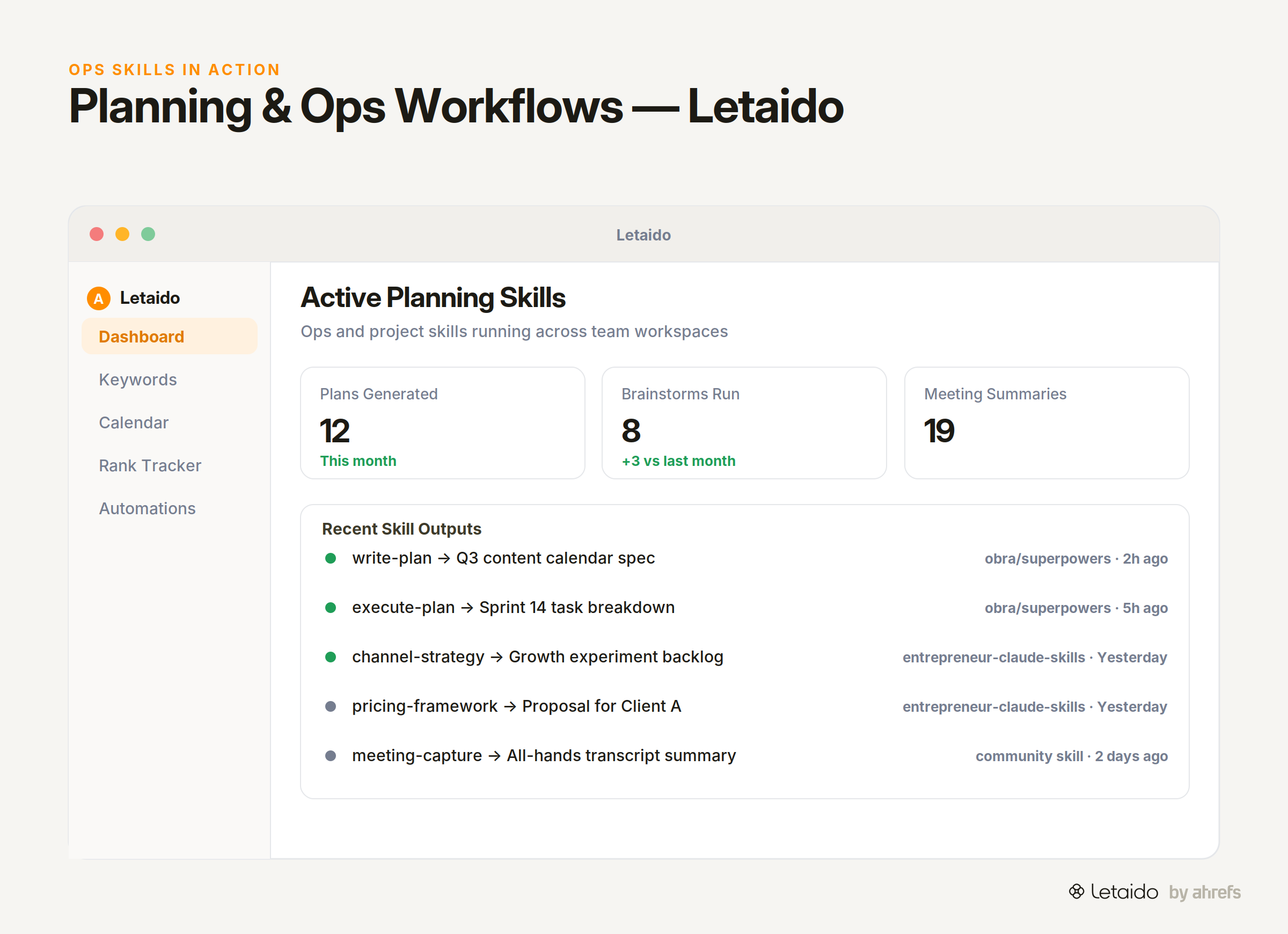
obra/superpowers deserves a second mention here for its write-plan and execute-plan skills. The SessionStart hook auto-loads them, and the natural-language trigger ("let's plan this") means there's no friction to adoption. The brainstorm skill in the same collection uses a structured brainstorm-to-spec format rather than a freeform "give me ideas" prompt.
mfwarren/entrepreneur-claude-skills groups domain SOPs by business function. The marketing and growth folder covers channel strategy and growth experiments. The sales folder handles outreach templates and pricing frameworks. There's a founder financial modeling section that ops-minded founders will find useful. The structure means you only load what's relevant — drop the folder you need into .claude/skills/.
For research-heavy teams, the discovery collections in the next section are the fastest way to find planning and ops skills worth trying — but treat every entry as a candidate, not a recommendation. Read the actual SKILL.md and check the repo's commit history before you build any community skill into a live workflow.
Community Collections Worth Bookmarking
No single repository covers the full skills ecosystem. These three collections, taken together, give you a reliable map of what exists and how to evaluate it.
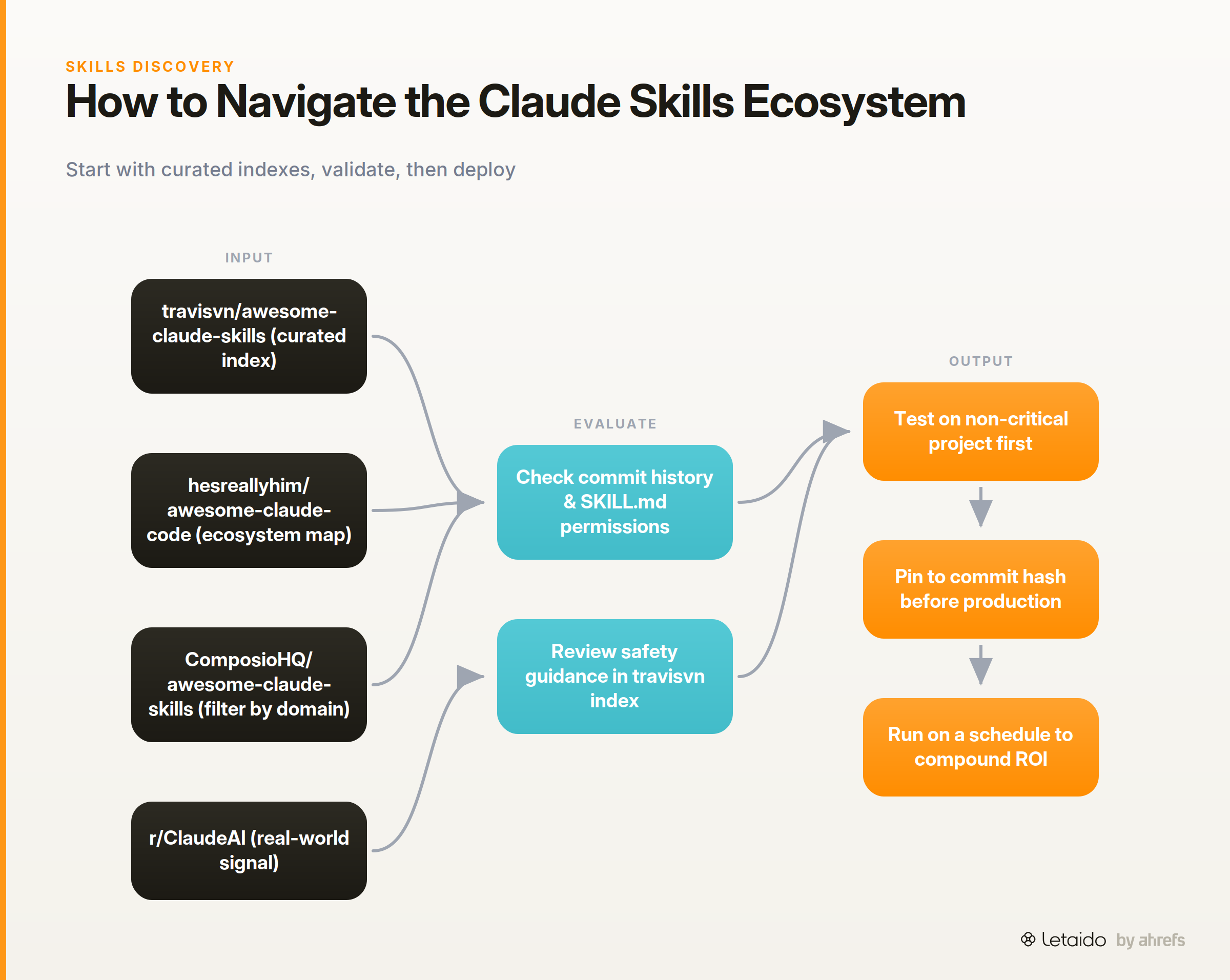
travisvn/awesome-claude-skills is the most curated community index available. It's organized as a markdown directory with coverage across marketing, SEO, and design skills. Importantly, it includes safety guidance — a baseline reference for vetting skills before team deployment. When evaluating any entry, check the linked repository's commit history and whether the SKILL.md documents its permissions requirements.
hesreallyhim/awesome-claude-code is broader in scope, covering skills, hooks, slash commands, agent frameworks, and plugins. Use it for ecosystem mapping when you're not sure what category of tool you need.
ComposioHQ/awesome-claude-skills complements the other two with one-command install tooling. The browsing experience is faster for teams that want to filter by workflow domain rather than read through markdown.
r/ClaudeAI is raw signal. It surfaces what practitioners are actually running week-to-week, which no curated list captures in real time. The noise ratio is high, but the comments on skills-specific threads reveal which skills hold up in real use versus those that impressed in a demo and got abandoned.
MCPModel Context ProtocolAn open standard for connecting AI models to external tools and data sources through one consistent interface instead of bespoke integrations. servers and subagents are worth pairing with skills as the ecosystem matures. An MCP server for Notion, Slack, or GitHub extends what a skill can act on — skills encode the workflow logic, MCP connections provide the data and action surfaces. The combination is where the most interesting automation patterns are emerging.
Build Your Own Skill When Off-the-Shelf Isn't Enough
Off-the-shelf skills cover common patterns well. For team-specific workflows, a brand voice, or a proprietary process, custom skills are worth the investment. Here's what the build looks like in practice.
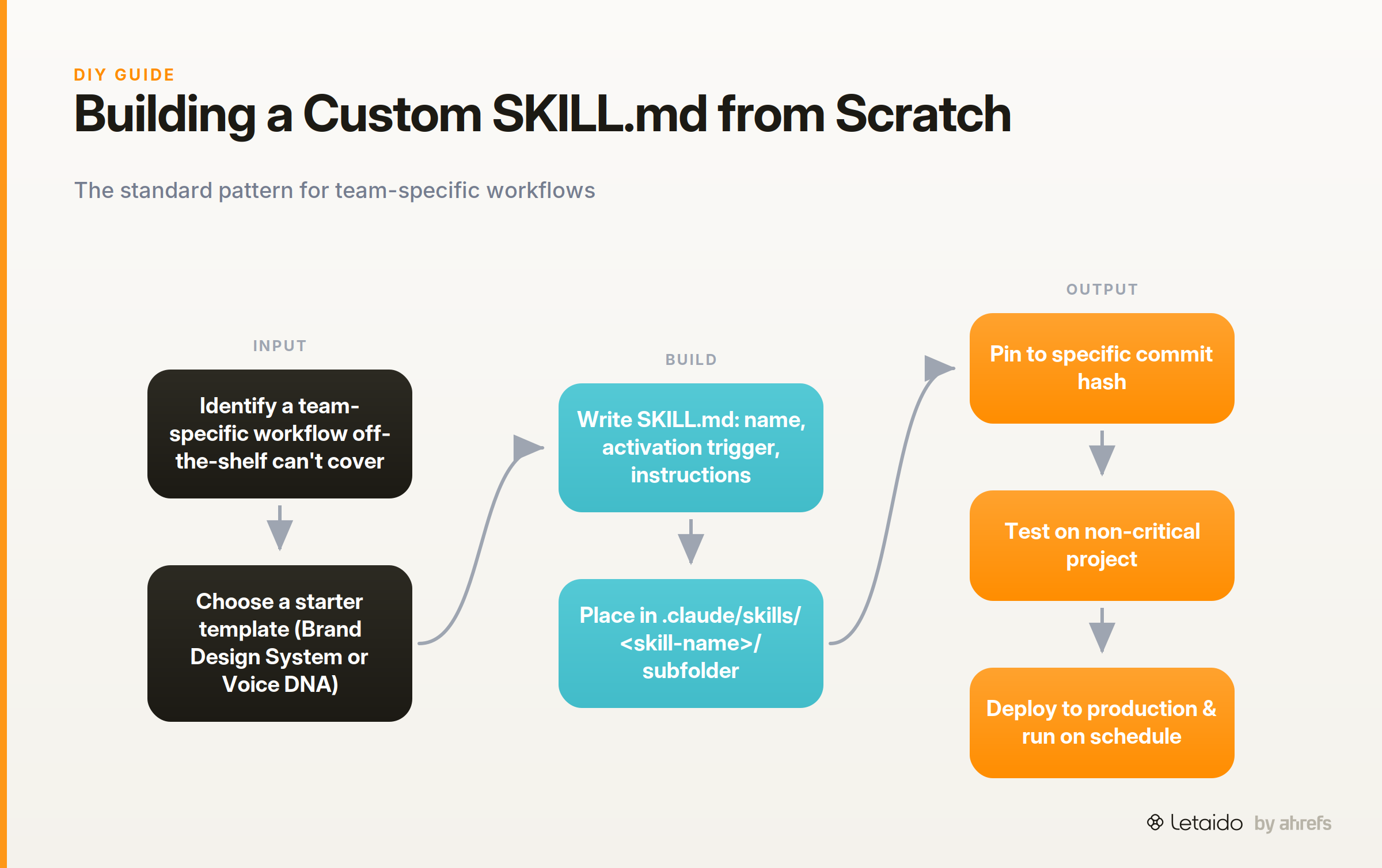
A SKILL.md file has a defined structure: a name, a description of when the skill activates, and the instructions Claude follows when it does. Skywork's explainer on SKILL.md structure covers the runtime loading mechanics in detail if you want to go deep on how progressive disclosure works under the hood.
For folder structure and version control, the standard pattern is a .claude/skills/ directory in your project repo, with each skill in its own subfolder containing the SKILL.md and any supporting files. Pin your SKILL.md to a specific commit hash before deploying to production — community skills update without warning, and a silent change to a skill that runs on a schedule can break a workflow in non-obvious ways.
The fastest way to start isn't a blank file — it's Anthropic's skill-creator (in the anthropics/skills repo). It interviews you about the workflow you want to encode, generates the folder structure, and formats the SKILL.md frontmatter for you. Point it at a process you repeat weekly — a brand-voice reference, a client-onboarding checklist, a reporting format — and iterate from the scaffold it produces.
Codebase to Course by Zara Zhang is worth studying even if you'll never build a coding course. It reads a codebase and renders a self-contained HTML course with quizzes and plain-English walkthroughs. The reason it's useful as a reference: it demonstrates how to encode a domain process (technical documentation) as a skill that produces a specific, structured deliverable. The pattern generalises — the same approach works for any workflow with a defined input and a defined output format.
Vet a Skill Before You Deploy It to a Team
Community skills run with the permissions you grant them. Before rolling out any third-party skill to a team environment, these checks are worth making explicit.
Least privilege. Audit what permissions the skill actually requires versus what it requests. A skill that asks for file system access to perform a text summarization task is asking for more than it needs. Limit permissions to the minimum required for the workflow the skill documents.
Sandboxing limitations. Claude Code does not sandbox skills execution in a way that fully isolates a skill from your local environment. A skill with file write permissions can modify files. Treat community skills from unknown authors the same way you'd treat a third-party npm package — review the code before running it in a production context.
Peer review checklist. Before team deployment: run an end-of-session review to confirm the skill completed its intended workflow; run a feature completeness check against the skill's documented capabilities; do a manual security pass on any skill that touches external APIs, writes to a database, or sends communications.
Formal security review. For development teams deploying skills that interact with production codebases, Trail of Bits Security Skills and CodeQL/Semgrep integration add a formal vulnerability detection and variant analysis layer. These are appropriate for enterprise and agency environments where a compromised skill could affect client data or production systems.
travisvn/awesome-claude-skills includes its own safety guidance section — a reasonable baseline checklist for teams that don't have a formal security review process in place.
How to Stay Current as the Ecosystem Moves Fast
The skills ecosystem is changing at a pace that makes any single article a snapshot, not a definitive reference,. As of July 2026, the directions with the most momentum are worth tracking specifically.
MCP servers are becoming the standard extension point for skills that need to act on external data — Notion, Slack, GitHub, and similar connectors are the most active area of community development. Reviewer agents (the pattern obra/superpowers uses) are gaining adoption as a quality-control layer for any skill that produces a consequential output.
For staying current, three sources are more reliable than any article:
The Anthropic skills repo commit history shows what's being actively maintained and updated. Anthropic's official Agent Skills documentation tracks changes to how skills work. The r/ClaudeAI new posts feed surfaces practitioner discoveries before they make it into curated lists.
One operational note: pin skills to commit hashes in production. New versions ship without changelog notices, and a silent update to a skill that runs on a schedule will change its behavior without alerting you.
If the skills above map to recurring work your team runs — weekly content audits, SEO briefs, rank-drop monitoring, competitive analysis — the leverage isn't in running them once manually. It's in running them automatically, on a schedule, without anyone having to trigger them.
That's what Letaido is built for. Letaido runs skills continuously with full Ahrefs data access, sends alerts to Slack when thresholds are crossed, and builds the dashboards and reports your team actually checks. At $99/month flat, it's worth a trial if you're already spending time on any of the workflows above.