
It's Monday morning. Before you opened your laptop, your marketing agent pulled last week's rank movements across 200 tracked keywords, flagged three competitor pages that climbed into your target positions, and drafted content briefs for the two topics with the highest traffic opportunity. Your weekly performance report is already in your inbox.
That's not a demo scenario — it's what a well-configured AI agent for marketing does on a repeating schedule. This guide explains how these agents actually work, which tasks they handle best, and how to deploy your first one without a six-month implementation project.
What an AI Marketing Agent Actually Is (And Isn't)
An AI marketing agent is software that can set its own sub-goals, take actions across tools and data sources, evaluate the results, and adjust — all without a human prompting each step. It's not a chatbot you query. It's not a Zapier workflow that fires when a condition is met. It's a system that reasons about what to do next based on a goal you've defined.
The practical difference: a chatbot answers your question. An automation runs when triggered. An agent decides how to achieve an outcome, executes multi-step tasks to get there, and gets better at it over time.
How agents differ from chatbots and simple automations
Here's where most people get confused. All three feel similar on the surface — they all "use AI" — but they operate at fundamentally different levels of autonomy.
| Rule-based automation | AI assistant (chat) | AI agent | |
|---|---|---|---|
| Trigger | Fixed condition ("if X then Y") | Human prompt | Goal or schedule |
| Reasoning | None — follows rules | Single-turn reasoning | Multi-step reasoning |
| Actions | One predetermined action | Generates text/response | Executes across tools |
| Learns over time? | No | No (in standard use) | Yes — updates based on outcomes |
| Example | "Send email when form submitted" | "Write me a subject line" | "Monitor rankings, flag drops >5 positions, draft briefs for gaps, post to Slack" |
The key capability that separates agents from the other two is autonomous execution across a chain of decisions — not just responding, but acting, checking, and acting again.
The agentic loop: perceive → reason → act → learn
Every AI agent runs some version of this four-step cycle:
- Perceive — takes in data from connected sources (your analytics, CRM, search console, competitor sites, keyword tool)
- Reason — determines what the data means relative to the goal and what actions to take
- Act — executes those actions: pulling a report, writing a brief, sending an alert, updating a record
- Learn — updates its understanding based on outcomes, so future cycles improve
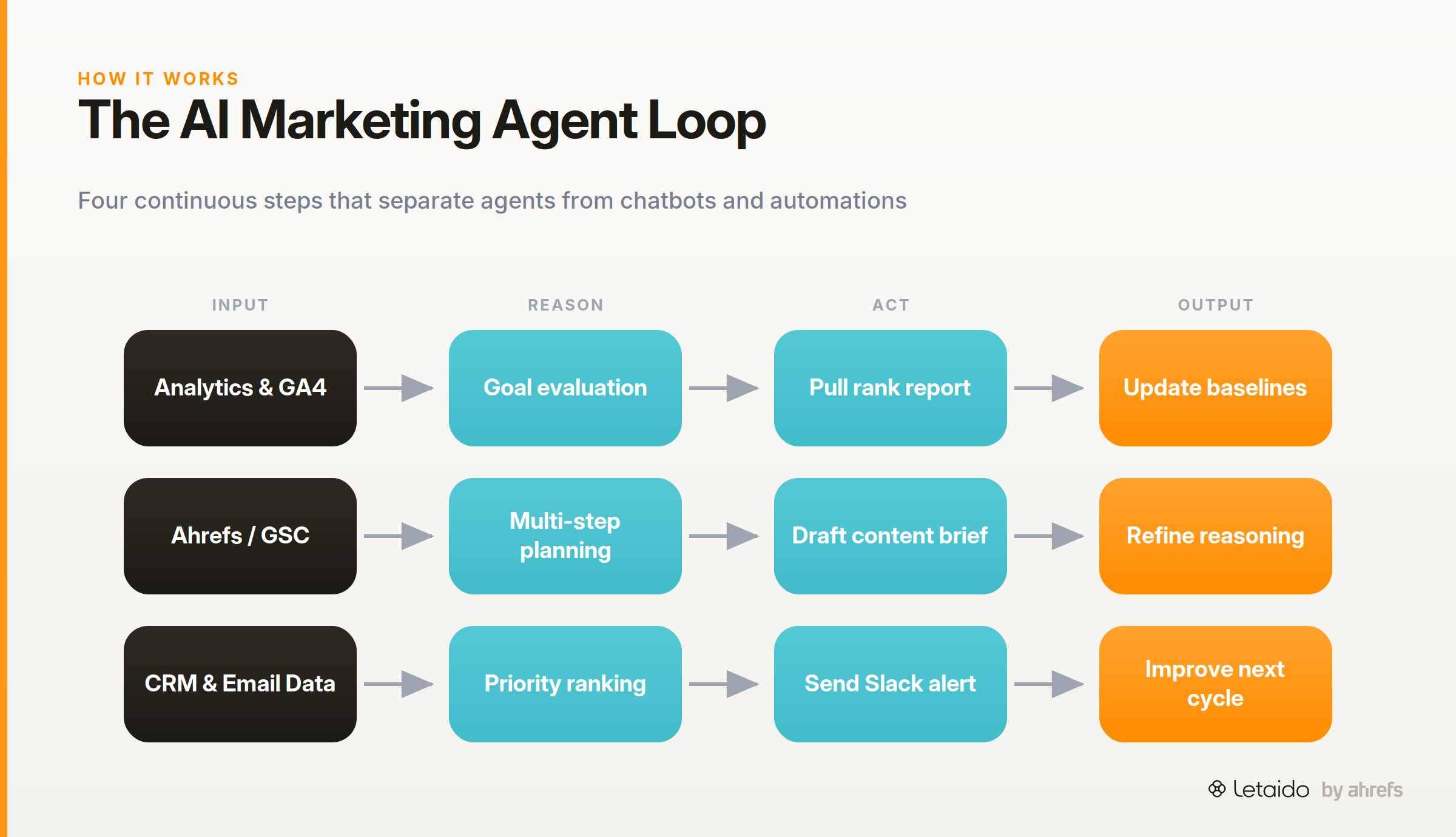
What makes this useful for marketing is that the loop runs continuously. An agent monitoring your paid campaigns doesn't wait for your Tuesday check-in — it catches the CTR anomaly at 2 a.m. and surfaces it before budget burns. The compounding effect is real: agents that run for weeks have more context than ones that just started, and that context improves the quality of their reasoning.
The Main Types of AI Agents Marketing Teams Deploy
These aren't academic categories — they map to the actual jobs marketing teams hire agents to do.
Content and creative agents
A content agent handles the generation and iteration side of content production: turning a keyword + audience brief into a draft, adapting a long-form post into social formats, maintaining a consistent brand voice across output. More advanced versions use brand voice training — ingesting your existing content to match your style, terminology, and tone — and multimodal creative briefs that incorporate image direction alongside copy.
What they replace: the first-draft grind, format repurposing, and the context-switching cost of briefing writers on the same audience repeatedly.
SEO and performance agents
These agents monitor keyword rankings, flag content that's slipping in search visibility, identify gaps where competitors are ranking and you're not, and generate on-page optimization recommendations. Connected to a tool like Ahrefs, they can run the kind of analysis that would take an SEO analyst a full morning — keyword clustering, intent mapping, SERPSERPThe search engine results page — the full set of organic listings, ads, and features returned for a query. gap identification — on a daily schedule.
Letaido in Letaido is purpose-built for this: it has direct access to Ahrefs data, which means it can build rank tracking dashboards, generate briefs based on live keyword opportunity data, and alert you when a competitor makes a significant move into your keyword space.
Campaign orchestration and email agents
These agents manage multi-step campaign logic: sequencing emails based on engagement behavior, running A/B tests on subject lines and CTAs, adjusting send timing based on open rate patterns, and triggering follow-up actions in connected platforms. They handle the branching decision tree that would otherwise require a marketing ops person to maintain manually in your automation platform.
Personalization and segmentation agents
A personalization agent segments your audience by behavior in real time — not the static lists you built last quarter, but dynamic segments that update as signals come in. It then serves different content, recommendations, or messaging to each segment. Hyperpersonalization at scale is the practical outcome: the agent makes decisions about which message each user sees based on what they've done, not which static bucket they were assigned to.
Analytics, reporting, and competitive intelligence agents
These agents connect to your data sources, surface anomalies, build scheduled reports, and track competitor activity. The more capable ones use Retrieval Augmented GenerationRetrieval-augmented generationFetching relevant documents at query time and feeding them to the model, so answers are grounded in your own content instead of the model's memory. (RAG) — a technique where the agent retrieves relevant information from a knowledge base before generating a response, rather than relying purely on its training data. For marketing, this means an agent can answer questions like "why did our organic traffic drop last week?" by actually pulling and reasoning over your real analytics data.
What AI Agents Actually Handle: Real Use Cases
This is where the rubber meets the road. Each use case below follows the same structure: what you did manually before, what an agent handles now.
SEO workflows — rank monitoring, gap analysis, brief generation
Before: Every Monday, someone on the team exports rank data from Ahrefs, filters for movement, compares against last week, builds a Slides deck, pastes it into Slack. Then separately, a writer manually researches what competitors are covering that you're not. The whole process takes three to four hours.
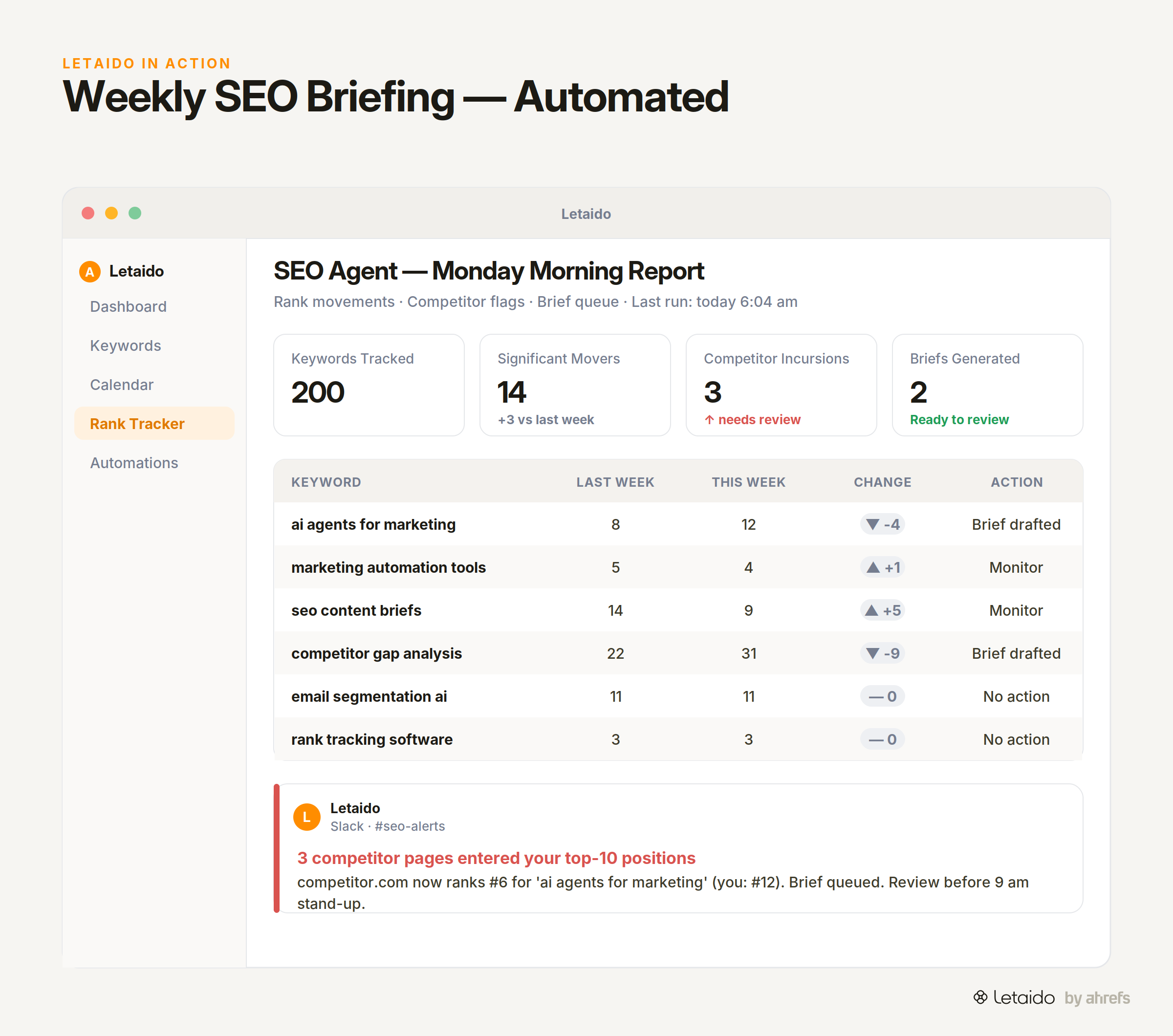
With an agent: The agent runs the rank pull on a schedule, identifies the keywords that moved significantly (up or down), cross-references them against your content inventory, flags competitor pages that moved into your top positions, and generates a prioritized brief for any gap worth targeting. It drops the summary directly into your Slack channel before you start your day.
On-page recommendations work the same way: connect the agent to your CMS and analytics, define the optimization criteria, and it surfaces a prioritized list of pages to update — with suggested changes — rather than requiring a manual audit.
This is Letaido's default starting workflow for Letaido users — see how it works.
Audience segmentation and real-time personalization
Before: Your email segments are defined by list source, lead score tier, and maybe one behavioral tag. They're updated quarterly if someone remembers.
With an agent: The agent ingests behavioral data continuously — pages visited, content downloaded, email engagement — and maintains dynamic segments that reflect what your audience is actually doing right now. When someone hits a signal that indicates high purchase intent, they move into the appropriate segment automatically. The agent can then trigger personalized content or outreach without a human reviewing each transition.
For e-commerce or SaaS teams, this extends to product recommendation engines: the agent surfaces the right product or feature based on a user's session behavior, not a pre-built "customers like you" rule.
Campaign performance monitoring and anomaly detection
Before: You check your campaign dashboards every morning, compare against targets, and try to catch problems before significant budget is wasted.
With an agent: You define acceptable performance ranges for your key metrics. The agent monitors continuously and alerts you the moment something falls outside those ranges — a CTR drop, a conversion rate spike in one segment (positive anomaly), a cost-per-acquisition that's trending toward budget breach. It can also run A/B tests autonomously, declare a winner when statistical significance is reached, and roll the winning variant into production.
Predictive analytics extends this further: rather than reacting to what happened, the agent models what's likely to happen based on current trajectory and flags it early enough to act.
Competitive intelligence on autopilot
Before: Competitive monitoring means setting up Google Alerts, occasionally running a manual Ahrefs search on a competitor domain, and hoping someone notices when a competitor launches a new content push.
With an agent: You configure the agent to track specific competitor domains. It monitors keyword ranking changes, new content publication, backlink acquisition, and SERP position shifts — and delivers a weekly or daily brief on what's changed. When a competitor posts a piece directly targeting one of your priority keywords, you know within hours, not weeks.
Integrated with your CRM, this kind of competitive data can also inform sales conversations: if a prospect is in your pipeline and their industry just saw a competitor move aggressively on a keyword, your sales team gets context.
Lead qualification and CRM enrichment
Before: SDRs manually score leads based on form fill data and basic firmographics, then spend time on calls that go nowhere.
With an agent: The agent scores incoming leads against your ICP criteria using real-time behavioral and firmographic data, enriches CRM records with missing fields, flags high-intent leads for immediate follow-up, and routes the rest into appropriate nurture sequences. The SDR queue contains people who are actually worth calling. The agent handles the research and triage that previously consumed hours of rep time.
The Real Benefits — and How to Know They're Working
Workflow automation is the most immediate benefit, but the right way to measure it is hours recovered per week per team member, not "tasks automated." If your content team spent six hours a week on reporting and brief research, and an agent reduces that to one hour of review, that's a measurable output you can track from week one.
Real-time data analysis matters because marketing decisions are time-sensitive. An agent catching a campaign anomaly in hour two instead of hour twenty-six isn't just faster — it can mean the difference between a minor budget adjustment and a significant waste. Measure this as mean time to detection for performance issues.
Hyperpersonalization at scale is genuinely different from what batch-and-blast marketing automation delivers. The signal is engagement metrics: when dynamic behavioral segments outperform static demographic segments on open rates, CTR, and conversion, the agent is working. Set up that A/B structure early.
Competitive intelligence value is harder to quantify, but proxy metrics work: how often does your team learn about competitor moves from the agent before they learn from a client or sales call? Track that ratio over 90 days.
Lead qualification ROI shows up in pipeline efficiency: cost per qualified opportunity and SDR-to-demo conversion rate. These should move if the agent is doing real triage rather than just adding noise to the CRM.
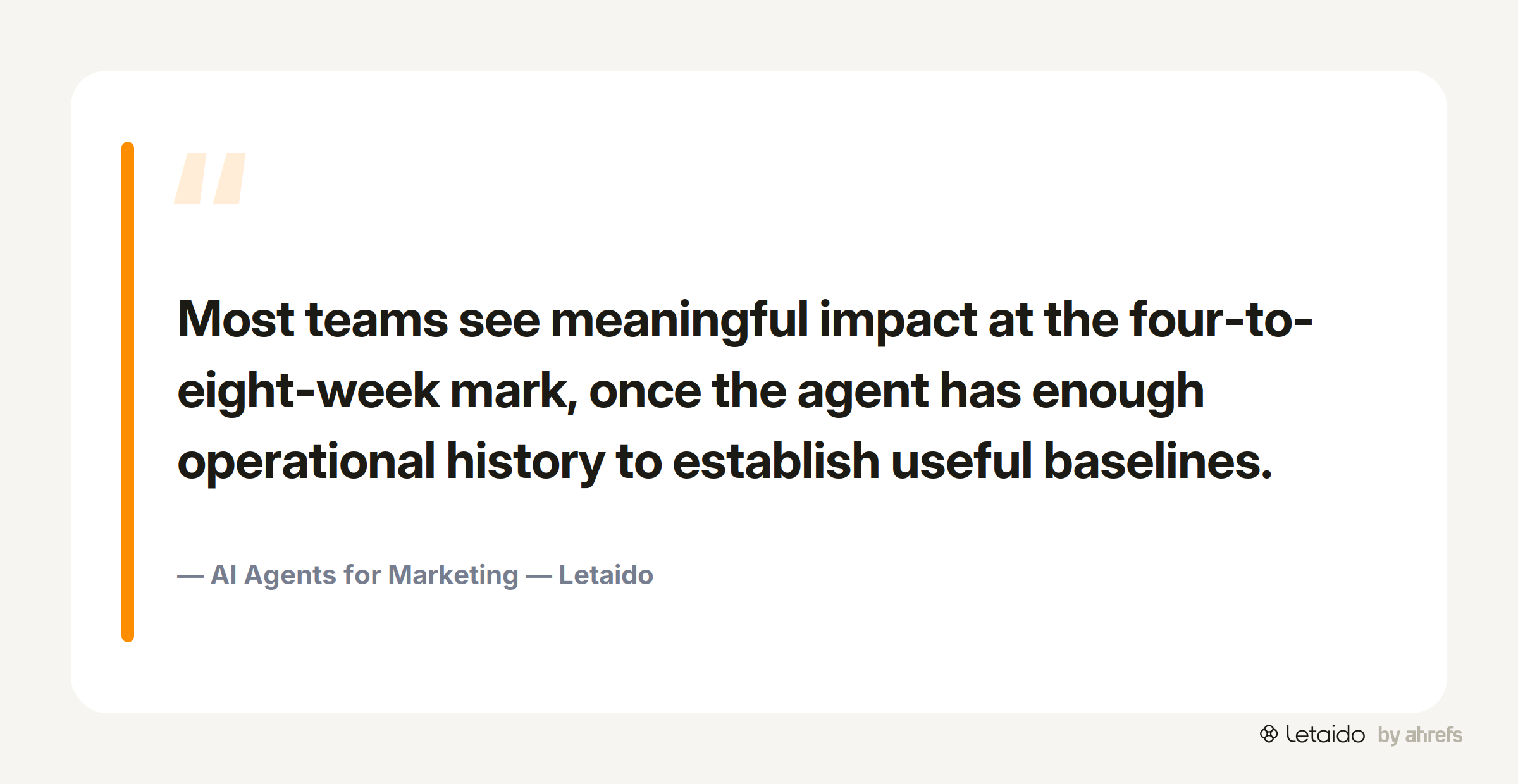
One honest note: these benefits don't materialize on day one. Most teams see meaningful impact at the four-to-eight-week mark, once the agent has enough operational history to establish useful baselines.
How to Deploy Your First Marketing AI Agent
The most common mistake is starting with a multi-agentMulti-agent systemSeveral specialised agents working together on one job, each owning a step, coordinated by a planner or a shared workflow. orchestration plan before you've confirmed a single agent works reliably. One agent, one workflow, clear outputs.
Step 1 — Pick one high-friction, repeatable workflow
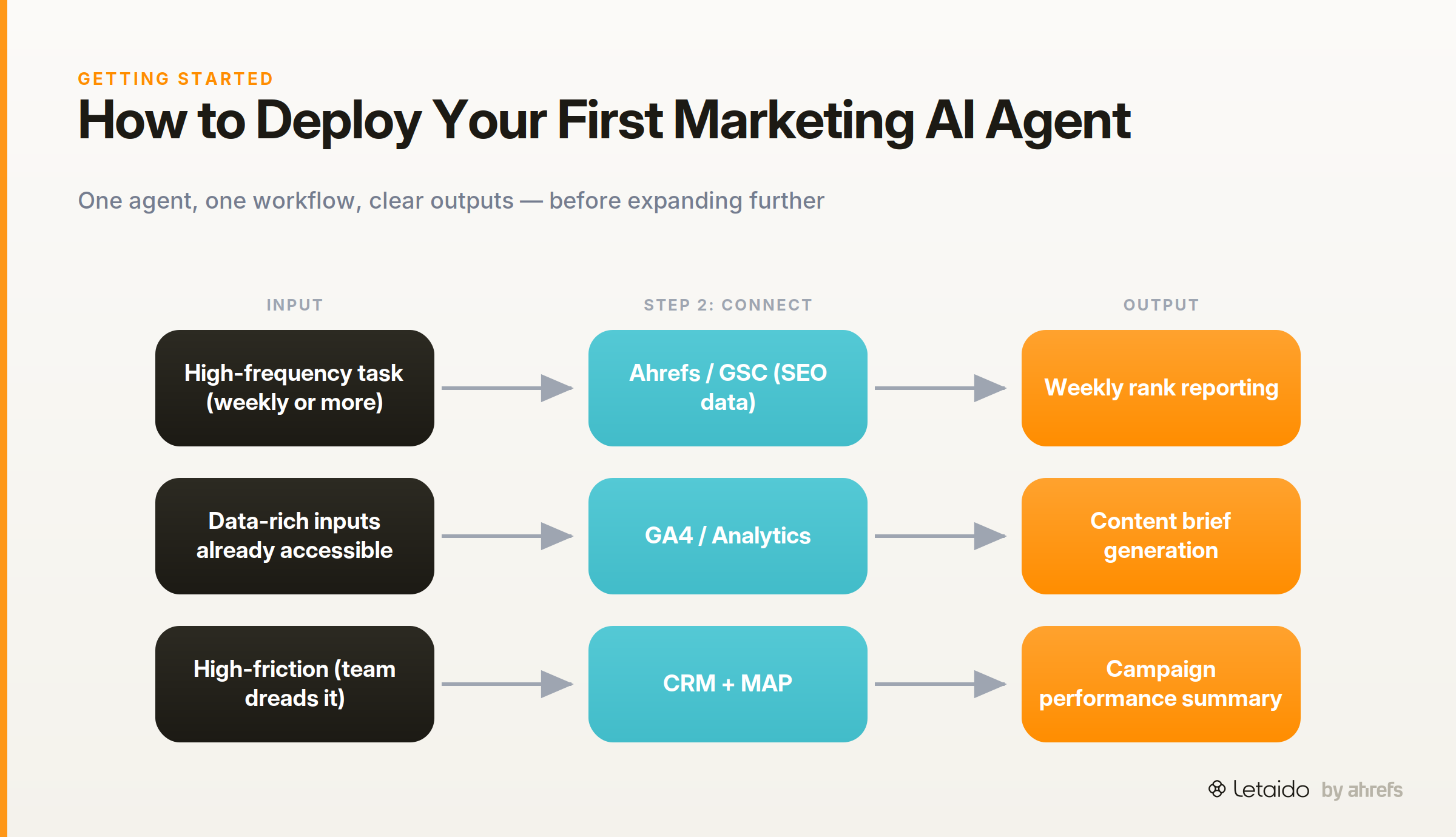
The ideal starting workflow has three characteristics: it's high-frequency (runs weekly or more), data-rich (the inputs exist and are accessible), and high-friction (someone currently spends meaningful time on it). Weekly rank reporting, content brief generation, and campaign performance summaries all qualify. Quarterly strategic planning does not — too infrequent and too dependent on judgment calls the agent can't make yet.
Ask your team: "What's the recurring task that people dread most because it's important but time-consuming?" That's your starting point.
Step 2 — Connect your data sources
An agent is only as good as the data it can reach. For most marketing teams, the core connections are:
- Search and SEO data — Ahrefs, Google Search Console, or both
- Analytics — GA4, Adobe Analytics, or your product analytics tool
- CRM — HubSpot, Salesforce, or wherever your contact and deal data lives
- Marketing automation platform — for email and campaign data
- Content inventory — your CMS or a structured export of existing content
Start with the sources that matter for your first workflow. Don't try to connect everything on day one — connection sprawl creates data quality problems before you've tested the agent's core behavior.
When setting up a Data Integration & Intelligence Agent, document what each source contains and how fresh the data is. An agent making recommendations based on week-old data when hourly data is available is a setup problem, not an AI problem.
Step 3 — Define outputs and human review checkpoints
Before you run the agent, decide exactly what it should produce and which outputs require human approval before any action is taken. This isn't just a safety measure — it's how you maintain quality control and catch systematic errors early.
A useful framework:
- Auto-publish: outputs the agent can send or post without review (e.g., internal Slack alerts)
- Review queue: outputs a human approves before they go anywhere external (e.g., drafted content briefs, email copy)
- Notify only: the agent flags something for human decision, takes no action itself (e.g., anomaly detection alerts on paid spend)
Define these gates before launch. Teams that skip this step often end up with an agent doing things they didn't intend, which erodes trust in the system and leads to shutting it down.
For content calendar management specifically: the agent can populate and maintain the calendar, but a human should sign off on the strategic prioritization before execution begins.
Step 4 — Measure, then expand to multi-agent systems
After two to four weeks, review two things: Did the agent produce what you expected? And did acting on its outputs move the metrics you care about? If both are yes, you've validated the workflow and can either expand the agent's scope or add a second agent for a complementary workflow.
Multi-agent systems — where specialized agents hand off to each other — become valuable once individual agents are running reliably. A common sequence: an SEO agent identifies a content gap → hands off to a content agent to draft the brief → hands off to a CMS integration to schedule the work. Each handoff should have a defined format so outputs don't need manual reformatting between steps.
The expansion path that tends to work: SEO/reporting agent first (high signal, low risk), then campaign monitoring, then content production, then personalization. Each layer builds on the data and context the previous one established.
Challenges to Solve Before You Scale
Every category of benefit has a corresponding failure mode. These aren't hypothetical — they're the reasons teams roll back agent deployments.
Data quality and hallucination risk
An agent reasoning over inaccurate data produces confidently wrong conclusions. If your CRM has 40% incomplete records, your lead qualification agent will make bad routing decisions at scale. If your rank data has tracking errors, your SEO agent will prioritize the wrong briefs.
HallucinationHallucinationA confident, fluent model output that is simply false. It's a property of next-token prediction, not a bug to be patched out. — where an AI generates plausible-sounding but fabricated information — is a real risk, particularly in content generation and competitive intelligence. The mitigation isn't avoiding agents; it's building in verification steps. For factual claims (competitor data, market statistics), require the agent to cite the source it pulled from and validate that the source is real. For content output, human review before publication is non-negotiable.
Practical sanity checks: audit the first 20 outputs manually before letting any go through without review. Look for systematic errors, not just one-off mistakes — systematic errors mean a setup problem.
Governance, oversight, and shutdown controls
Before you give an agent access to any external channel — email sending, social posting, CRM writing — define the kill switch. Who can pause or shut down the agent? Under what conditions should it automatically stop? What's the escalation path if it does something unexpected?
AI sandboxing — running the agent in a read-only or staging environment before granting production access — is worth the extra setup time. It lets you observe behavior without risk.
Governance considerations that matter more as you scale:
- Approval gates for any action above a defined threshold (spend, volume, audience size)
- Audit logs of what the agent did and why, so you can diagnose problems
- Regulatory compliance — if your agent handles personal data, ensure it operates within your existing data governance policies; GDPR and CCPA implications apply regardless of whether a human or agent is processing the data
- Cybersecurity review of any new API connections the agent uses — each integration is an attack surface
Emergency shutdown mechanisms should be simple and documented. Not buried in a settings panel — known by everyone who works with the agent.
Brand voice, bias, and company-specific knowledge
A general-purpose AI agent doesn't know your brand. Without deliberate training on your specific voice, terminology, and positioning, content output will be correct but generic — which means it will need significant revision before it's useful.
Brand voice training means giving the agent a set of reference materials: your best-performing content, your style guide, examples of copy you'd approve versus copy you'd reject. More is better. The agent uses these as guardrailsGuardrailsThe checks around a model — validation, allowlists, human review — that constrain what its output is allowed to do downstream. when generating new content.
Company-specific knowledge extends this: your product's differentiators, your pricing logic, your ICP characteristics, your competitors' known weaknesses. An agent writing content about your product without this context will default to category-level claims.
Bias enters in two places: in the training data the underlying model was built on (which you can't control) and in the data you feed the agent (which you can). If your historical email data shows that certain demographic segments got less attention, an agent optimizing on that history will perpetuate the pattern. Audit training data for representational gaps before using it to configure personalization agents.
Where AI Marketing Agents Are Heading
The current generation of AI marketing agents is largely single-modal (text), single-channel, and requires meaningful technical setup. That's changing fast.
Multimodal AI will let agents reason across text, image, video, and audio simultaneously — a content agent that can brief a designer, review a visual for brand compliance, and flag inconsistencies in a video ad without human intermediaries for each format.
No-code and low-code platforms are compressing setup time significantly. Teams that needed a developer to configure integrations six months ago can now do it without one. This shifts the constraint from technical resources to strategic clarity about what you want the agent to do.
Multi-agent systems are maturing from concept to practical infrastructure. The coordination problem — how do specialized agents communicate, hand off, and avoid stepping on each other — is getting solved at the platform level, which means teams can run more complex pipelines without custom engineering.
Predictive AI is moving from descriptive (here's what happened) to prescriptive (here's what to do). The next generation of performance agents won't just flag anomalies — they'll propose specific interventions with modeled confidence levels.
The governance question is the wildcard. As agents get more capable and autonomous, the standards for oversight, auditability, and ethics will tighten — both from regulators and from enterprise buyers. Teams building governance practices now will have a structural advantage when those standards arrive. The direction of travel is more capability with more accountability, not more autonomy with less oversight.
Frequently Asked Questions
Do I need engineering resources to deploy an AI marketing agent?
For most starting workflows, no. Platforms like Letaido are built for marketers without engineering support — you connect data sources through standard integrations, configure the agent's goals and outputs through a UI, and define review checkpoints without writing code. You will need someone with enough technical fluency to manage API connections and understand what data is flowing where — typically a marketing ops role. For custom integrations with proprietary systems, engineering involvement speeds things up but isn't always required from day one.
What data access does a marketing AI agent actually need?
It depends entirely on what the agent is doing. An SEO agent needs access to keyword and ranking data, your content inventory, and ideally your analytics. A campaign monitoring agent needs your ad platform data, conversion data, and attribution model. A lead qualification agent needs your CRM and behavioral data from your site and product. Start with the minimum data required for your first workflow — don't connect everything upfront. Each new data source increases complexity and the risk of data quality issues.
How do I maintain brand voice and company-specific knowledge?
Treat brand voice setup the same way you'd brief a new contractor: provide examples, not just rules. Give the agent your ten best-performing content pieces, your style guide, a list of terminology you use and avoid, and examples of copy you've rejected with notes on why. Revisit this training set quarterly or when your positioning changes. For company-specific knowledge (product details, competitive positioning, ICP characteristics), build a structured knowledge base the agent can retrieve from — and update it as your product and market evolve.
What about creativity and emotional intelligence — aren't those gaps AI can't close?
Yes, and this is worth being direct about. Current AI agents are strong at pattern recognition, synthesis, and high-volume execution. They're weak at genuine creative leaps — the kind of unexpected angle or cultural resonance that makes a campaign memorable rather than functional. They're also poor at reading emotional subtext in customer conversations or making judgment calls that require empathy. The practical answer isn't to avoid agents for creative work — it's to use them for the first 80% (research, structure, options) and reserve the last 20% (the actual creative judgment) for humans. That's a reasonable division of labor, not a workaround.
When does human oversight remain non-negotiable?
Always for: anything that touches customers directly at scale (outbound email campaigns, chatbot responses, ad copy), strategic positioning decisions, compliance-sensitive content, budget decisions above defined thresholds, and any output that carries reputational risk. Human oversight isn't a temporary concession until AI gets better — it's the right design for a system where mistakes have real consequences. Build review checkpoints into your workflow architecture, not as an afterthought.